CP5 • Replacing components
CP_SEM_60-00-60.001 57
6.4 Connectors
When inserting the new cable ensure that the connections are correctly assigned. For overview the
most important connectors with pin assignment. Further information to the part numbers is provided
in the chapter 7.6 „Service component part numbers“ on page 67.
6.4.1 Circuit boards connectors
FCI plug connector
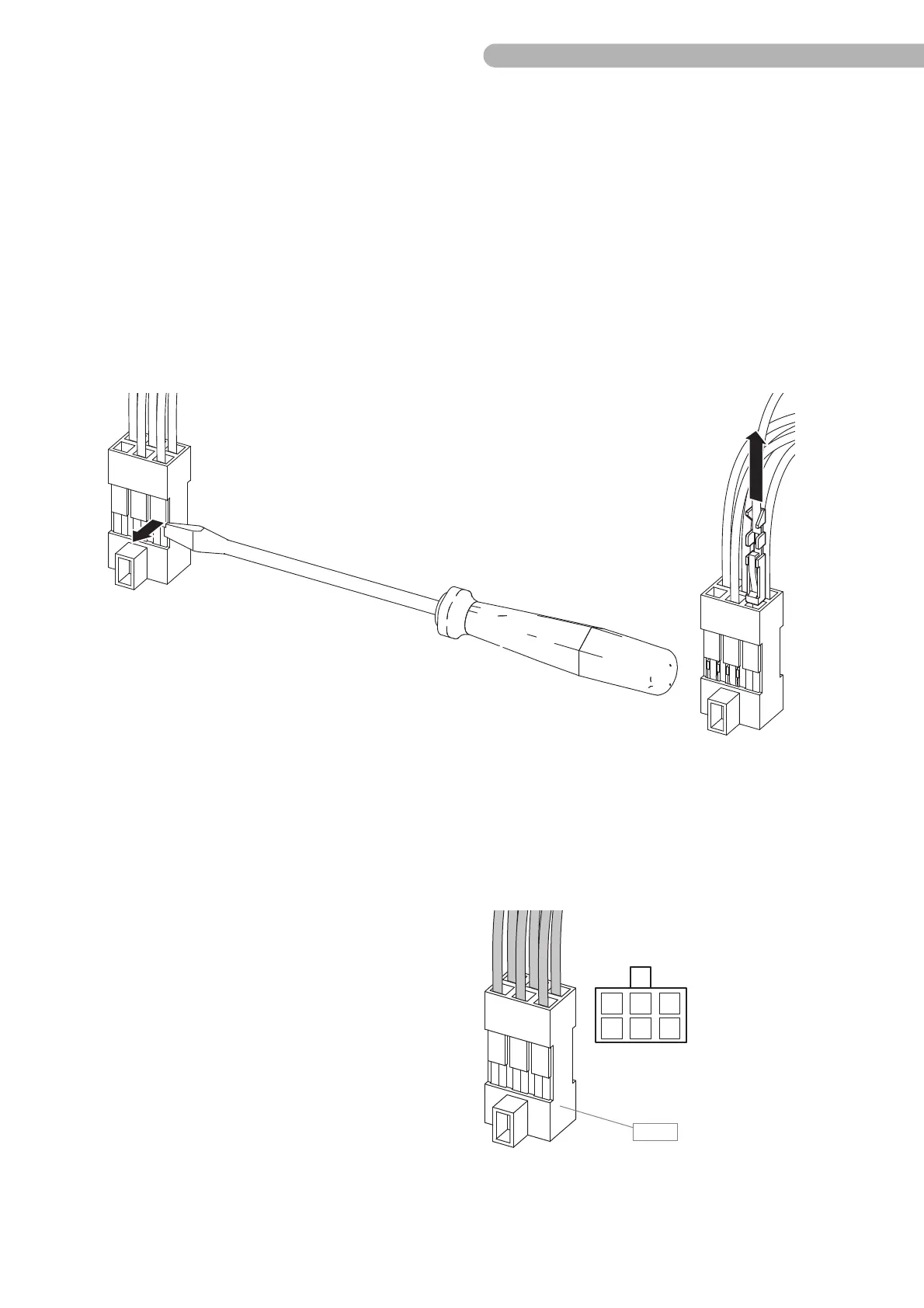
If you have to detach an existing plug connector from a cable or replace it, see below for the relevant
terminal configurations.
Fig. 31: FCI plug (e.g. circuit board ZPR 0801)
◗ Use a small screwdriver that is suitable to bend the clips on the housing of the plug connector
gently forward, and pull the cable with the crimp contacts out of the housing. Take care not to
damage the clips.
Configuration of plug connector PANEL (circuit board 0801/pump control panel connection)
1 Green
2 Black (sheath)
3 Yellow
4 Green
5 Black (sheath)
6 Yellow



 To Next Page