4D-Nucleofector
®
Manual
|
23
2.12.1 Using the 1 mL Nucleocuvette
®
Catridge
(Fixed volume)
2.12.1.1 Defining a new experiment
Following vessel type selection (see chapter 2.8.2) you can
now either select a predefined experiment (see chapter
2.8.4) or define an experiment from the beginning.
If you want to create a new experiment, you may tap in the
field “Experiment name” and enter a specific name for the
experiment or accept the suggested name generated with
date and time stamp (see chapter 2.8.4). Tap on the check
mark button to get to the Experiment setup screen.
(Figure 2.8).
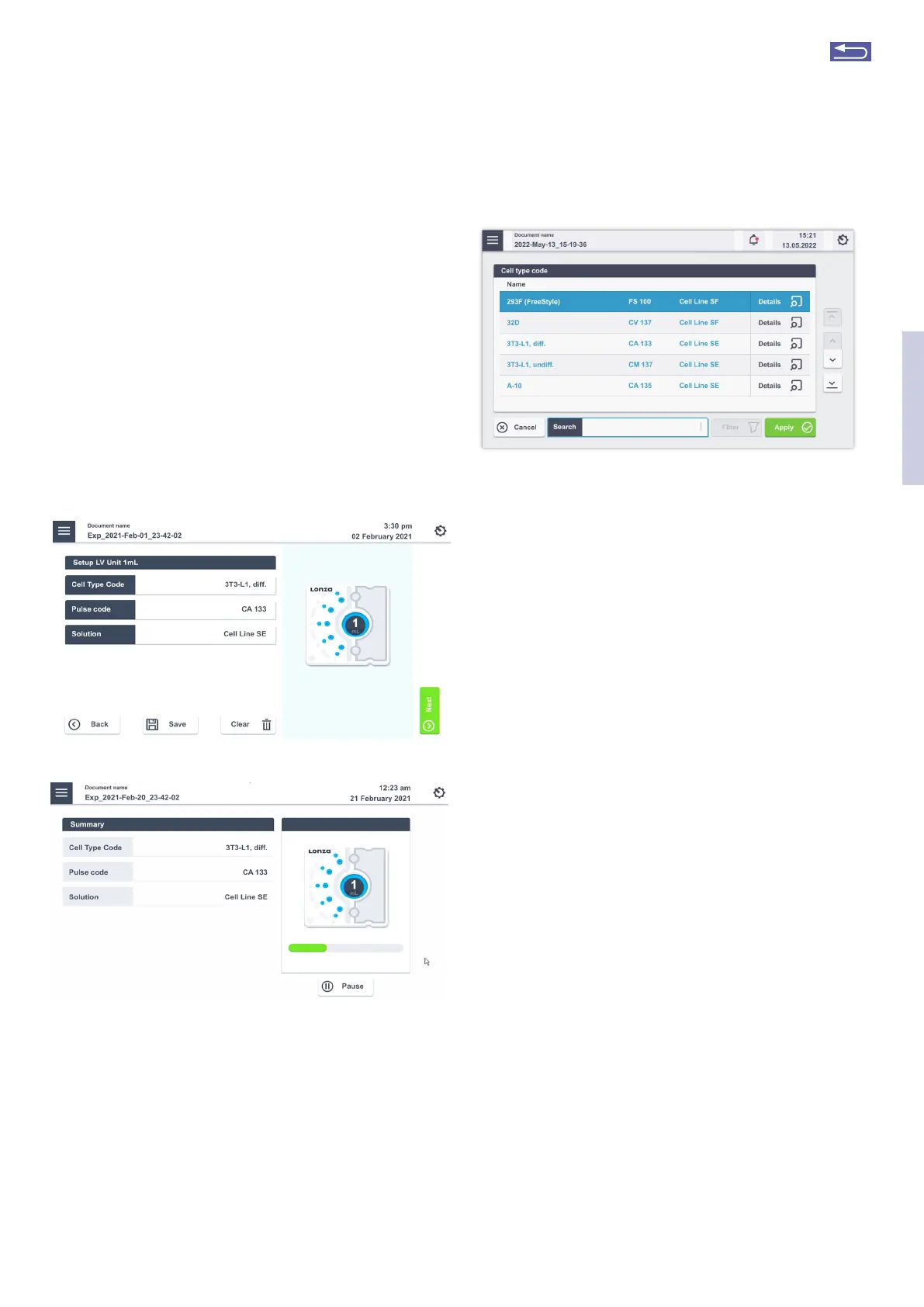
Figure 2.32: (A) Experiment setup screen for 4D-Nucleofector
®
LV Unit using
1 mL Nucleocuvette
®
Catridge. (B) Progress screen during experiment.
A screen appears with the title “Setup LV 1 mL”
(Figure 2.32, A).
1. Press the field “Cell Type Code” to choose predefined
Nucleofection
®
Conditions from a Cell type list (Figure 2.33).
A list with all available Cell type codes (defined by Lonza or
custom) will appear.
A
B
Figure 2.33: List of predefined Cell type codes. Select the Code by either
typing in a name in the Search Field, scrolling the screen or using the arrows
on the right of the screen.
2. Select the code that shall be used by scrolling through
the menu or stat typing in the search field (Figure
2.33). To confirm your selection press “Apply” For ad-
ditional information about the cell type selected
press “i”.
3. If required, modify pulse code by pressing the letter or
number code fields. A keyboard will appear, enabling
you to change settings. The solution code can be
modified via a selection list.
4. Instead of defining solution and program code via the
Cell type code, both parameters can also be selected
manually, e.g. in case no predefined Cell type code is
available. For adding new Cell type codes, please refer
to chapter 2.13.2.3.
Optional: At this stage, you can save your defined ex-
periment or only the pulse-solution code combination (as
custom Cell type code) for future use by pressing the “Save”
button. Select whether the Cell type code or the experi-
ment shall be saved. A keyboard will appear allowing you
to define a name (max. length: 26 characters) for either the
Cell type code or the experiment depending on your previ-
ous selection.
2
Return to TOC



 To Next Page