16 | 4D-Nucleofector
®
Manual
2.9.2 Loading samples
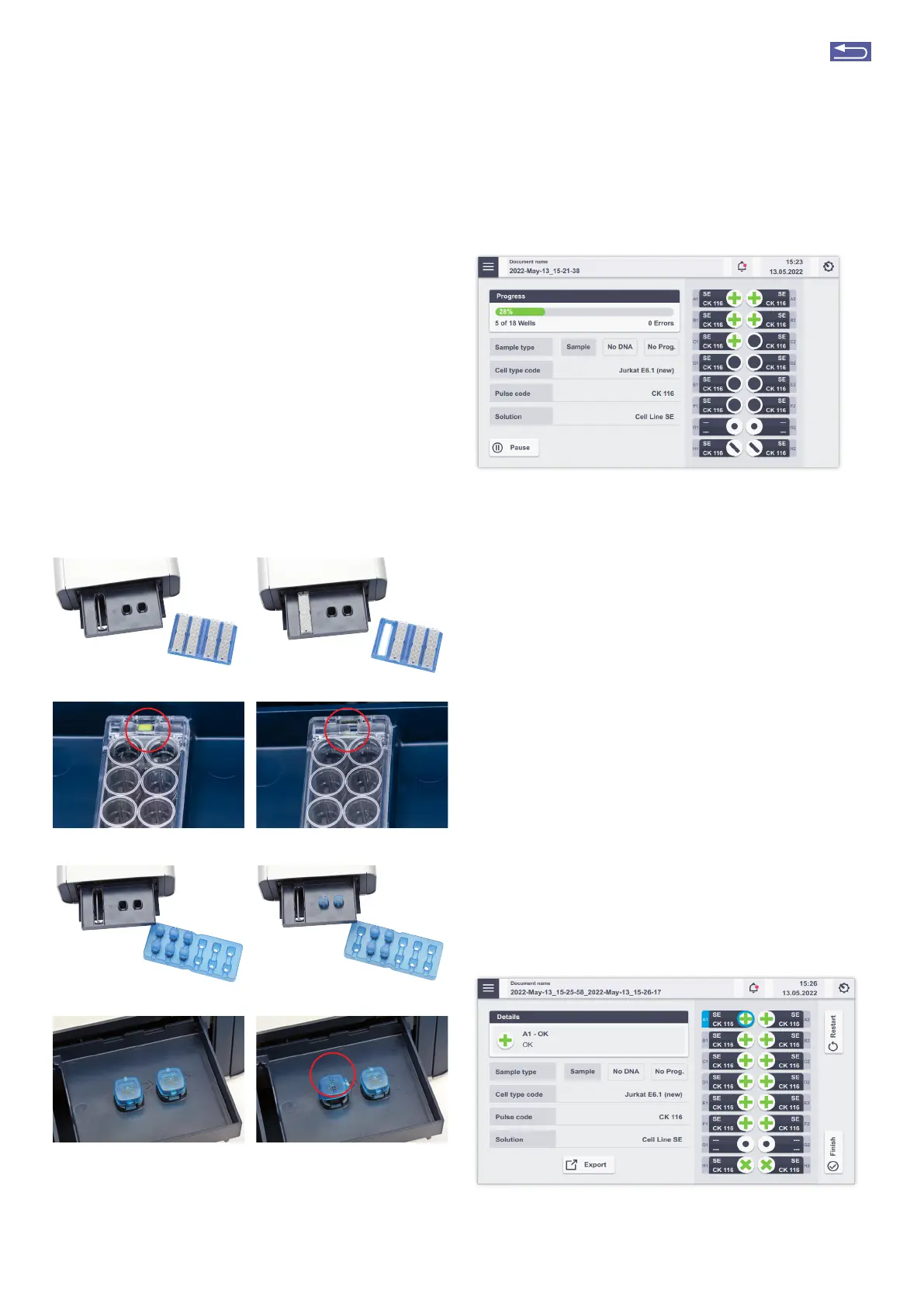
1. Load the 16-well Nucleocuvette
®
Strip (Figure 2.17, A, B)
or one or two 100 L Nucleocuvette
®
Vessels into the
sample tray (Figure 2.17, E, F)
2. Make sure that the 16-well Nucleocuvette
®
Strip is posi-
tioned correctly to avoid damaging the X Unit:
For the 16-well Nucleocuvette
®
Strip, the yellow pin at
the rear end of the strip must be visible (Figure 2.17, C).
If the strip is mounted in the wrong orientation, its rear
end will stay above the strip holder and the yellow pin
is barely visible (Figure 2.17, D). For the 100 L Nucleocu-
vette
®
Vessel, the cuvettes should be mounted such that
the label Lonza on the lid is readable and the opening
clip is at the front (Figure 2.17, G, H).
2.9.3 Running the experiment
Figure 2.18: Experiment progress (X Unit)
1. After loading the samples, press “Stat” to run the experi-
ment (Figure 2.16).
The progress of the experiment is indicated by changing
the color of the cuvette or well positions (Figure 2.18;
for color codes, see chapter 4).
NOTE: When working with the single 100 L Nucleocuvette
®
Vessels you can process two cuvettes at once. If more than
two cuvettes have been defined, the drawer opens auto-
matically after each set of two and a message “Please inset
cuvette for…” will be displayed. Load next samples and press
“OK” to continue or “No” to interrupt the experiment.
2. When the experiment is complete, a result file summariz-
ing the Nucleofection
®
Process will be displayed (Figure
2.19).
3. The result file will be saved automatically by the system
(either as Result + Date + Time or in case you saved the
experiment under an individual name as “Experiment
name + Date + Time) and can be reopened as described
in chapter 2.13.2.2.
4. Press “Restat” to stat the experiment or “Finish” to
return to the home screen.
Figure 2.19 Result screen (A). Tap on wells to receive details about the ex-
periment. For explanation of symbols, refer to chapter 4.1.
E
F
G
A B
H
D Wrong orientationC Right orientation
Figure 2.17: Loading vessels into 4D Nucleofector
®
X Unit
Return to TOC



 To Next Page