4D-Nucleofector
®
Manual
|
31
12. Press “Stat” to stat the experiment again, or “Back”
and return to the “Experiment set up” screen.
2.13 Additional settings and options
This chapter explains how to change settings like date and
time and how to organize and manage your stored experi-
ments, results and custom programs.
2.13.1 Settings menu on the right
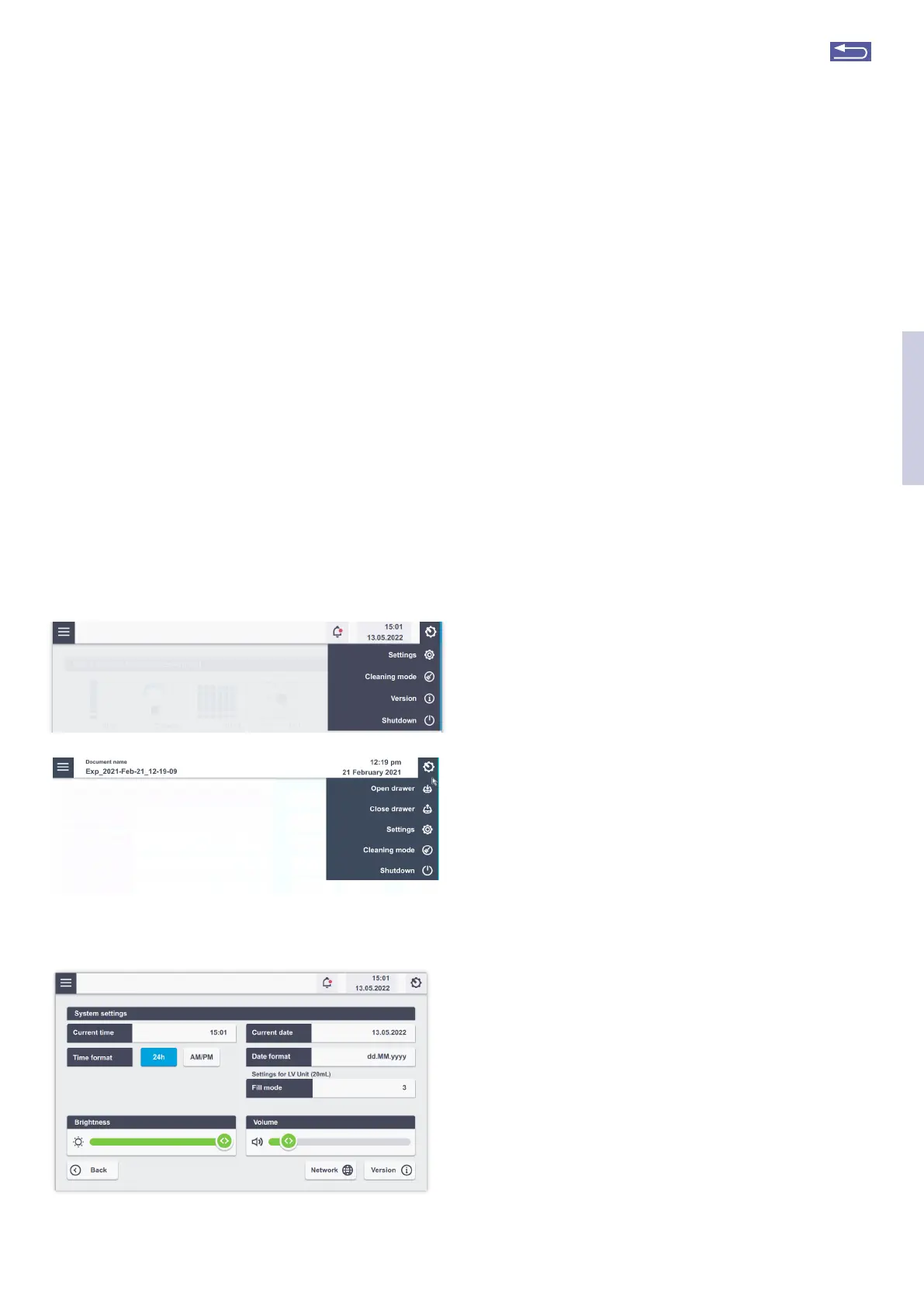
Activate the “Settings” menu by tapping on the gear icon on
the right on the home screen. A screen appears displaying a
list of setting options (Figure 2.41).
Depending on the available units, the available menu items
may differ (Figure 2.41 A or B).
To open one of the setting menus, touch the appropriate
field. Most of the menus are intuitive. The menus requiring
additional information are described below.
Figure 2.41: Settings menu without (A) or with (B) upfront choice of
functional unit.
Figure 2.42: System settings screen
A
B
2.13.1.1 System settings
Tap on “Settings” to open the system settings. Here you can
adapt various general settings and also access the software
version.
• Current time: Set or change the time by tapping on this
field.
• Time format: Change the time format to 24 hours or
AM/PM.
• Current Date: Tap on this field to adjust the date
• Date format: Tapping on this field allows for setting dif-
ferent date formats
• Transpotation mode: This field is checked by default
and will apply the transpotation lock upon shutdown of
the system.
• Brightness: Use the slider to adjust brightness of the
screen.
• Volume: Use slider or tap on the speaker icon to adjust
or mute sound.
• Network: Shows available network connections
• Version: Displays software and firmware versions of all
connected 4D-Nucleofector
®
Units.
• Fill mode (only available if LV Unit is connected): The “Fill
mode” can be adapted when using the flow-through
catridge version, the LV Nucleocuvette
®
Catridge.
The standard fill mode “1” (default setting) calculates
with a slight overfill of the catridge to compensate for
variations in tube diameters and avoid an underfill, as
this can lead to arcing when using strong pulses. Since
this “overfill” strategy may also lead to some potential
dead volume, the filling strategy can be adapted for an
individual use case by selecting other fill modes from “2”
(moderate reduction of overfill) to “5” (strong reduction
of overfill). The user may keep the standard fill mode (1)
which safely avoids underfilling and arcing or try differ-
ent underfill levels to maximize the transfected volume
(knowing that this may cause arcing).
2
Return to TOC



 To Next Page