Rev #37
Version 8.0
April 2021
Page 79 of 121
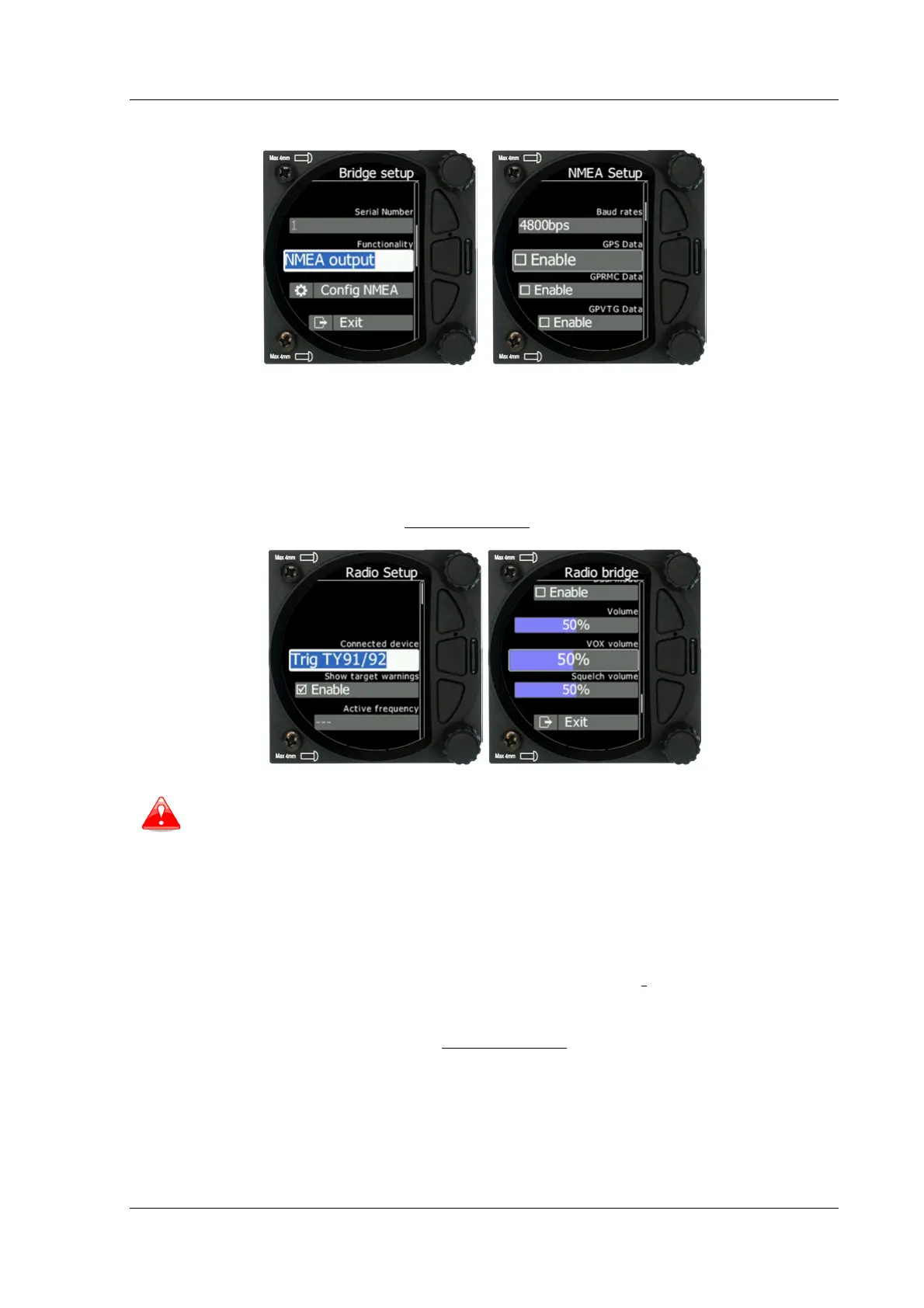
5.7.13.8.1 NMEA Output
NMEA output is used to transmit NMEA sentences. You can select desired NMEA sentences
and define the baud rate at which they will be transmitted.
5.7.13.8.2 Radio Bridge
The Radio Bridge is used to operate a radio through the main display unit. First the type of
connected radio must be selected. For the list of supported devices please refer to CAN
Bridge installation manual found on www.lxnav.com.
Due to Becker AR6201 not supporting RS-232 connections it is not yet supported.
Selecting Config radio will open the radio setup menu. In this menu you can select Show
target warnings. This will trigger warnings generated from the device (example: radio is
too hot). Here you can also setup active and standby frequency, volume, squelch
volume and VOX volume.
5.7.13.8.3 XPDR Bridge
The XPDR Bridge can operate the transponder via the main unit. You can set the ICAO
Identity in the XPDR Setup menu which is opened by clicking Config XPDR. It can also
show target warnings from the transponder. For the list of supported devices please refer to
CAN Bridge installation manual found on www.lxnav.com.



 To Next Page