v
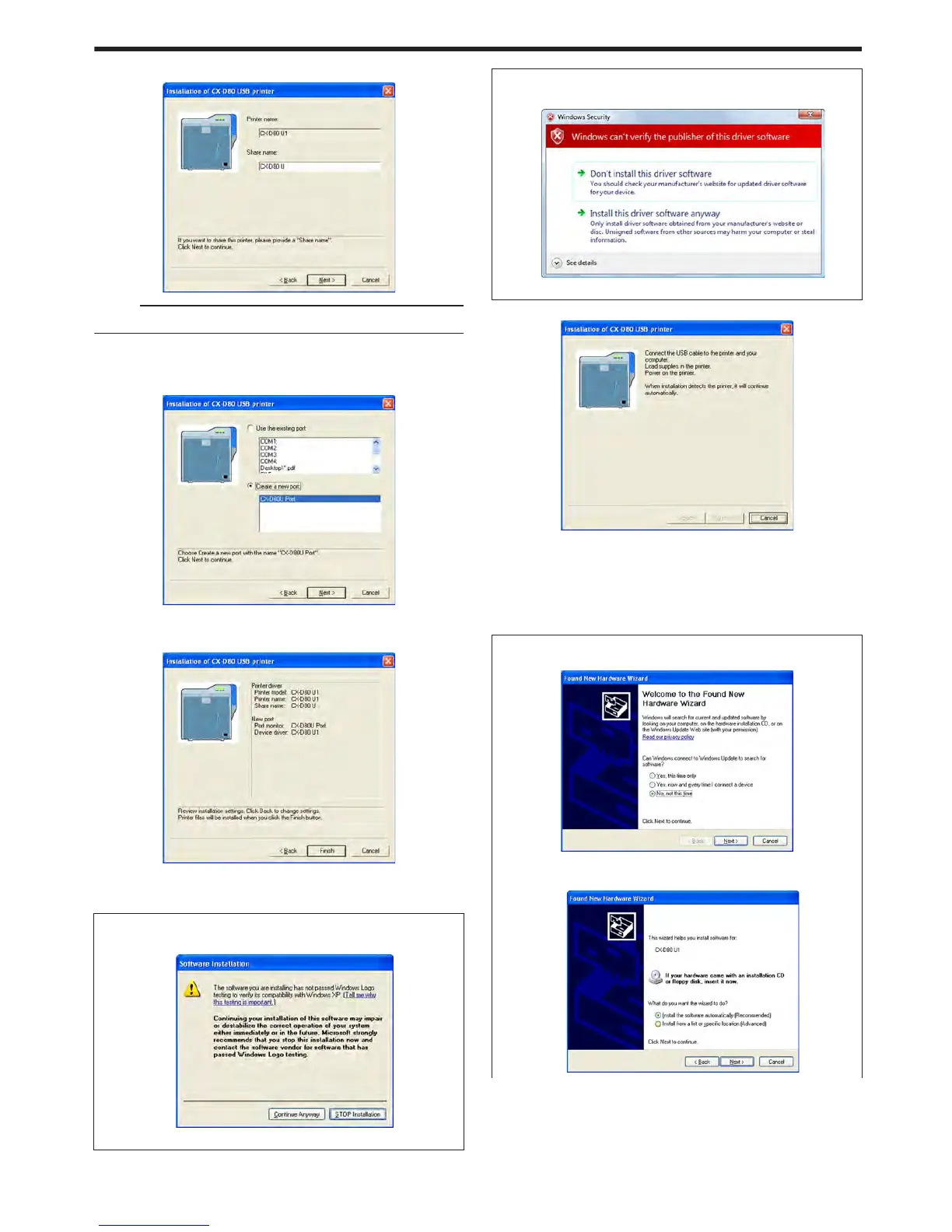
Enter the shared name when you are sharing a printer.
.
Memo:
v
You can also set the shared name after installation is complete.
8
Click [Next]
v
A port selection screen appears.
v
Select [CX-D80U Port] under [Create a new port].
.
9
Click [Next]
v
An install information confirmation screen appears.
.
10
Check the installation information, followed by clicking [Finish]
v
To change the settings, click [Back].
m
Windows XP
v
A [Software Installation] screen appears.
.
A Click [Continue Anyway]
m
Windows Vista
v
A [Windows Security] screen appears.
.
A Click [Install] part
v
A USB cable connection instruction screen appears.
.
11
Connect the printer and computer using the USB cable
12
Turn on the power of the printer
v
Installation starts automatically after the printer is detected.
v
Installation does not start if connection is improper. When this
occurs, check the connection.
m
Windows XP
A [Found New Hardware Wizard] screen appears.
.
A Select [No, not this time], and click [Next]
v
An installation method selection screen appears.
.
Setup
67















 To Next Page