B Select [Install the software automatically (Recommended)], and
click [Next]
v
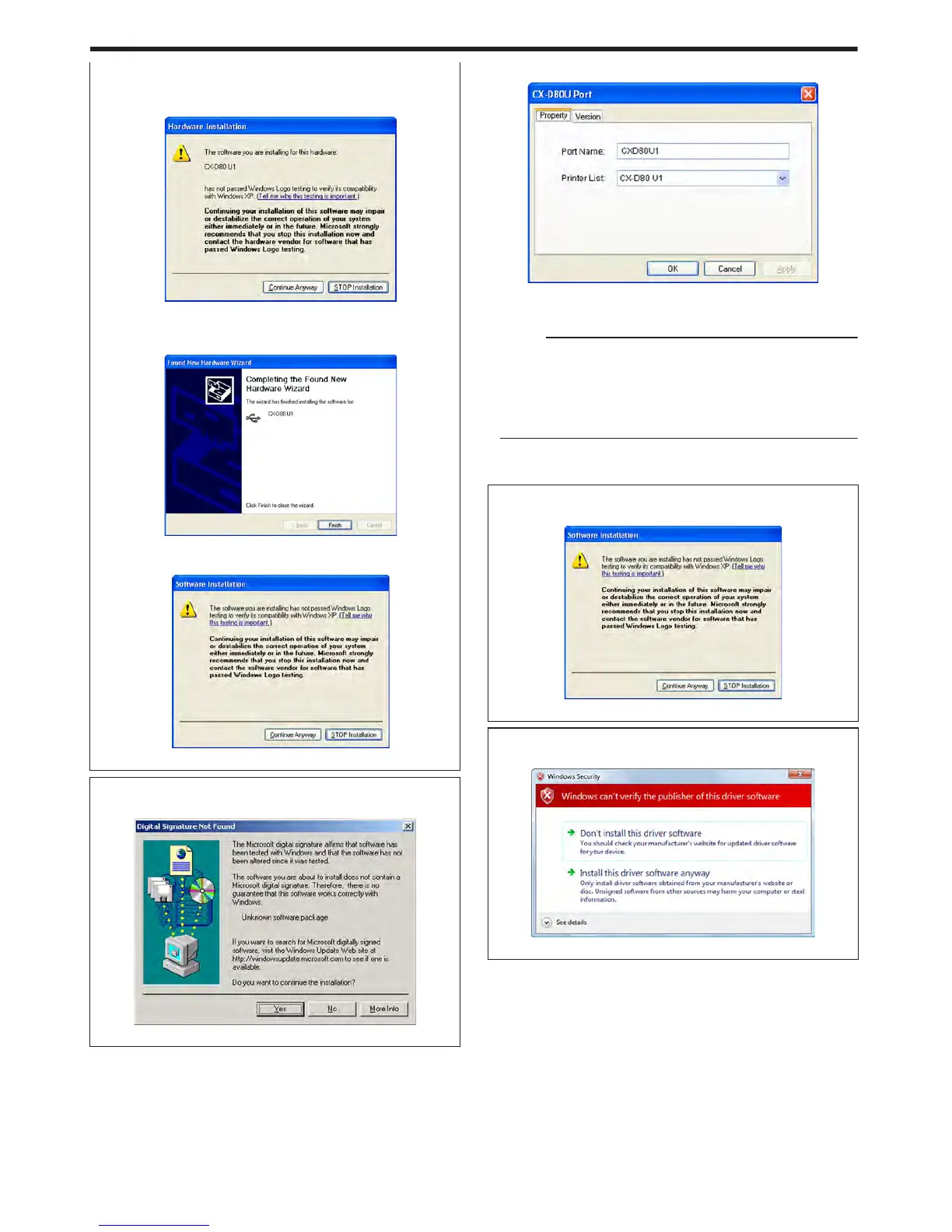
A [Hardware Installation] screen appears.
.
C Click [Continue Anyway]
v
A “Completing the Found New Hardware Wizard” screen
appears.
.
D Click [Finish]
v
A [Software Installation] screen appears.
.
E Click [Continue Anyway]
m
Windows 2000
v
A [Digital Signature Not Found] screen appears.
.
A Click [Yes]
v
A [CX-D80U Port] screen appears.
.
13
Select the [Property] tab
A Select this printer from [Printer List]
Memo:
v
USB connection is improper if “No Device” appears in the [Printer
List]. When this occurs, end the installation process and reinstall
the program.
v
If “No Selection” appears in the [Printer List], select a USB device
name that coincides with the printer unit number that is currently
being installed from the pull-down list.
B Enter the port name
14
Click [OK]
m
Windows XP
v
A [Software Installation] screen appears.
.
A Click [Continue Anyway]
m
Windows Vista
v
A [Windows Security] screen appears.
.
A Click [Install] part
Setup
68















 To Next Page