7
Click [Install this driver software anyway]
v
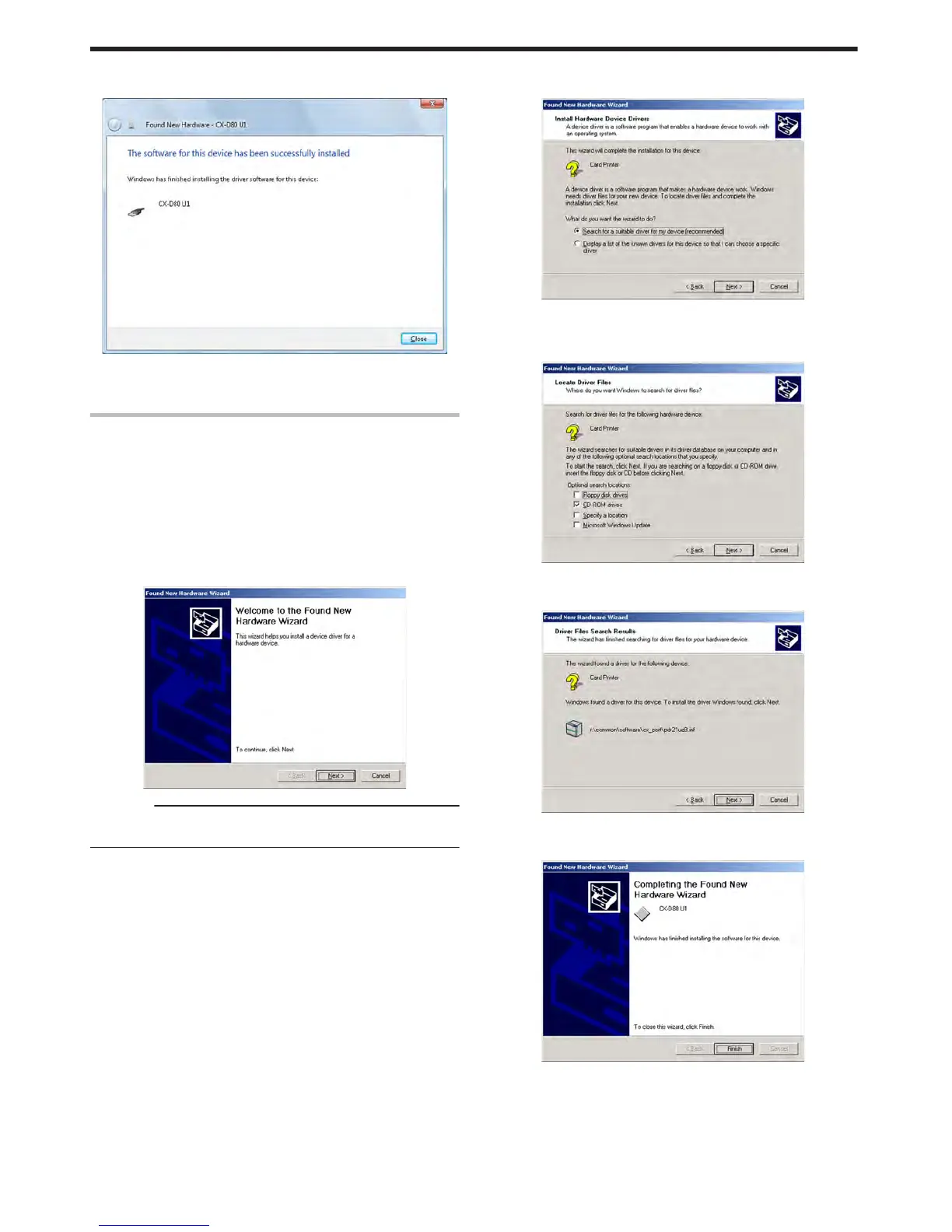
An installation complete screen appears.
.
8
Click [Close]
v
Installation of the USB driver is complete.
Windows 2000
1
Start up Windows
2
Set the supplied CD-ROM into the computer
v
The “SETUP.exe” automatic execution program in the CD-ROM is
not used. Exit this program.
3
Connect the computer and printer using the USB cable, and turn on
the power of the printer
v
The printer is automatically detected by the computer.
v
A [Found New Hardware Wizard] screen appears.
.
Cautions:
v
Connection is improper if this screen does not appear. Make sure
that the connection is properly established.
4
Click [Next]
v
A search method selection screen appears.
.
5
Select [Search for a suitable driver for my device (recommended)],
and click [Next]
v
A “Locate Driver Files” screen appears.
.
6
Select the [CD-ROM drives] checkbox, and click [Next]
v
A “Driver Files Search Results” screen appears.
.
7
Click [Next]
v
A “Completing the Found New Hardware Wizard” screen appears.
.
8
Click [Finish]
v
Installation of the USB driver is complete.
Setup
78















 To Next Page