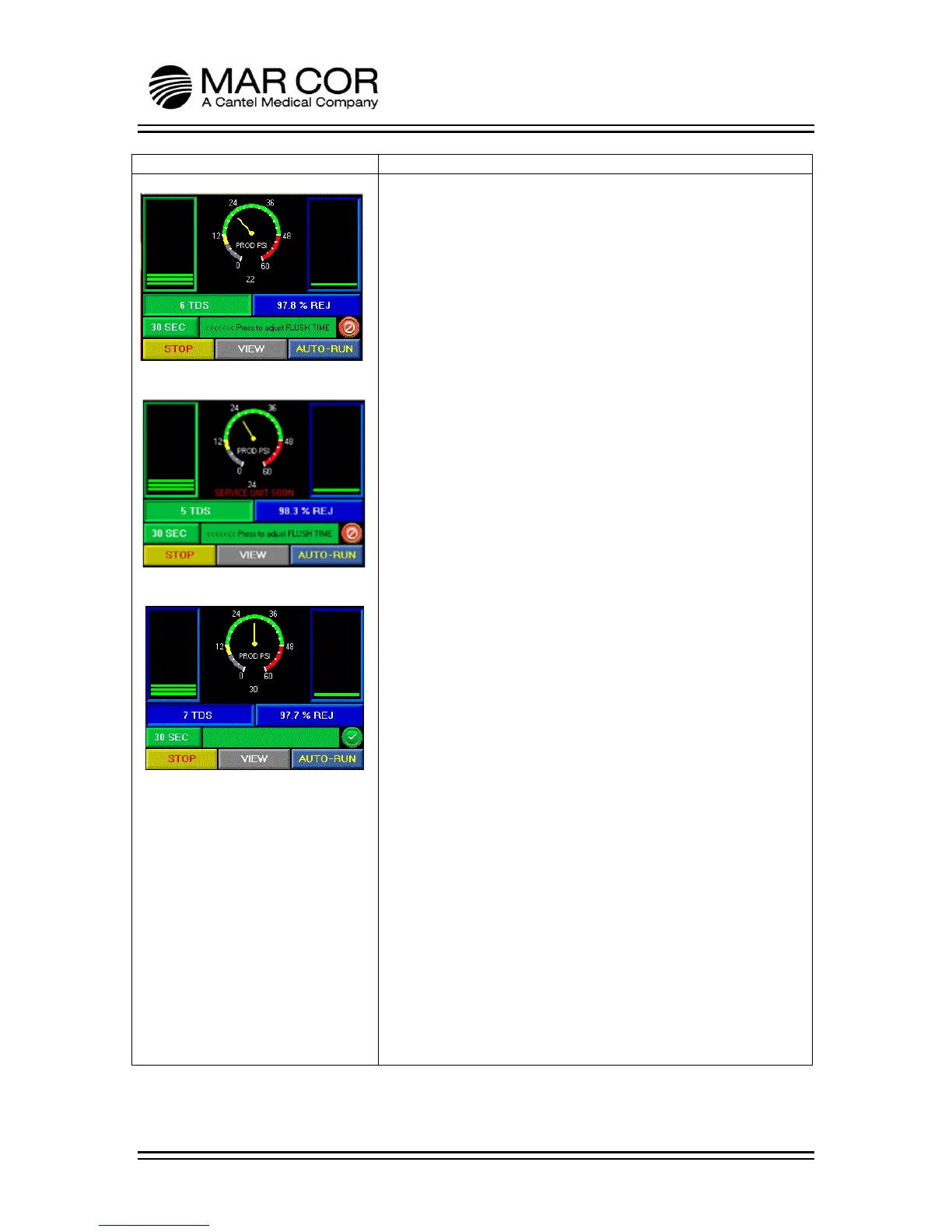
RUN SCREEN
During Flush (Figure 1)
This screen is viewed once the RUN button is pressed. Upon
startup, the RO performs a flush, which is shown in the 2
nd
banner. The flush time is user adjustable from 30 to 300 seconds.
The operator can also view the product water pressure (0-60 PSI),
TDS/µS value and % Rejection (% REJ). These values are displayed
in number form as well as graphically for a quick visual indication
of the parameters value or state (Figure 1 and 2).
NOTE: Adjustment of any setting should only be done by
properly trained personnel and according to facility policies and
procedures.
Service Unit Soon Indicator (Figure 2)
The % rejection reading provides the operator a means for
evaluating membrane performance. The % rejection is calculated
based on a comparison of RO feed water quality and product
water quality. If the membrane performance decreases by 5%
from the original membrane performance setting, a SERVICE UNIT
SOON message will be display indicating that the RO membrane
should be cleaned or evaluated. The RO will not alarm or
shutdown as a result of this indicator being activated. In
addition, this message is received if the membrane displayed %
rejection increases by 3% from the performance setting indicating
that there could be a problem with the conductivity probes.
The Product Water TDS/µS reading indicates the quality of the
RO’s product water read in TDS or µS. It is temperature
compensated to adjust the value of the display with changing
water temperature for improved accuracy.
There is an indicator on the screen that shows the state of the
divert valve (lower right of screen). When the indicator is red, the
divert valve is closed. When there is a green indicator with a
check mark, the divert valve is open allowing product water to
flow through the product line.
After Flush (Figure 3)
This screen is viewed once the flush time has completed. The
operator can view the product water pressure (0-60 PSI), TDS/µS
value and % Rejection. These values are displayed in number
form as well as graphically for a quick visual indication of the
parameters value or state (Figure 1 and 2).
The operator can STOP the RO, VIEW additional screens or enter
AUTO-RUN.



 To Next Page