3030226 Rev. D 4-9 Screen Operation And Specifications
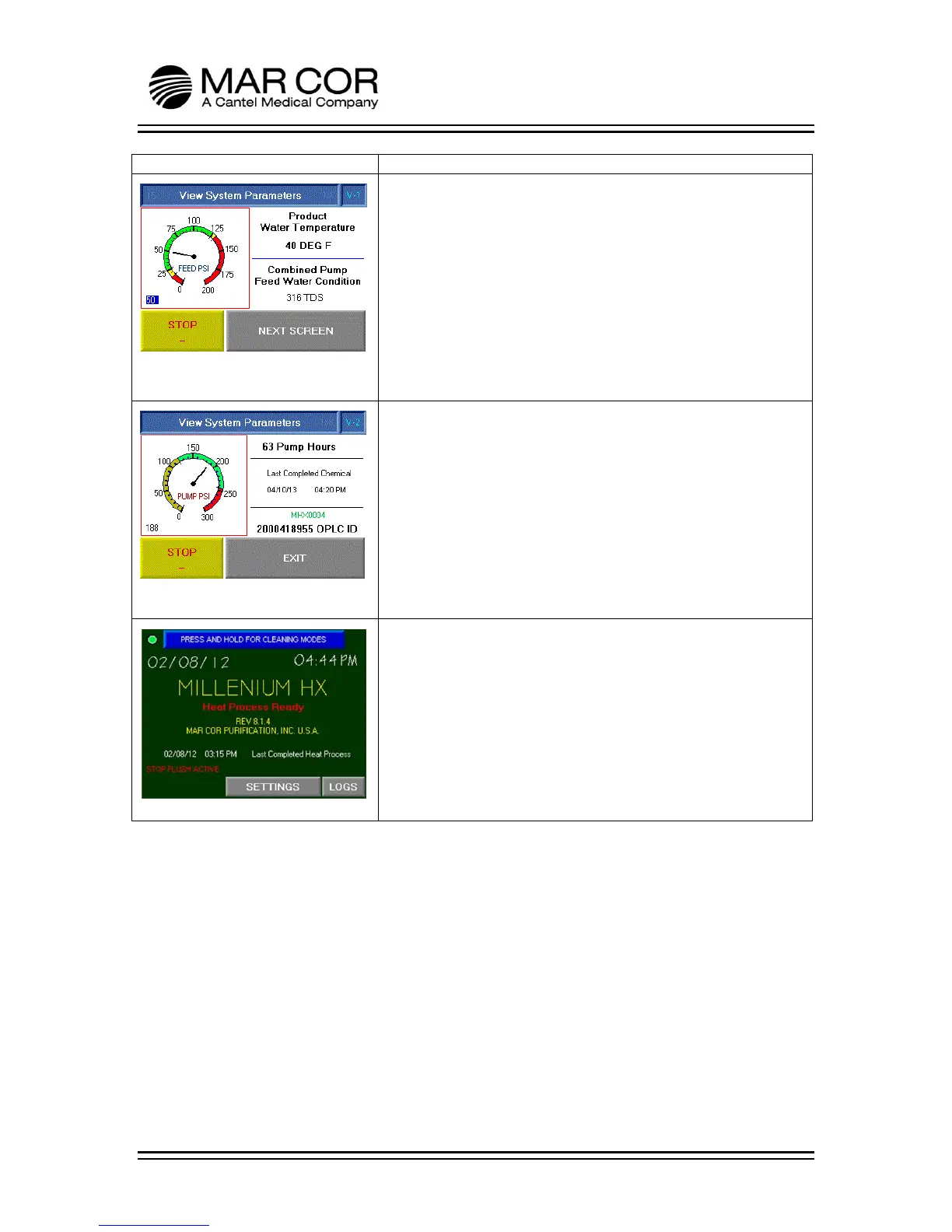
RUN SCREEN V-1
This screen is viewed if the operator presses the VIEW button in
the previous screen. The operator can view the Product Water
Temperature in F or C, Combined Pump Feed Water Condition in
TDS or µS and the feed water pressure on a scale of 0-200 PSI
(also shown numerically in lower left corner of gauge).
NOTE: The RO feed water can mix with some recycle water
depending on feed water pressure.
The operator can STOP the RO or proceed to the next screen.
RUN SCREEN V-2
This screen is viewed if the operator presses the NEXT SCREEN
button on the previous screen. This screen displays the number
of hours the pump has operated, date and time of the last
completed chemical, pump pressure and the identification
number of the OPLC.
The Pump Pressure Gauge reads the pump pressure from 0 to 300
PSI (also shown numerically in lower left corner of gauge).
The operator can STOP the RO or EXIT returning to Run Screen.
MAIN SCREEN STOP FLUSH
If the STOP button is pressed and held for 2 seconds from any of
the run screens, the RO will enter a stop flush. During the
shutdown, a 60 second low pressure membrane flush is
performed. Once complete, the RO pump stops running and the
RUN button reappears.



 To Next Page