Catch Sensors | V1 | Sensor Configuration
b)
From the DealerWeb, click Sensors> A1.
c)
Enter the sensor product serial number in the search box on the right.
d)
From the part Configuration Readings, right-click in the box next to Config Read
and select Paste to paste the contents that you copied from Mosa.
e)
Click Save Config Read.
Exporting Sensor Configuration for Receiver
You can export the sensor settings you configured on Mosa on an XML file. You can
afterward use this file when adding the sensor to a receiver.
Before you begin
• You have finished configuring the sensor.
• The sensor is connected to Mosa.
Procedure
1.
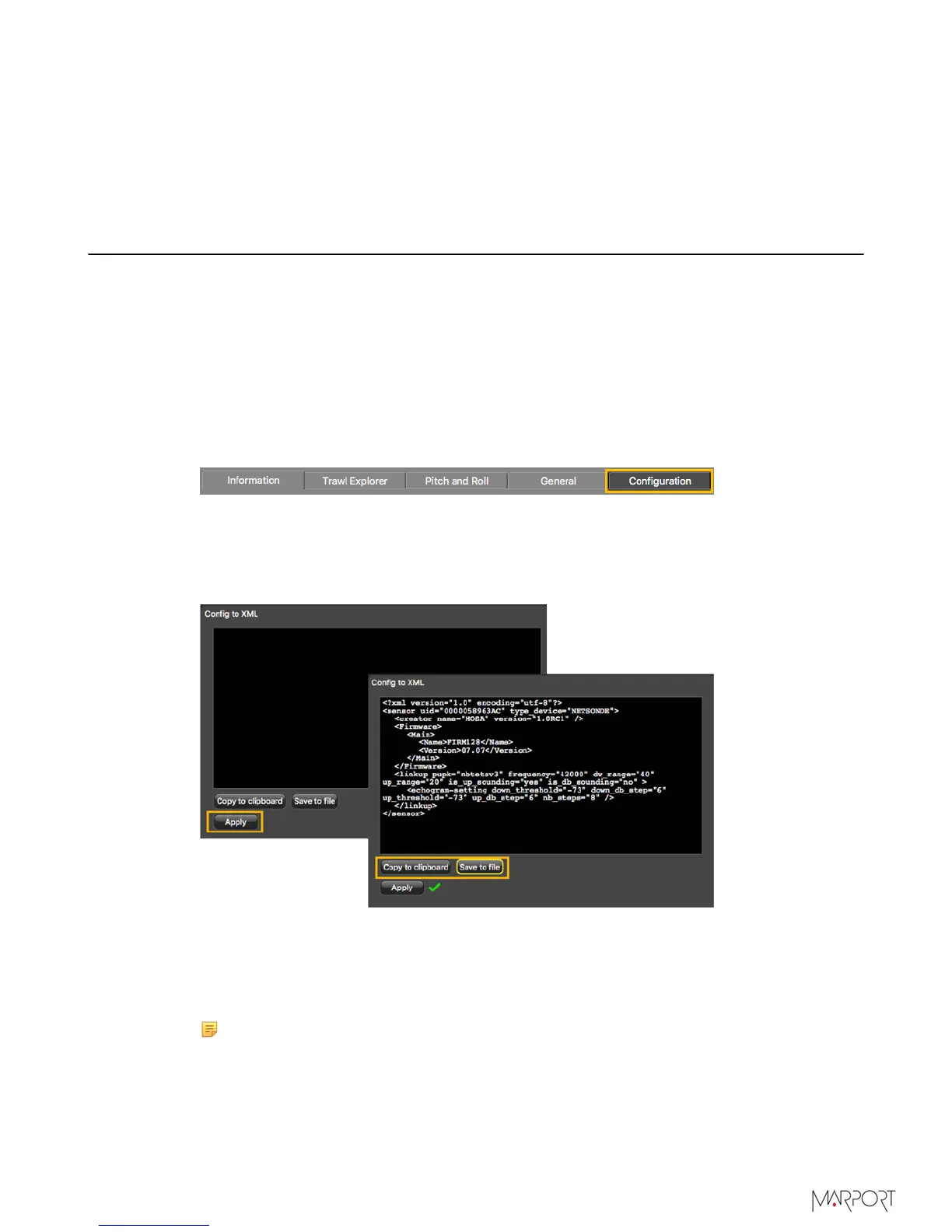
Click the tab Configuration.
2.
Click Config to XML.
3.
Click Apply under the black area.
The settings are displayed.
4.
To save the settings:
•
Click Save to file to download an XML file on the computer.
•
Or, click Copy to clipboard, then press Cmd + V on a word processor like Microsoft
Word to paste the contents.
5.
Change the name of the XML file saved on your computer.
Note: When you export the sensor settings, the XML file always has the same
name. Changing its name will prevent you from overwriting it the next time you
download sensor settings.
| 41



 To Next Page