Catch Sensors | V1 | System Configuration and Display
Configuring Data Display on Scala
You can display on pages in Scala measurements taken by the sensors (e.g. catch status,
depth, pitch and roll...).
About this task
Sensor measurements are displayed in the control panels, under Sensors Data. Data title
should be:
•
TE/CATCH for a Catch Explorer
•
CATCH for Catch sensors
•
PI-CATCH for Catch hybrid PI sensors.
The title is followed by the node where the sensor was placed when added to the system.
Data displayed (e.g. pitch & roll, temperature) depends on the firmware installed.
Procedure
1.
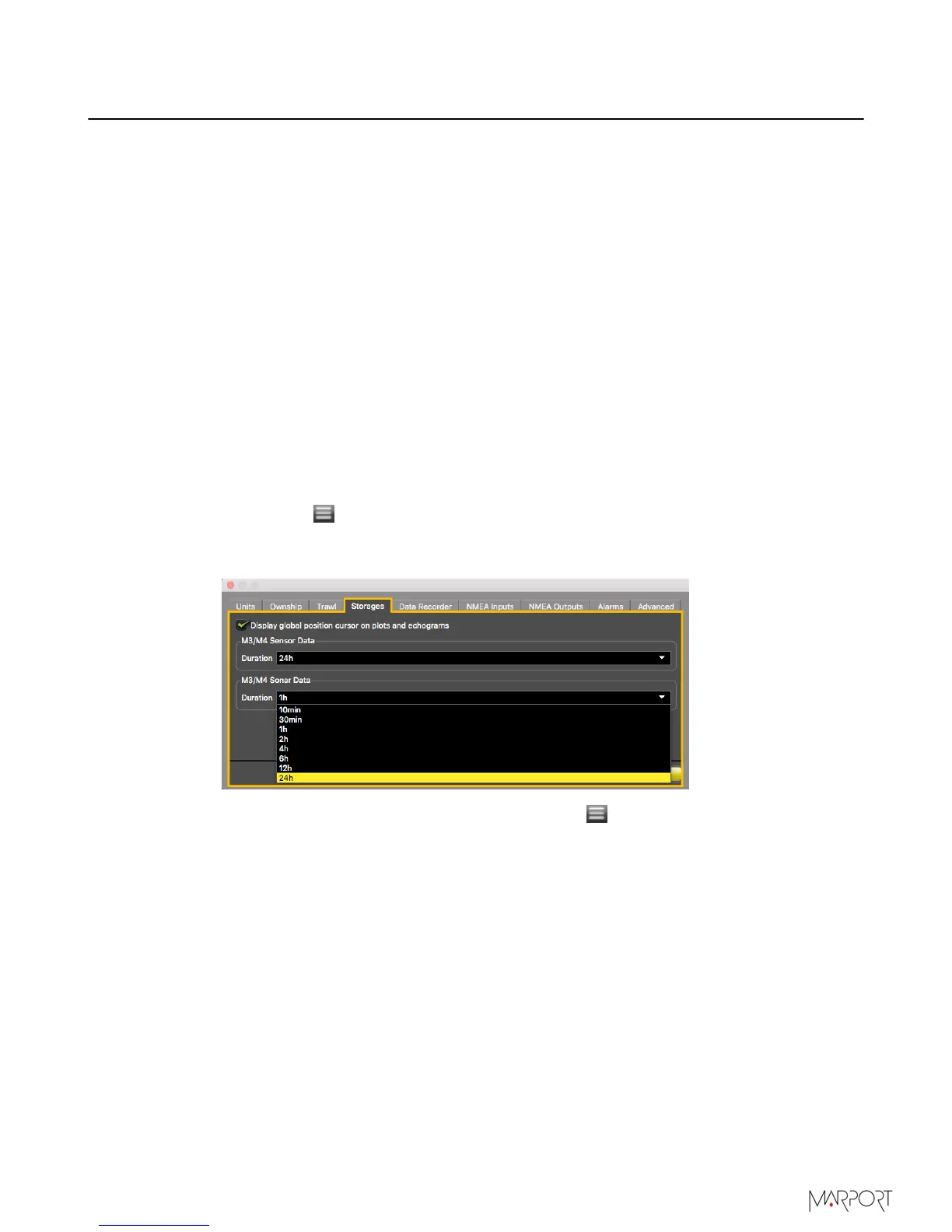
For a Catch Explorer, we recommend to put in Scala a storage time of data of 24h. It
can take a few hours before the trawl is full. If you do not change the storage time,
you can only zoom out on a scale of 2 hours. With 24h, you will be able to zoom out on
a larger scale and see the progression of the trawl filling up.
a)
Click Menu
> Settings.
b)
Click the tab Storages.
c)
From M3/M4 Sensor Data and M3/M4 Sonar Data duration, select 24h.
2.
From the top left corner of the screen, click Menu
> Customize.
| 49



 To Next Page