Catch Sensors | V1 | System Configuration and Display
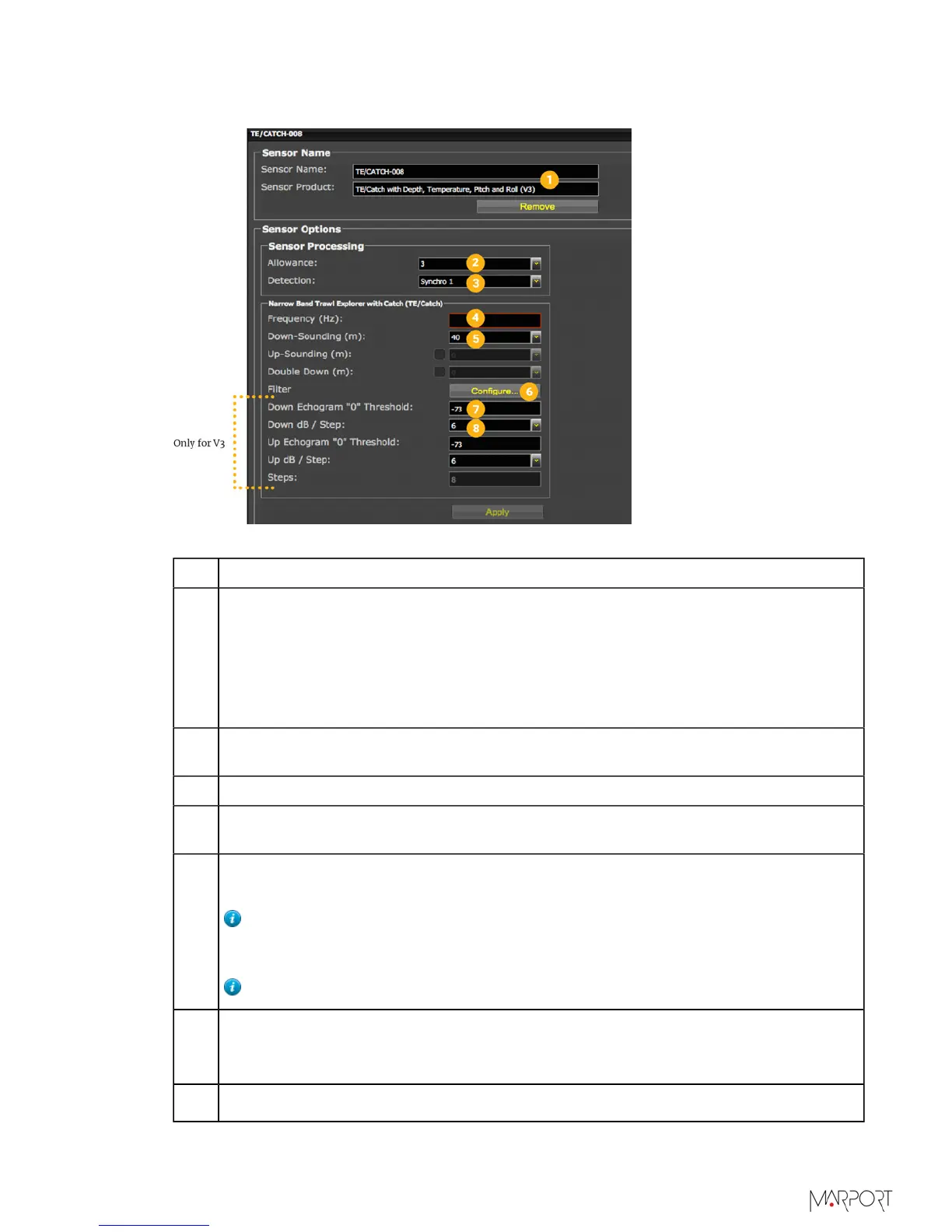
Catch Explorer
1 Sensor name displayed in Scala and its features.
2 This setting helps detecting the signal of the sensor among other sensor or
echosounder signals. Change only if you have issues receiving data.
• 0-2: select only if no interferences on the vessel (not recommended).
• 3-4: default setting.
• 5-6: select if you have issues receiving data. It will allows you to receive more
data, but be aware they might be wrong data.
3 This setting also helps detecting the sensor signal. Leave default setting at
Synchro 1.
4 Enter the same frequency as the one entered for the uplink frequency in Mosa.
5 Range of the down sounding (do not select the other soundings). Corresponds to
Sounding Range in Mosa.
6
Click Configure to change filters applied on incoming data. It is particularly useful
to reduce interferences on the echogram data.
Tip: Catch telegram has a specific filter called Debounced: you can choose
to display status as full when receiver has received 2, 3 or 4 "full" signals
from the sensor.
Tip: Please refer to Scala user guide for more information about filters.
7
Helps you detecting targets on the echogram. Corresponds to Channel minimum
TS in Mosa. Put -79 dB to detect small targets. Otherwise, leave the default
settings at -73 dB.
8
Do not change this setting.
| 48



 To Next Page