Catch Sensors | V1 | System Configuration and Display
6
Click Configure to change filters applied on incoming data.
Tip: Catch telegram has a specific filter called Debounced: you can choose
to display status as full when receiver has received 2, 3 or 4 "full" signals
from the sensor.
PI Catch Sensor
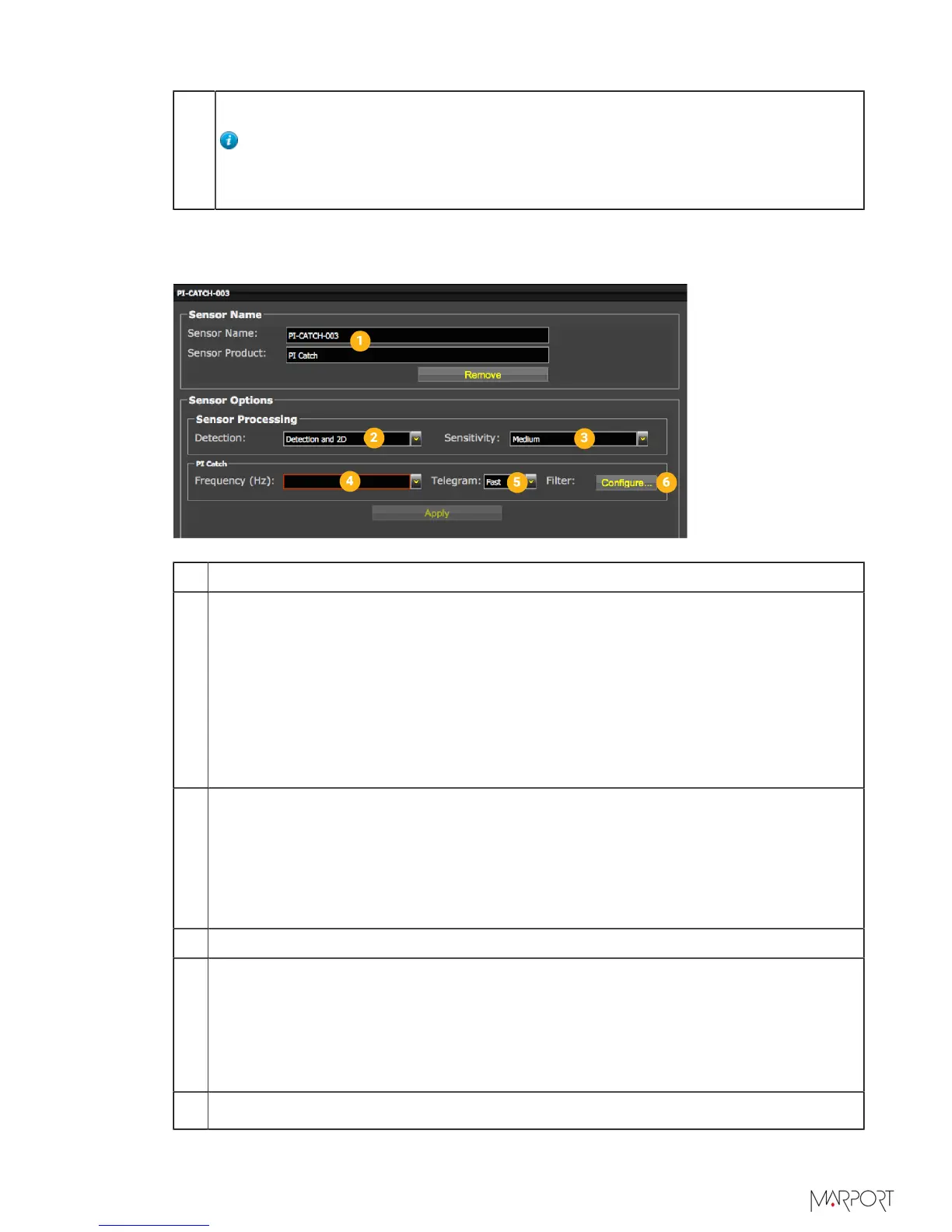
1 Sensor name displayed in Scala and its features.
2 This setting helps detecting the signal of the sensor among other sensor or
echosounder signals. Change only if you have issues receiving data.
•
Detection and 2D: default value. This setting helps distinguishing the sensor
signals when there are a lot of interferences (e.g. echosounders). It selects the
correct signals according to very selective criteria.
•
Detection: If you do not receive data, it may be because the Detection and 2D
setting is too selective with the signal. Detection is less selective and allows more
signals to be received.
•
Detection for Seiner: no need for this sensor
3
•
Low: if the signal of the sensor is high = the trawl is close to the vessel (SNR
min. 18dB).
•
Medium: Default setting. Compromise between the two other settings (SNR min.
12dB).
•
High: if the signal of the sensor is low = the trawl is far from the vessel (SNR
min. 6dB).
4 Enter the same frequency as the one entered for the uplink frequency in Mosa.
5
Enter the interval at which signals are sent. They must be the same as in Mosa. The
update of data is quicker when Fast is set, but this reduces the battery life.
•
Fast: full every 5 sec. / Empty every 5.5 sec.
•
Normal: full every 32 sec. / Empty every 3 sec.
•
Slow: full every 123 sec. / Empty every 126 sec.
6
Click Configure to change filters applied on incoming data.
| 47



 To Next Page