Catch Sensors | V1 | Sensor Configuration
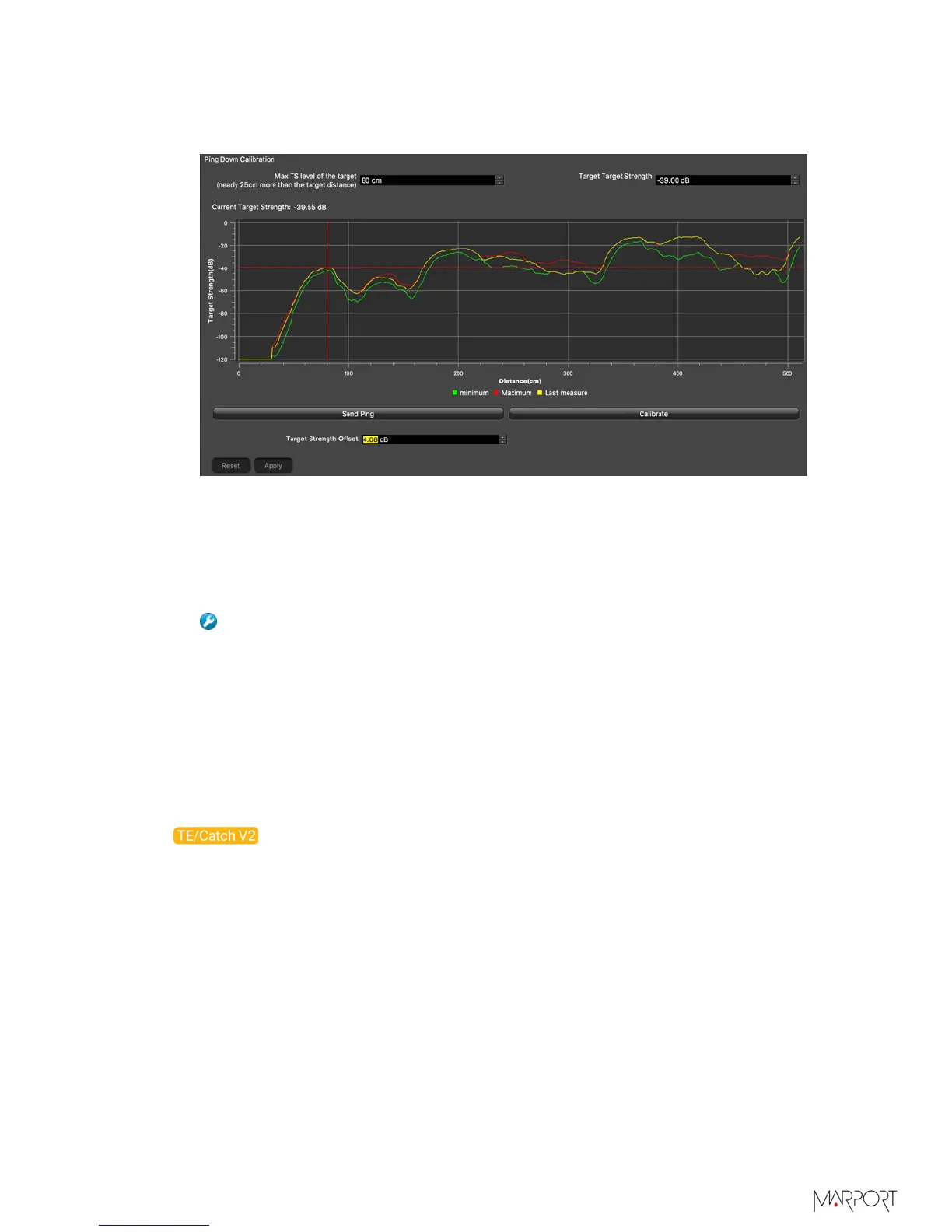
The sensor sends 1 ping to check if the calibration settings are correct in comparison
to the target strength set (e.g. -39 dB). If they are correct, calibration settings are
saved.
If calibration settings are not correct, check:
• the pitch and roll
• the installation in the water tank
Then restart the calibration procedure.
Troubleshooting: If the sensor LEDs do not seem to work correctly right
after the calibration procedure it is normal: calibrating influences LED display.
Activate and deactivate the water-switch.
10.
Click Apply to save the offset.
11.
Click Send Ping to check the target strength of the ball.
12.
Click Reset to come back to the last saved configuration and check that the offset has
been saved.
Canceling the Ringing
On Catch Explorer V2 echograms, there is a ringing coming from the transducer, that
appears as a red line on top of the echogram. You can cancel it.
Before you begin
• To correctly configure the ringing, the sensor needs to be in a large water tank at a
depth of at least 5 meters, or in air, with a space of at least 1.20 meters in front of the
Down sounder.
• The sensor is connected to Mosa.
About this task
Ringing is an oscillation of the signal coming from the sensor transducer. At shallow
depth, it can be confused with the bottom, so it is recommended to deactivate it.
| 31



 To Next Page