HELIOS LED Processing Platform - USER GUIDE 25
Tile Conguration
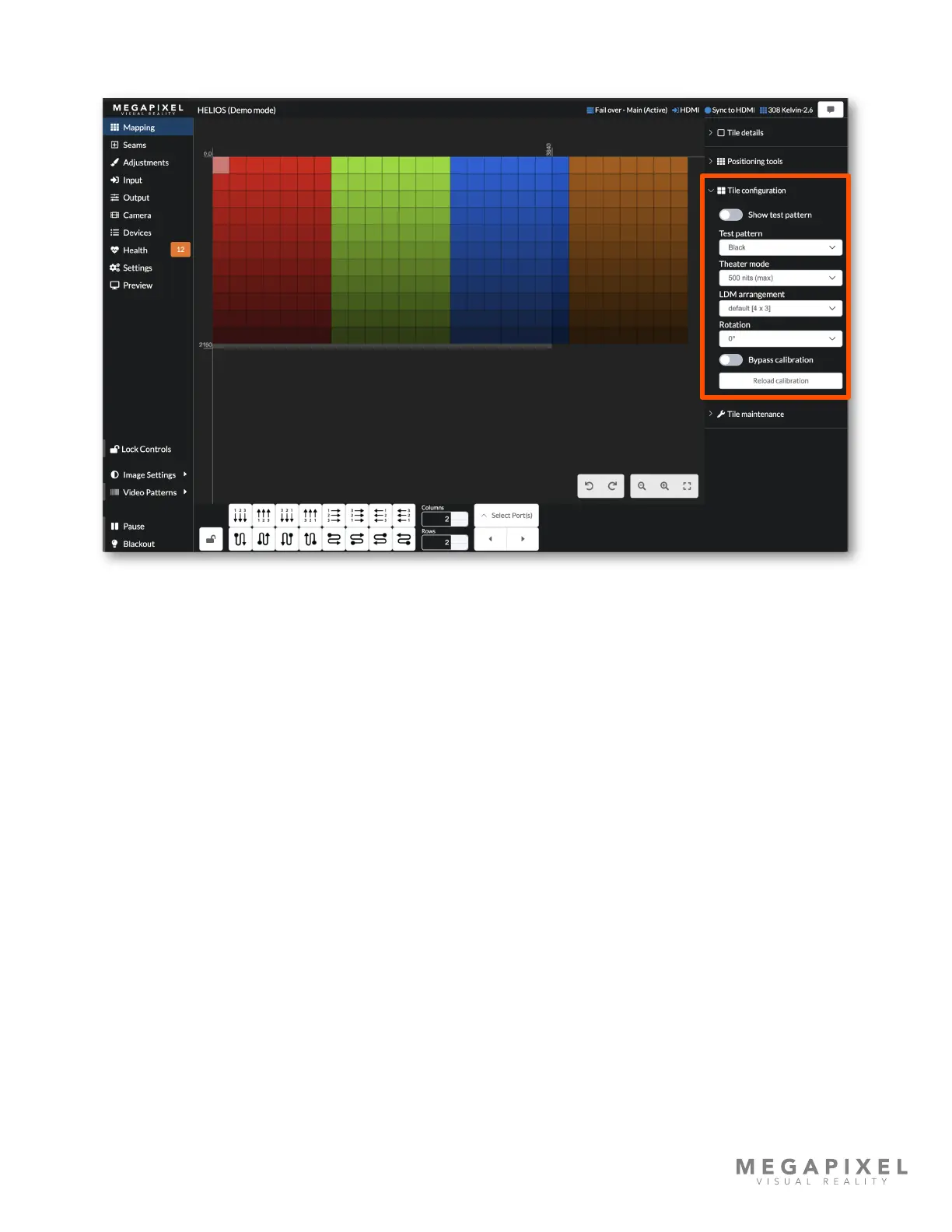
Figure 29: Tile conguration.
Test pattern toggle - Select the tile test pattern desired and then choose to enable it with the toggle. These patterns are
tile patterns that each individual tile calls up from on board memory. This is different from the Video Patterns located
above Pause and Blackout that send a video signal from the HELIOS to the entire array of tiles.
Theater mode - A special low light level calibration conguration. If a tile has been calibrated for special low light
situations, the tile will utilize full bit-depth at the selected lower luminance. If a tile does not have this additional calibration
le, it will not support theater mode and will default to showing maximum luminance.
LDM arrangement - A single tile type can sometimes have multiple LDM congurations. If the tile type being used
supports this, the drop down menu will list them here.
Rotation - Rotate the video being displayed on a tile so that the tile can be physically installed at a rotated angle but still
display right side up video. Keep in mind that rotated tiles may not look the same as other non rotated tiles. LED panels
with vertically stacked diode SMDs are especially affected by rotation changes to their viewing angle.
Reload calibration - Reload calibration is useful if an LDM has been replaced and calibration data needs to be reloaded.
Bypass calibration (Advanced) - This toggle is available as an advanced function for rare cases where tile calibration data
is suspect. Turn the toggle on to disable tile's uniformity correction and color space retargeting.



 To Next Page