HELIOS LED Processing Platform - USER GUIDE 37
Output Pane
Display Gamut
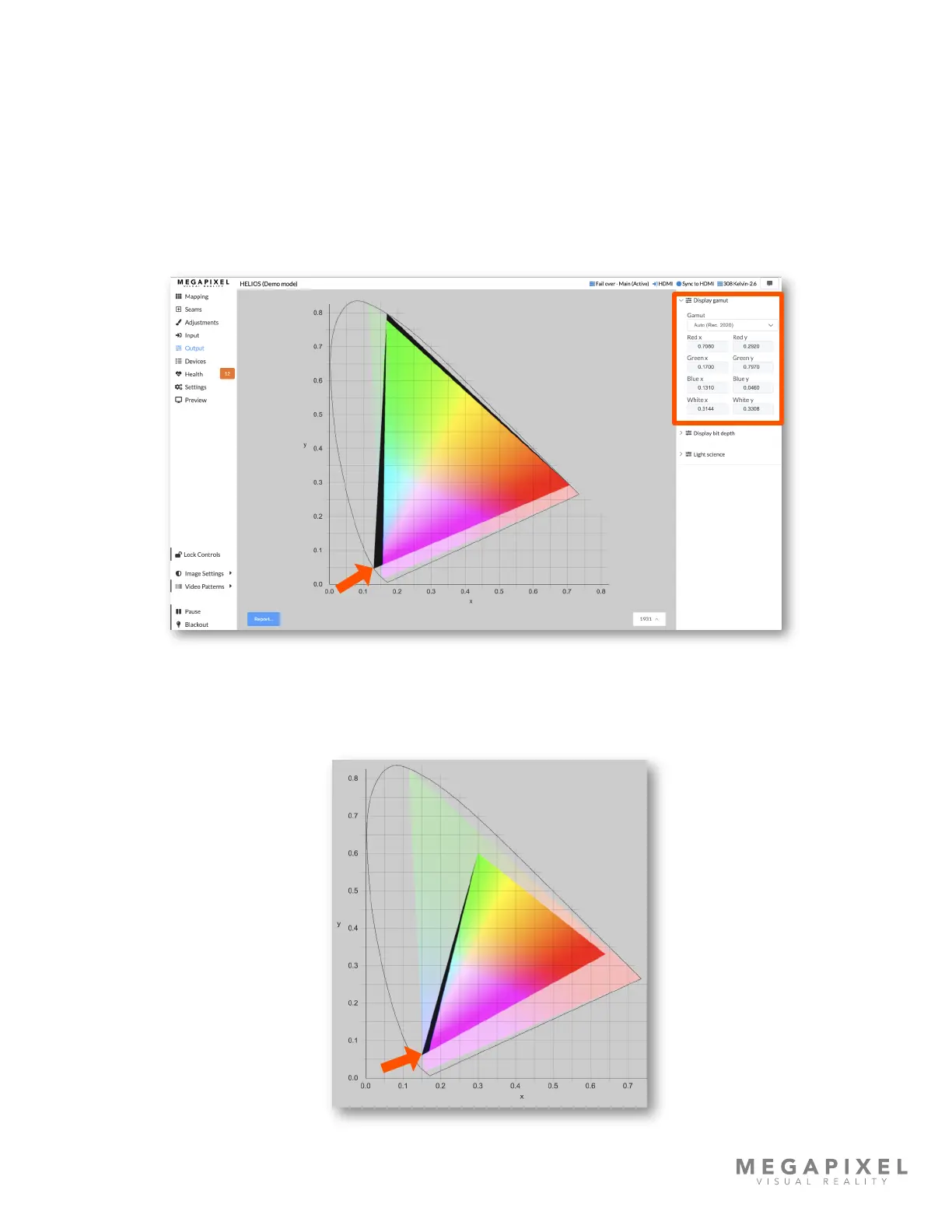
The gamut tool sets the range of each color for the system using CIE1931 chromaticity (x & y) coordinates to dene the
targeted value for red, green, and blue. The user can choose a standard preset from a drop down list (Rec. 2020 in the
example below) or set custom targets to match the display being driven by the HELIOS processor to other devices, such
as a projector. Tile capabilities are indicated by the entire rainbow region (both transparent and opaque). The achievable
colors for a system are indicated by the opaque rainbow region at the center. Lastly, a black region (identied by the
orange arrow below) indicates colors targeted by the settings that are beyond the capability of the display. If the color
targets are set within the display capabilities, this black region will not appear.
Figure 45: Display gamut
In the example below, the large transparent triangle shows the capabilities of the tile are greater than the targets of the
system. It also shows a small black region on the left (orange arrow below) where some blue colors are out of range.
Figure 46: Targets are in bounds



 To Next Page