HELIOS LED Processing Platform - USER GUIDE 41
Output Pane (Advanced)
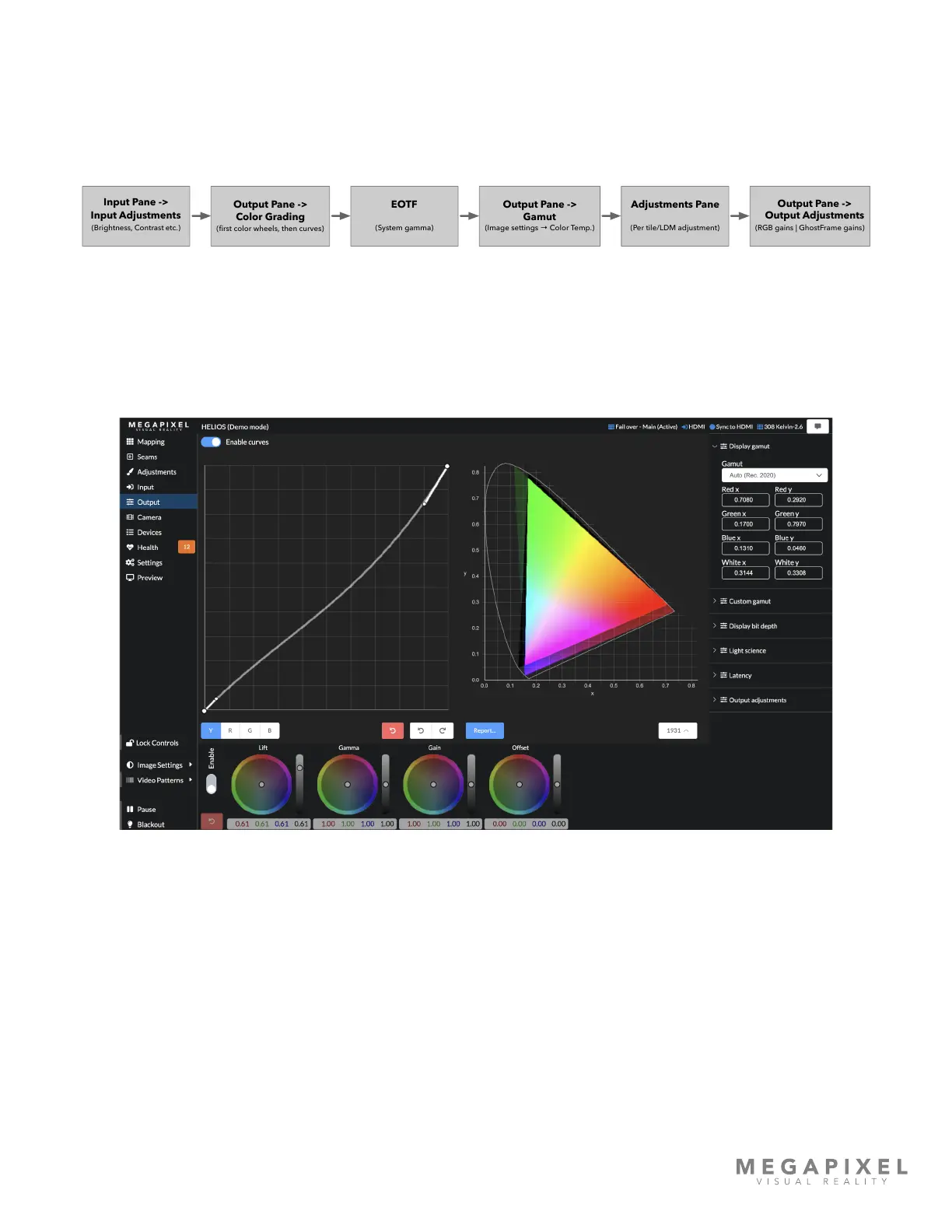
With Advanced mode enabled, HELIOS displays two separate interfaces for color grading, a curves graph and a set of
color wheels. In the HELIOS processing pipeline, these two tools are applied sequentially. Any adjustment made by the
color wheels will come rst, followed by the curves. Below is a simplied color processing pipeline diagram for the entire
HELIOS system.
Figure 53: HELIOS color processing pipeline
Color grading tools - Curves
HELIOS offers curve control for luminance (Y) and the primary colors (Red, Green, and Blue). Select which curve to control
from the YRGB radio buttons at the bottom of the curve graph.
Figure 54: Color grading curves
Output Pane ->
Color Grading
(rst color wheels, then curves)
Output Pane ->
Gamut
(Image settings → Color Temp.)
EOTF
Adjustments Pane
(Per tile/LDM adjustment)
Output Pane ->
Output Adjustments
(RGB gains | GhostFrame gains)
Input Pane ->
Input Adjustments
(Brightness, Contrast etc.) (System gamma)



 To Next Page