HELIOS LED Processing Platform - USER GUIDE
34
EOTF Adjustments
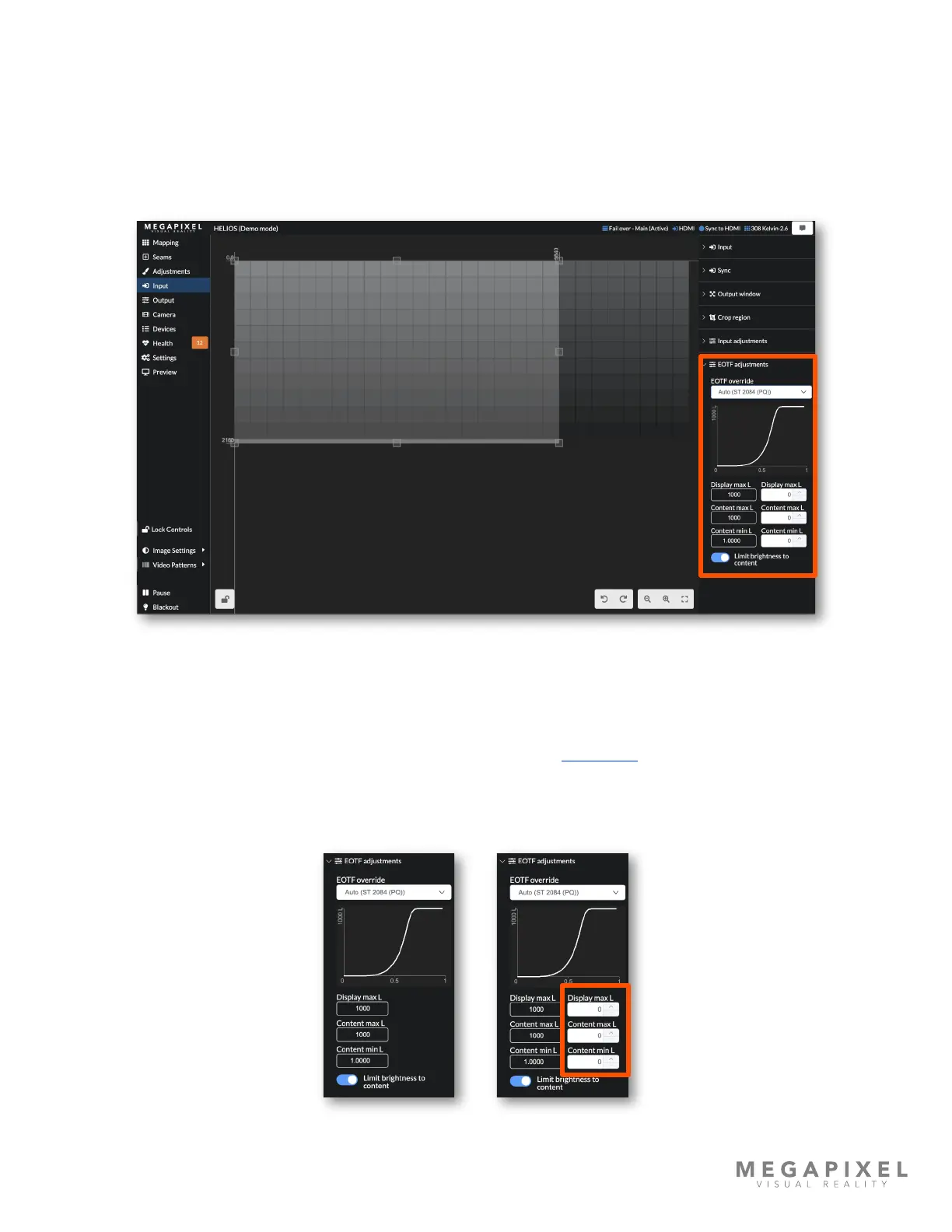
The HELIOS EOTF (Electro Optical Transfer Function) adjustments are used to inspect and manually override EOTF
settings encoded in the source signal's metadata. If content has a standard dynamic range, it should be interpreted with
the SDR setting. Content encoded with a high dynamic range should be set to the EOTF with which it was mastered. Most
HDR content will have a metadata label indicating which transfer function was used. HELIOS with default settings, should
automatically recognize and select the correct EOTF for the content. If for some reason the user needs to override the
automatic settings, this drop down menu allows for manual selection.
Figure 40: EOTF adjustments
When HELIOS is operating in default mode the override controls; Display max L, Content max L, and Content min L are
read only values (left example below). With Advanced mode ON (see the Advanced mode in the Processor Settings
section) editable elds appear. Advanced users may enter specic numbers here. If the correct values are not known, keep
the eld values at zero. The system is in automatic mode when these values are at zero. If non-zero values are entered,
keep Advanced mode ON so that the values affecting the system are visible.
Figure 41: Advanced mode adjustments



 To Next Page