8. Direction of Motor Rotation
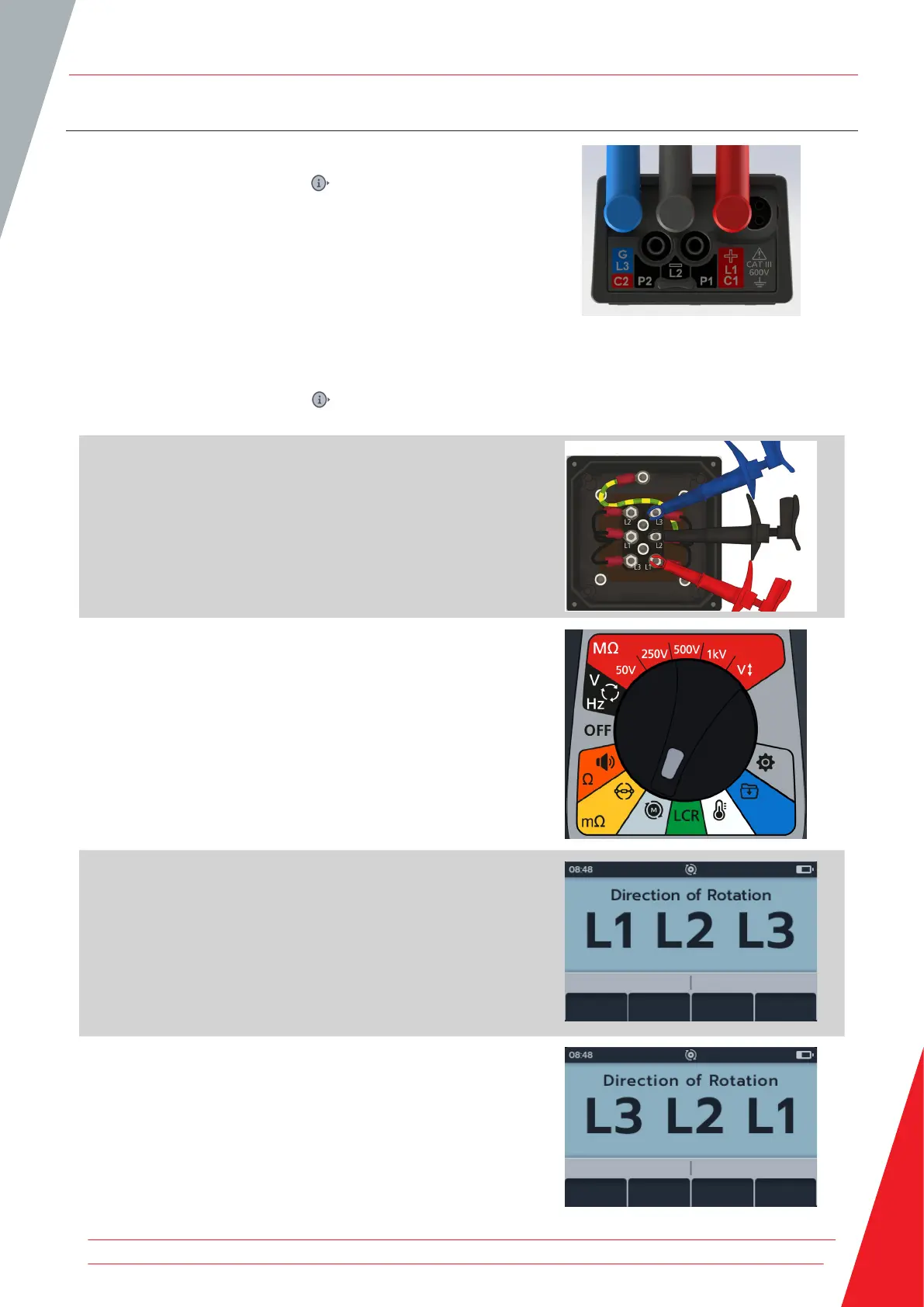
1. Connect the test leads to the MTR105.
1.1. Press the Information ( ) button to view the lead set
up diagram.
Connect L1 to phase 1
Connect L2 to phase 2
Connect L3 to phase 3
Please ensure the motor is configured for star (Y) or delta
configuration before performing the test.
NOTE: when the diagram is displayed a test cannot be
performed. Press Information ( ) button to return to the test
screen.
2. Connect the test leads to the unit under test.
NOTE: The connection is for illustrative purposes only.
3. Turn rotary switch to select direction of motor rotation
position.
4. Rotate the motor in one direction. Check if display matches
L1 L2 L3 correct phases of rotation.
5. Rotate the motor in opposite direction. Check if display
matches L3 L2 L1 correct phases of rotation
Direction of Motor Rotation
www.megger.com 47



 To Next Page