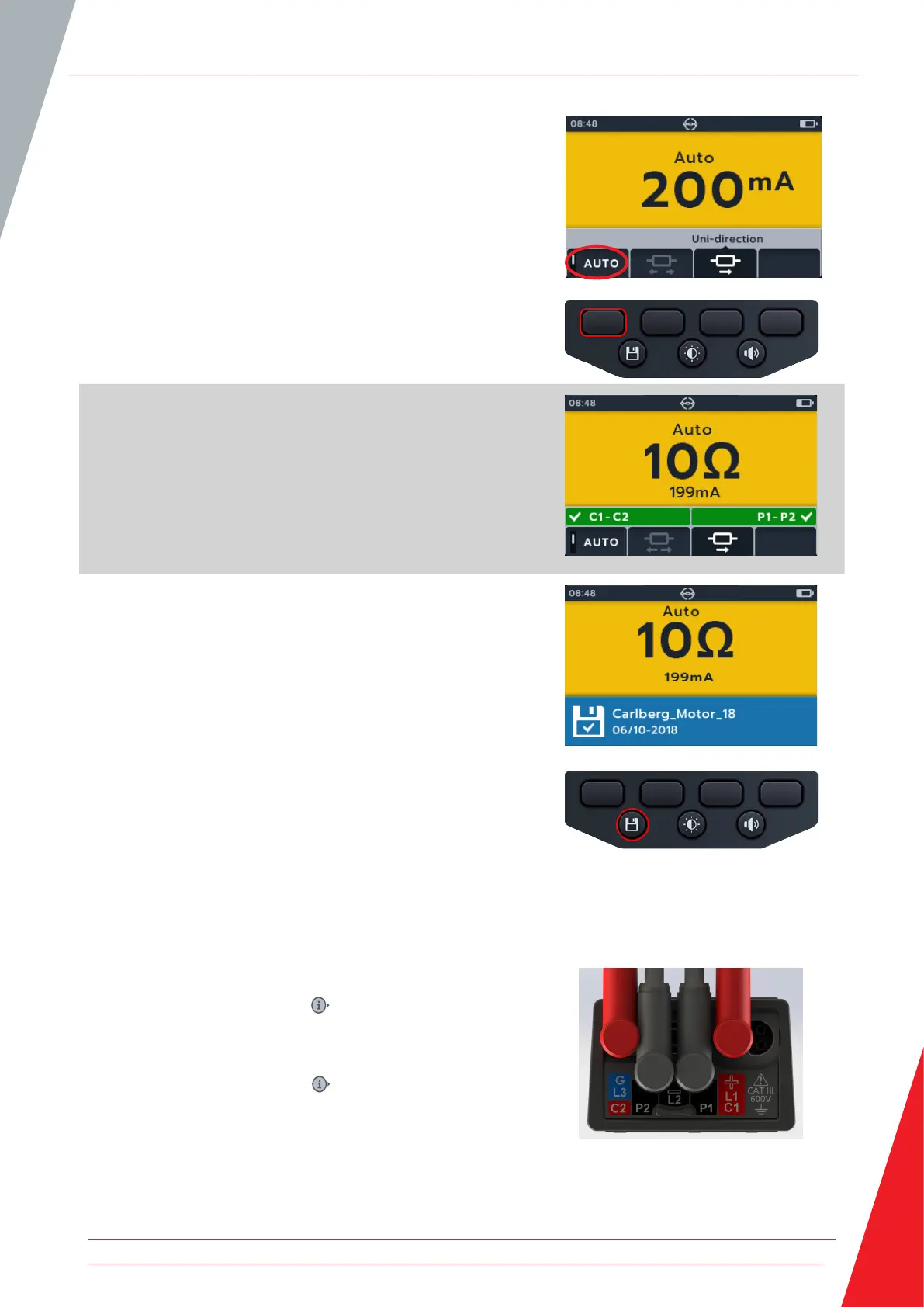
5. Press soft key 1 to enable auto mode.
6. If there is a continuity reading detected for C and P
connections the secondary fields will display with a tick and
background will be green.
If all the leads are connected correctly, test will start immediately.
7. The test runs for a few seconds then automatically stop
8. During the tests,
The primary field displays the result with the actual
current being delivered. As the resistance gets higher the
current will get lower.
The secondary field displays the continuity on the Current
(C1-C2) and potential (P1-P2) circuits.
9. The result can be saved by pressing the SAVE button. A
message will inform you the data was saved and which asset
ID it was saved to.
10. To restart the test, re-connect to a new test piece and the
test will start automatically.
7.3 Manual bi-direction test
1. Connect the test leads to the MTR105.
1.1. Press the Information ( ) button to view the lead set
up diagram.
NOTE: When the diagram is displayed a test cannot be
performed. Press Information ( ) button to return to the test
screen.
DLRO Digital Low Resistance Ohmmeter
www.megger.com 41



 To Next Page