14. Settings
Various user settings can be adjusted, serial and software version numbers can be accessed in this section.
IR Test Settings General Settings Language settings
DAR Back-light timer English
Insulation threshold Battery Technology French
Lock Date Dutch
Temperature Compensation Instrument information Spanish
Terminal Lock out Voltage Key Press Notification
Time Insulation Sleep timer
Variable Voltage Time
Restore Factory settings
Rotate the switch to the settings position. The set up procedures are all similar to one-another. The following
paragraphs give details of some of the set up procedures, the information given will cover all of the settings
procedures.
14.1 IR Test Settings
IR settings are available as listed in the chart above.
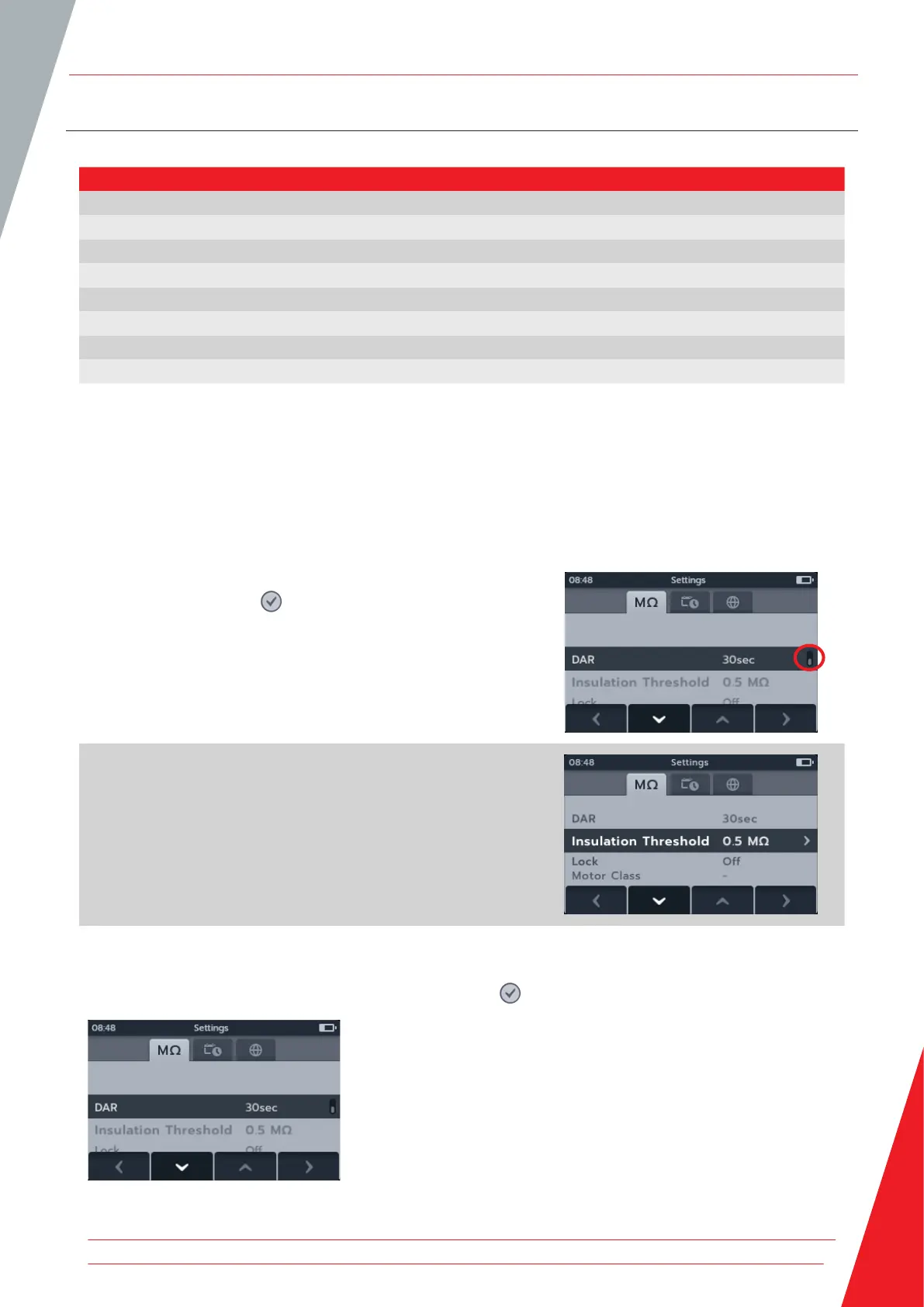
1. Scroll through the individual settings using soft keys 2 and 3.
2. Use the tick button ( ) to select a setting.
2.1. This will toggle between the two options where a
toggle key is displayed to the right hand side.
or
2.1. This will enter a sub menu if more than two options are
available.
14.1.1 DAR Settings
There are two options available for DAR. Press the tick button ( ) to toggle between 15 seconds and 30 seconds.
Settings
www.megger.com 71



 To Next Page