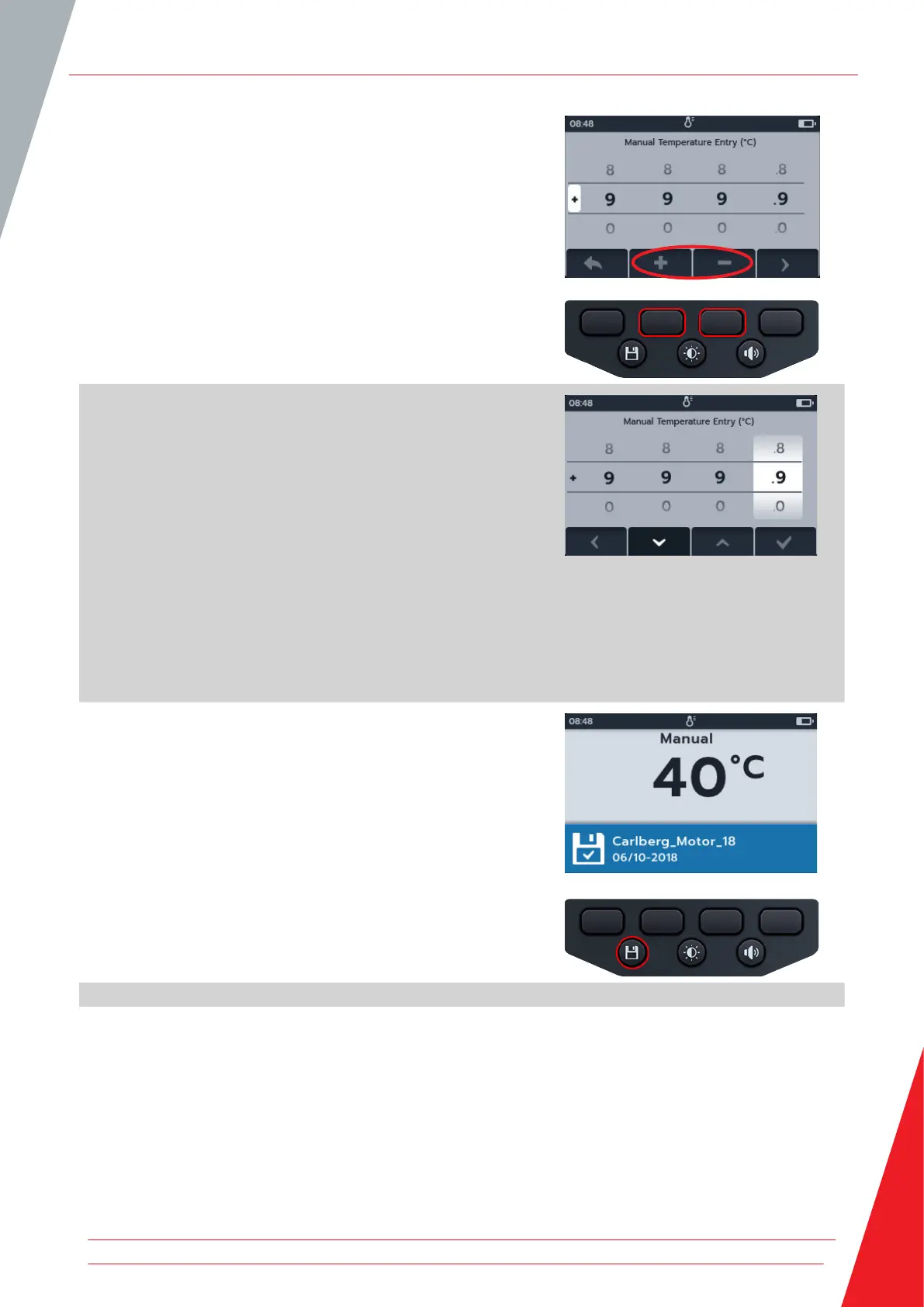
3. Press soft keys 2 and 3 to select a positive or negative
temperature.
4. Press soft key 4 to confirm.
or
Soft key 1 to cancel.
5. Press soft key 2 and 3 to scroll through the digits.
6. Press soft key 4 to accept the first digit and move to the
next.
7. Press soft key 2 and 3 to scroll through the digits.
8. Press soft key 4 to accept the second digit and move to the
next.
9. Press soft key 2 and 3 to scroll through the digits.
10. Press soft key 4 to accept the third digit and move to the
next.
11. Press soft key 2 and 3 to scroll through the digits.
12. Press soft key 4 to accept the temperature value.
13. Press soft key 1 to cancel and return to the previous menu at
any point.
14. The new temperature will be displayed.
The result can be saved by pressing the SAVE button. A
message will inform you the data was saved and which asset
ID it was saved to.
Temperature measurement
www.megger.com 57



 To Next Page