29
2.1.3.5 Parameter settings for EtherCAT network connection
Using MV810-ECAT01 to operate the MV820 drive, you need to set the operation command channel and frequency
source of MV820 to the bus communication card, as shown in the following table.
Table 2-5 Parameter settings for MV810-ECAT01 communication
Set the operation command channel to communication control
Set the communication command channel to EtherCAT
Set the main frequency source to bus card (EtherCAT)
Set the option type to EtherCAT bus option
Option type status identification, 2 is EtherCAT bus option
2.1.3.6 Network topology
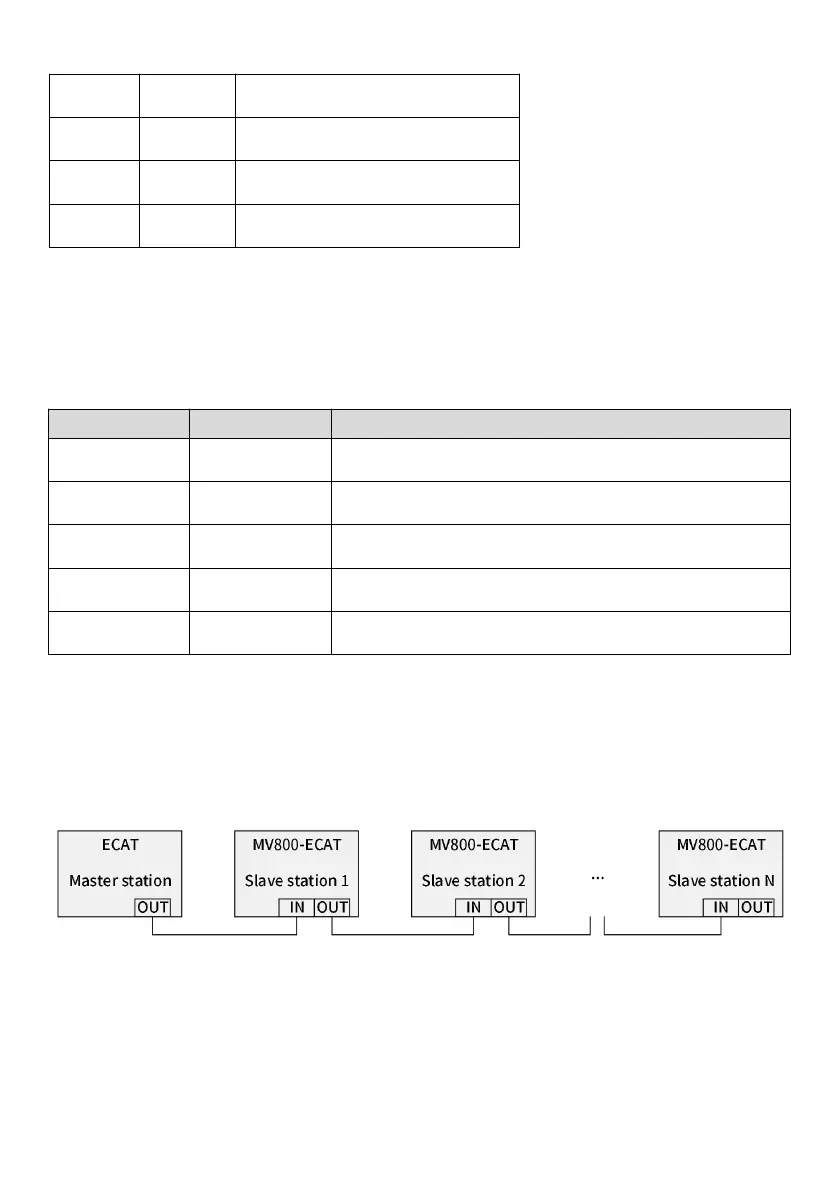
EtherCAT network is generally composed of a master station and multiple slave stations. The network structure can be
divided into the bus type, star type, tree type, etc., or the combination of several types, realizing flexible device
connection and wiring. The bus-type network topology is shown in the figure below.
Fig. 2-9 ECAT bus connection
2.1.3.7 LED indicator description and fault diagnosis
MV810-ECAT01 has two LED indicators: the LED on the PCBA of the expansion box (LED1 on the left, LED2 on the right,
which can be viewed through the hollow part of the expansion box) and LED on the communication port. The LED on the



 To Next Page