72
Chapter 4 Congure the Router in Wireless Router Mode
devices to access your home network.
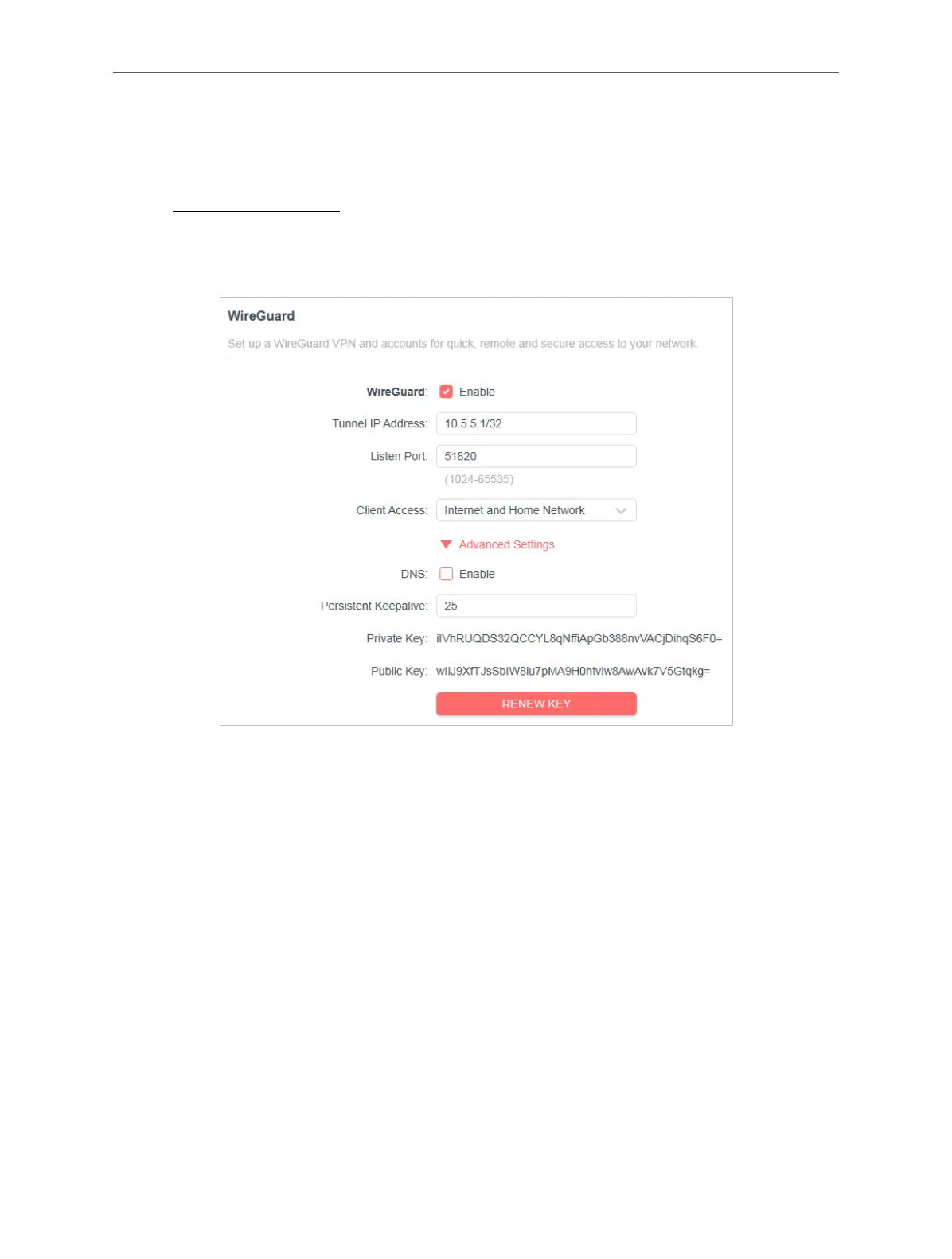
Step 1. Set up WireGuard VPN Server on Your Router
1. Visit http://mwlogin.net, and log in with your Mercusys ID or the password you set
for the router.
2. Go to Advanced > VPN Server > WireGuard, and enable WireGuard.
3. Set the Tunnel IP Address and Listen Port. Do NOT change it unless necessary.
4. Select your Client Access type. Select Home Network Only if you only want the
remote device to access your home network; select Internet and Home Network if
you also want the remote device to access internet through the VPN Server.
5. (Optional) Click Advanced Settings to display more settings. If DNS is turned on, the
router will become the DNS server of the VPN client that establishes a connection
with it. Change the Persistent Keepalive time (25 seconds by default) to send out
heartbeat regularly, you can also click RENEW KEY to update the private key and
public key.
Step 2. Create accounts that can be used by remote clients to connect to the VPN
server.
1. Locate the Account List section. Click Add to create an account.



 To Next Page