■■■■■■■■■■■■■■■■■■■■■■
4 Installation
930 Compact IC Flex Oven/SeS/PP (2.930.2500)
■■■■■■■■
45
4.13.3 Installing the adsorber cartridge
The aspirated air has to have the lowest CO
2
content possible in order for
the CO
2
to be removed from the eluent efficiently. In order to achieve this,
the air is aspirated through a CO
2
adsorption cartridge CW (6.2837.100).
Accessories For this step, you need the following accessories:
■ CO
2
adsorption cartridge CW (6.2837.100)
The adsorber cartridge is in the accessory kit: Vario/Flex SeS
(6.5000.020).
Preparing the CO
2
adsorber cartridge CW
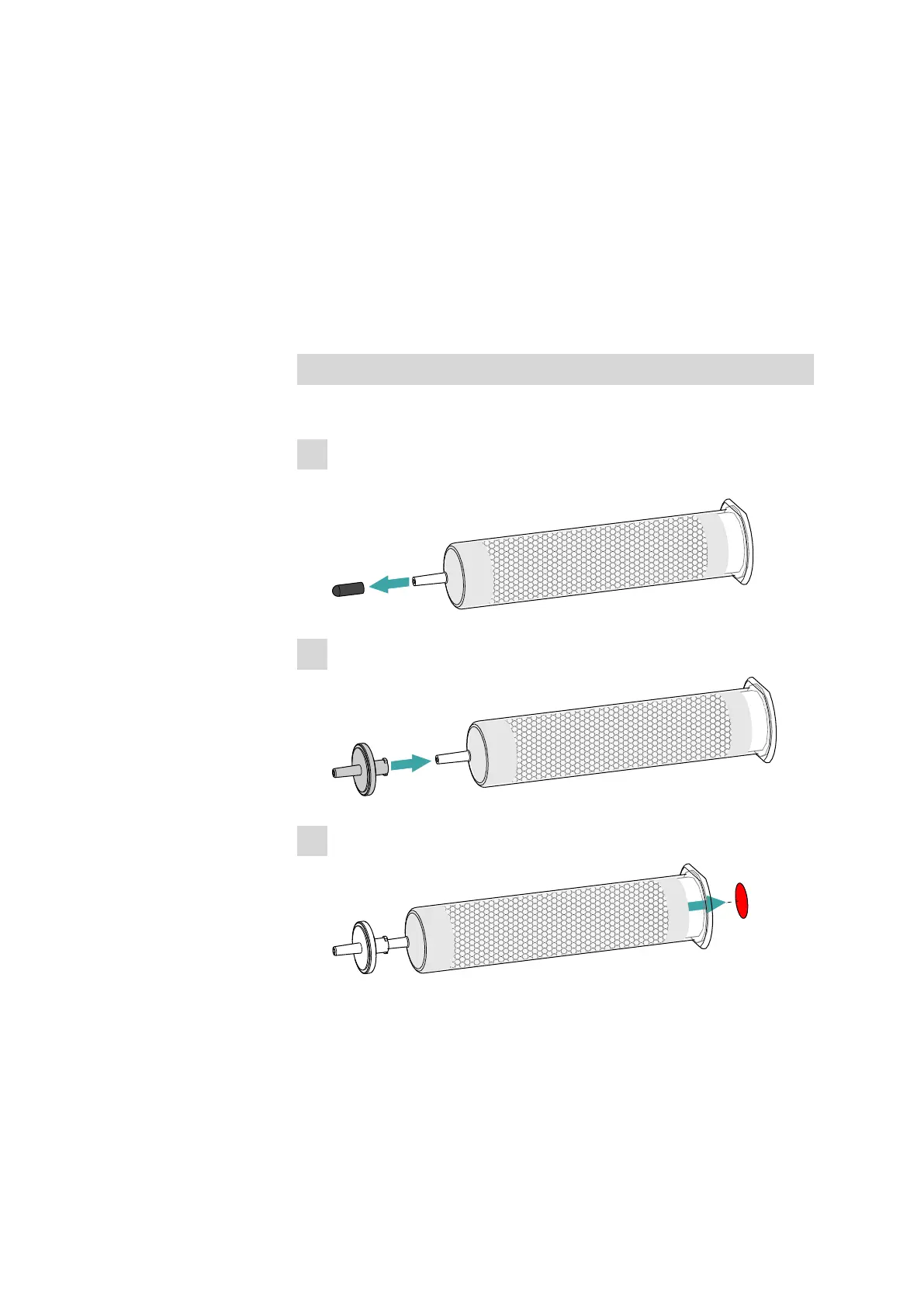
Prepare the CO
2
adsorption cartridge CW for use as follows:
1
Remove the protective cap from the tip of the CO
2
adsorption car-
tridge CW.
2
Attach the dust filter to the tip of the CO
2
adsorption cartridge CW.
3
Remove the label from the lid of the CO
2
adsorption cartridge CW.
This uncovers the small opening in the lid of the CO
2
adsorption car-
tridge CW, through which air is aspirated.
The CO
2
adsorption cartridge CW is now ready for installation.















 To Next Page