Workstation 5 Field Service Guide 3-5
Workstation 5 Troubleshooting
Operational Troubleshooting
Five Beeps - CF Not Found
o Incorrect CMOS Configuration or corrupt CMOS memory. Make
sure a CF card is installed if this is a WINCE unit. See below to
Reset CMOS Defaults.
o Check the Daughter Card CF socket for bent pins and make sure the
CF Daughter Card is seated properly in the system board connector,
IDE1.
o Defective or incompatible CF Card.
o Defective System Board.
Six Beeps - USB Flash Drive Not Found
o Make sure the USB flash drive is correctly oriented on the 2x5
socket, J9. See 4-19.
o Defective USB Flash Drive.
o Defective System Board.
o Incorrect CMOS Configuration or corrupt CMOS - See below to
Reset CMOS Defaults.
• If NO, the boot process halts and a text message reports “UDOC.ID not
found,” “Operating System Not Found,” or “Remove disks or other media.
Press any key when ready,” or similar.
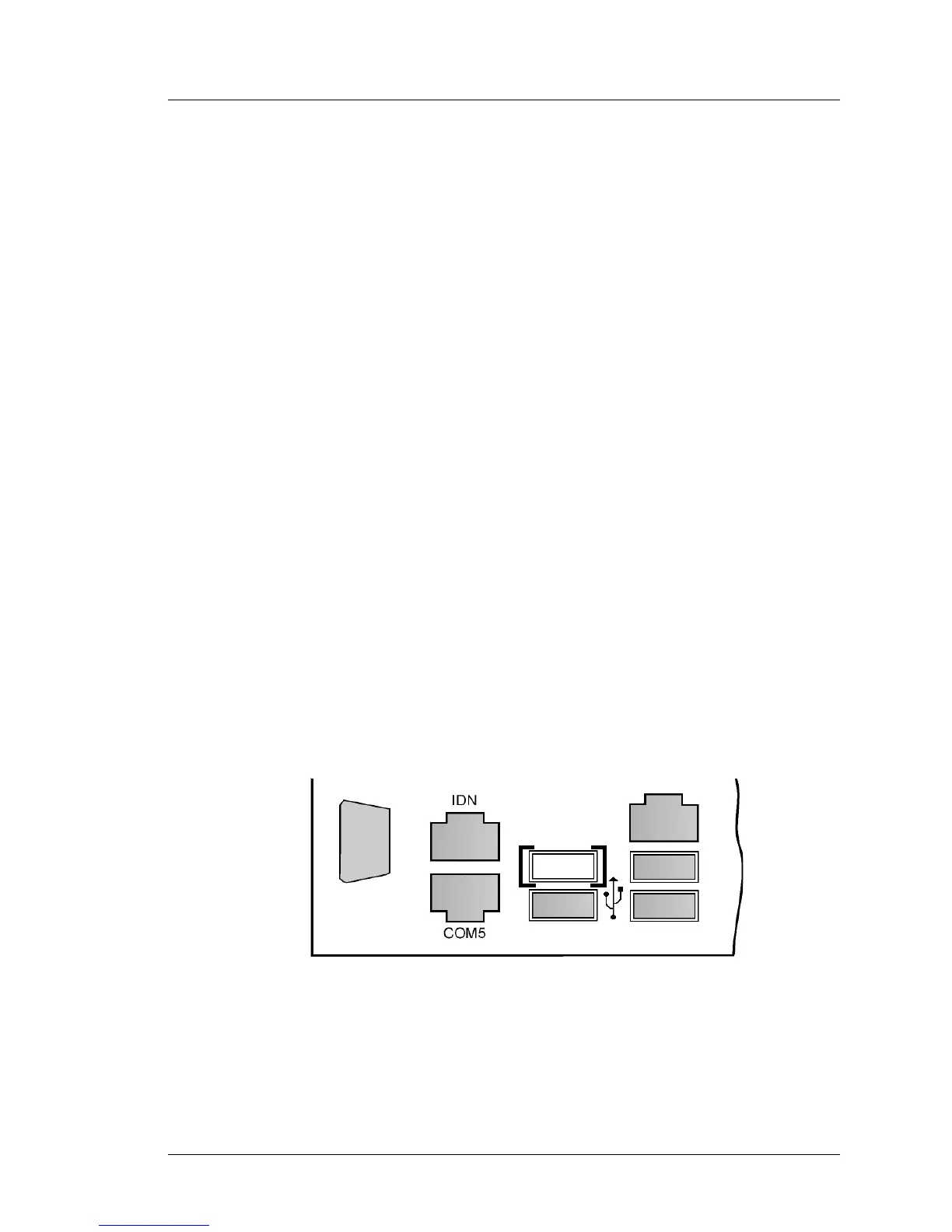
o Remove the USB ‘Stick,’ ’Thumb’ or Flash Drive from the IO panel
USB connector or refer to the Figure below and attach it to the
connector shown in brackets []. Connecting a USB thumb drive to the
port indicated prevents start-up errors in situations where the device
must remain attached across reboots.
Figure 3-2: Recommended USB Port for e7 Installations and Upgrades



 To Next Page