Workstation 5 Field Service Guide 3-21
Workstation 5 Troubleshooting
Workstation Recovery and Platform Update Procedures
Using Windows CE Factory Restore
For Windows Embedded CE 6.0 configurations, a custom pre-boot
firmware application we call Windows CE Factory Restore is available.
This is a new tool designed to ease depot maintenance. Should the OS
image or platform files become corrupt and prevent the unit from booting,
Factory Restore replaces all files on USB Flash Drive and erases the CF
Card, returning the unit to the ‘out of box’ factory condition.
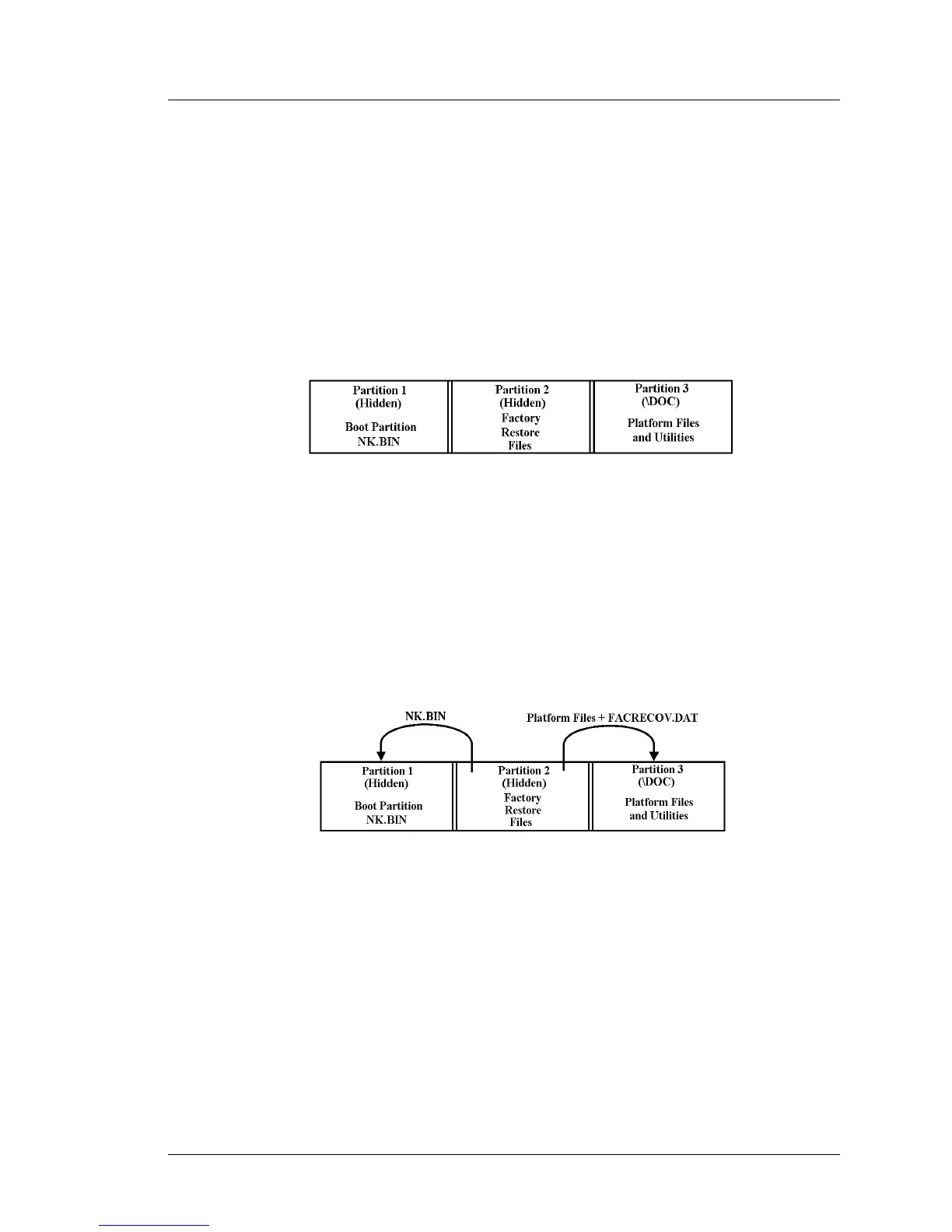
To understand how Factory Restore functions, refer to Figure 3-6, below
and examine how the USB Flash Drive is partitioned.
Figure 3-6: USB Flash Drive Partitions
Starting at the left, Partition 1 is the hidden boot partition, containing the
WinCE image file NK.BIN. Partition 2 is also hidden and contains the
factory restore files. This includes a duplicate set of platform files,
configuration files and folders, utilities and the NK.BIN file. Partition 3 is
visible and appears as \DOC in ‘My Devices.’
Figure 3-7 illustrates how WinCE Factory Restore copies the image file
and platform files to the correct partitions.
Figure 3-7: Windows CE Factory Restore Operation
NK.BIN is copied from Partition 2 to Partition 1, the boot partition.
Platform files and folders are copied from Partition 2 to Partition 3, the
‘\DOC’ folder. Finally, WCF is used to remove all files from the CF Card.
Included in the \DOC folder is the FACRECOV.DAT file. When the unit is
shipped, this file contains the GR version of the recovery files. Each time
the Factory Restore feature is used, the time and date are appended to the
file. The contents of this file can be viewed with the WS5DiagUtility by
pressing the [Recovery Image Info] button located on the System
Information Screen.



 To Next Page