ENGLISH
OM-225 389 Page 15
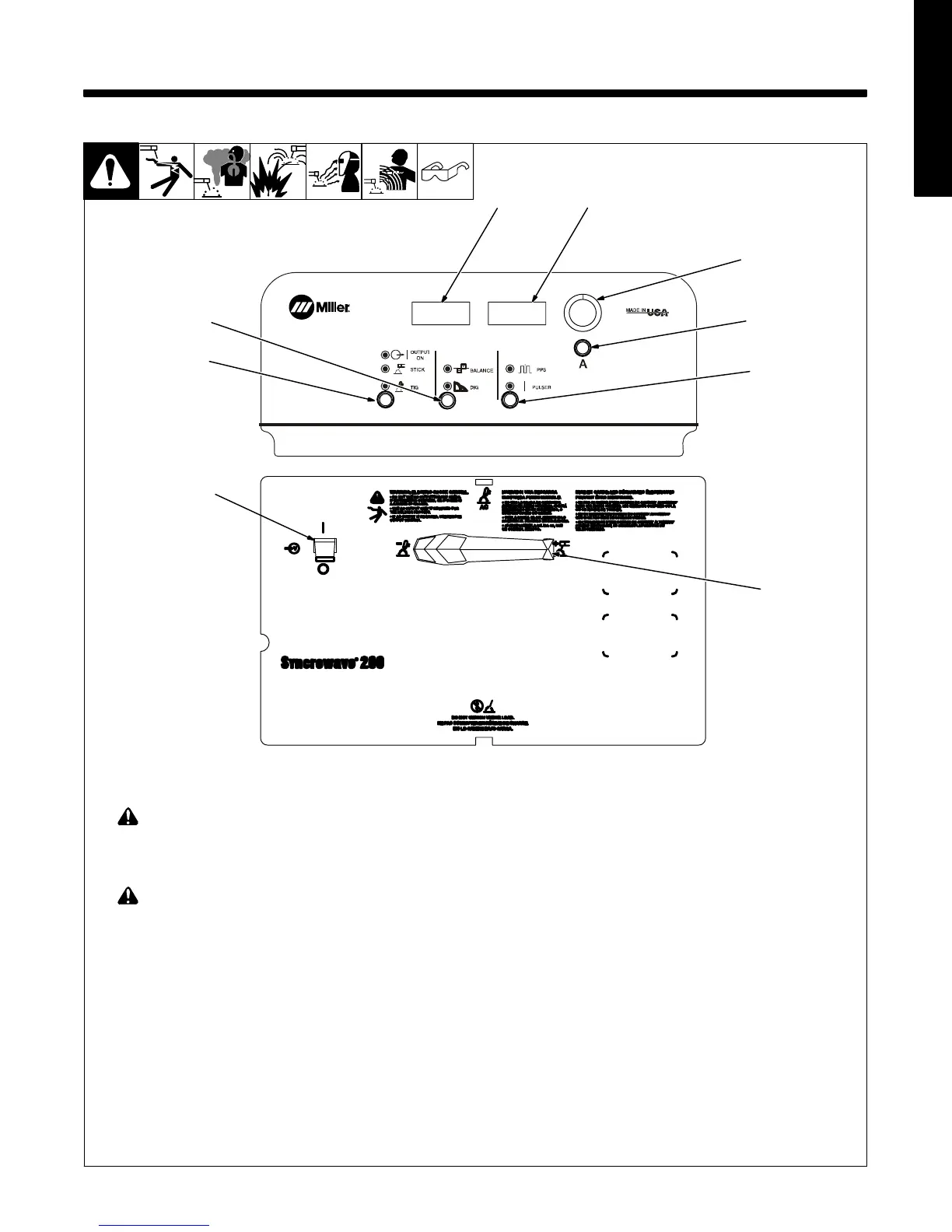
SECTION 3 − OPERATION
1 Output Selector Switch (Polarity)
! Do not use AC output in damp areas, if
movement is confined, or if there is
danger of falling. Use AC output ONLY
if required for the welding process, and
then use a remote control.
! Do not change position of switch while
welding or while under load.
Use switch to select Direct Current Electrode
Negative (DCEN), AC, or Direct Current Elec-
trode Positive (DCEP) output without changing
weld output cable connections.
2 Pulse Push Button Control
See Section 3-5.
3 Main Amps Push Button
(Amperage/Purge Control)
See Section 3-3.
4 Encoder Adjustment Control
Use control in conjunction with applicable front
panel function switch to set values for that func-
tion.
5 Ammeter And Parameter Adjust
See Section 3-2.
6 Voltmeter And Parameter Adjust
See Section 3-2.
7 Adjust Push Button Control
See Section 3-6.
8 Process Push Button Control
See Section 3-4.
9 Power Switch
Use switch to turn unit On and Off.
3-1. Controls
1
228 528-A / 242 738-A
2
3
4
56
7
8
9
0000 0000










 To Next Page