OM-225 389 Page 26
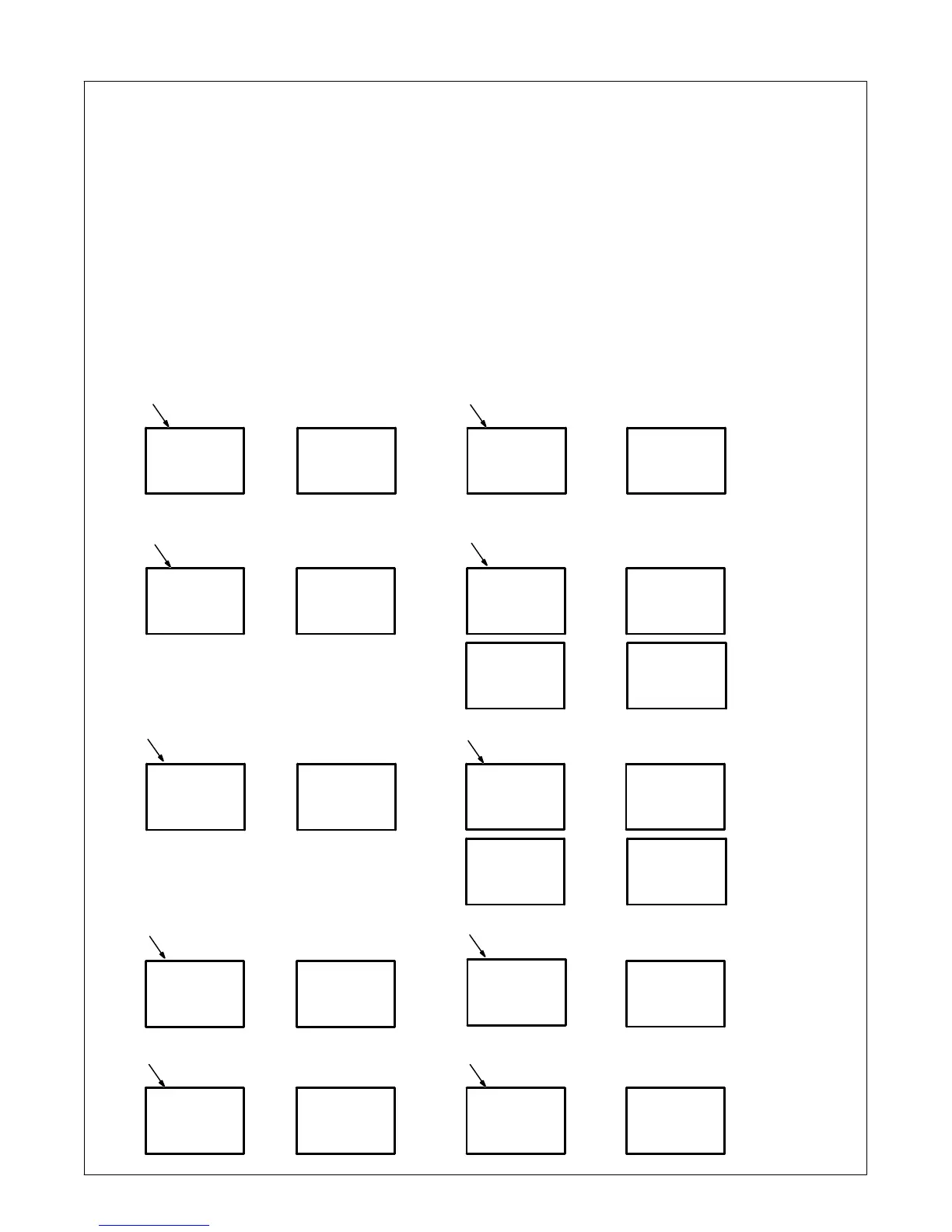
4-3. Voltmeter/Ammeter Help Displays
. All directions are in reference to the
front of the unit. All circuitry referred to
is located inside the unit.
1 Help 0 Display
Indicates a short in the thermal protection
circuitry located on the transformer of the
unit. If this display is shown, contact a Fac-
tory Authorized Service Agent.
2 Help1 Display
An SCR overcurrent condition has oc-
curred. Turn power off and back on to cor-
rect condition. If problem continues, con-
tact a Factory Authorized Service Agent.
3 Help2 Display
Indicates an open in the thermal protection
circuitry located on the transformer of the
unit. If this display is shown, contact a Fac-
tory Authorized Service Agent.
4 OVER TEMP XFMR
Indicates the transformer of the unit has
overheated. The unit has shut down to al-
low the fan to cool it (see Section 2-6). Op-
eration will continue when the unit has
cooled.
5 Help 4 Display
Indicates an open in the thermal protection
circuitry located on the rectifier assembly of
the unit. If this display is shown, contact a
Factory Authorized Service Agent.
6 OVER TEMP RECT
Indicates the rectifier assembly of the unit
has overheated. The unit has shut down to
allow the fan to cool it (see Section 2-6). Op-
eration will continue when the unit has
cooled.
7 Help 9 Display
Indicates a short in the thermal protection
circuitry located on the rectifier assembly of
the unit. If this display is shown, contact a
Factory Authorized Service Agent.
8 REL RMT
Indicates Remote Output control is acti-
vated. Release Remote Output control to
clear help message.
9 POL ERR
Indicates Output Selector switch is not in
correct position (see Section 3-1).
10 NOT VALID
Indicates a non-allowable set-up on the
front panel.
A
A
V
V
A
A
0
2
HELP
OVER
1
TEMP
V
V
HELP
HELP
A
A
4
9
V
V
OVER
REL
A
A
TEMP
RMT
7
8
2
5
6
V
NOT
10
A
VALID
V
V
HELP
HELP
1
V
POL
9
A
ERR
3
4
XFMR
RECT
Toggles Every
Two Seconds
}
Toggles Every
Two Seconds
}










 To Next Page