ENGLISH
OM-225 389 Page 21
0000 0000
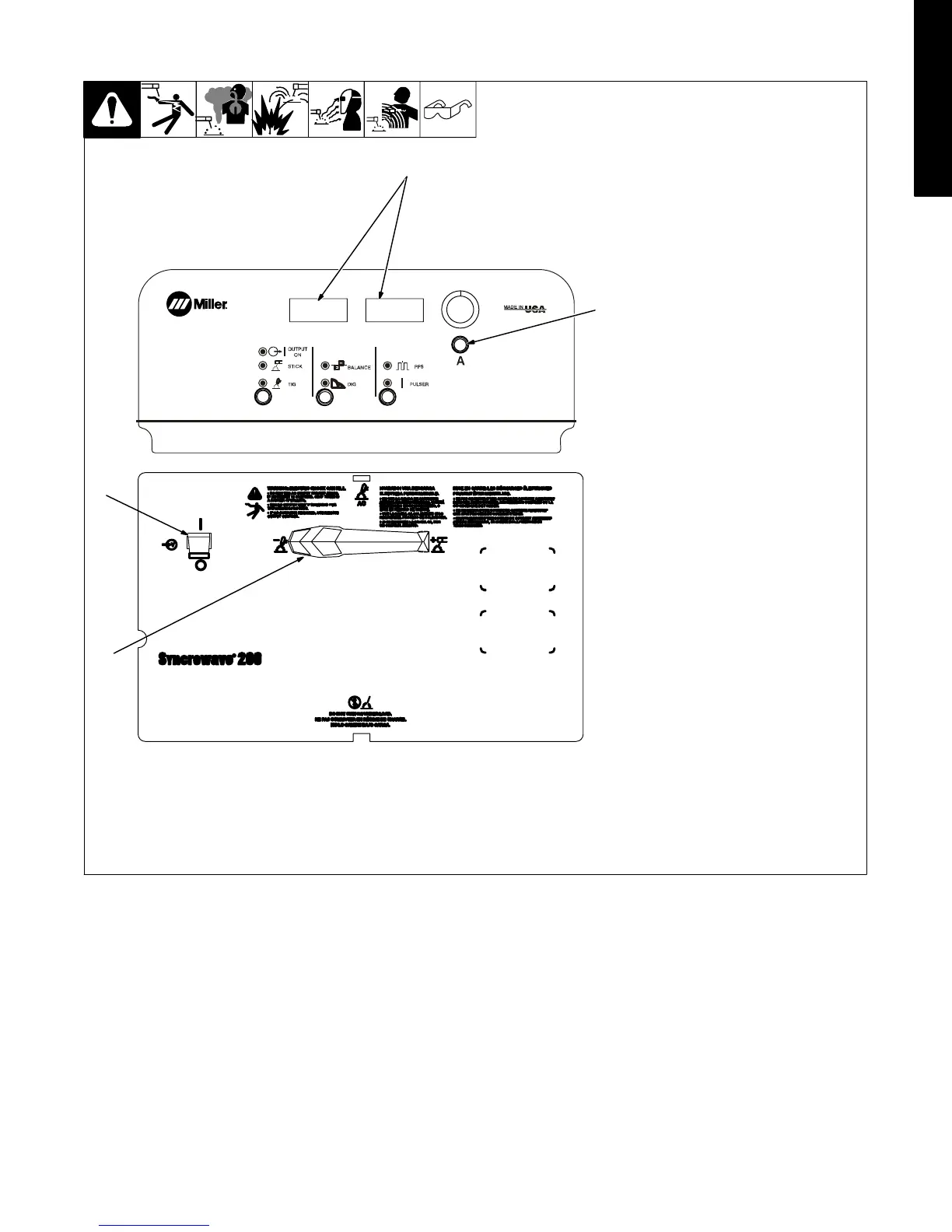
3-9. Selecting Syncro Start Characteristics
1 Power Switch
2 Main Amps Control
3 Volt And Ammeters
4 Process Selector Switch
To change TIG HF Syncro starting char-
acteristics, turn Off power, place Output
Selector switch in desired position,
DCEN, DCEP or AC. Each position has
three start characteristics options. Push
and hold Main Amps button and turn on
power. Hold button for approximately 7
seconds.
Meters will display [AC] [MED] or [DCEN] [MED],
or [DCEP] [MED], depending on position of
Output Selector switch
Turn Encoder to step through the three
start characteristics choices. Ammeter
displays active choice: soft start, me-
dium start, or hot start.
Change polarity (see Section 3-1) to set
values for each TIG output. Each setting
is polarity specific.
Press torch trigger or turn off power to
save settings.
Application:
Soft start - use for thin gauge material
and small diameter tungstens
(.040−1/16 in)
Medium start - factory-set default, used
for most welding applications with 1/16,
3/32 and 1/8 in. tungstens.
Hot start - use for thick materials with a
large diameter tungsten (1/8−5/32 in.).
2
1
3
4










 To Next Page