OM-225 389 Page 20
0000 0000
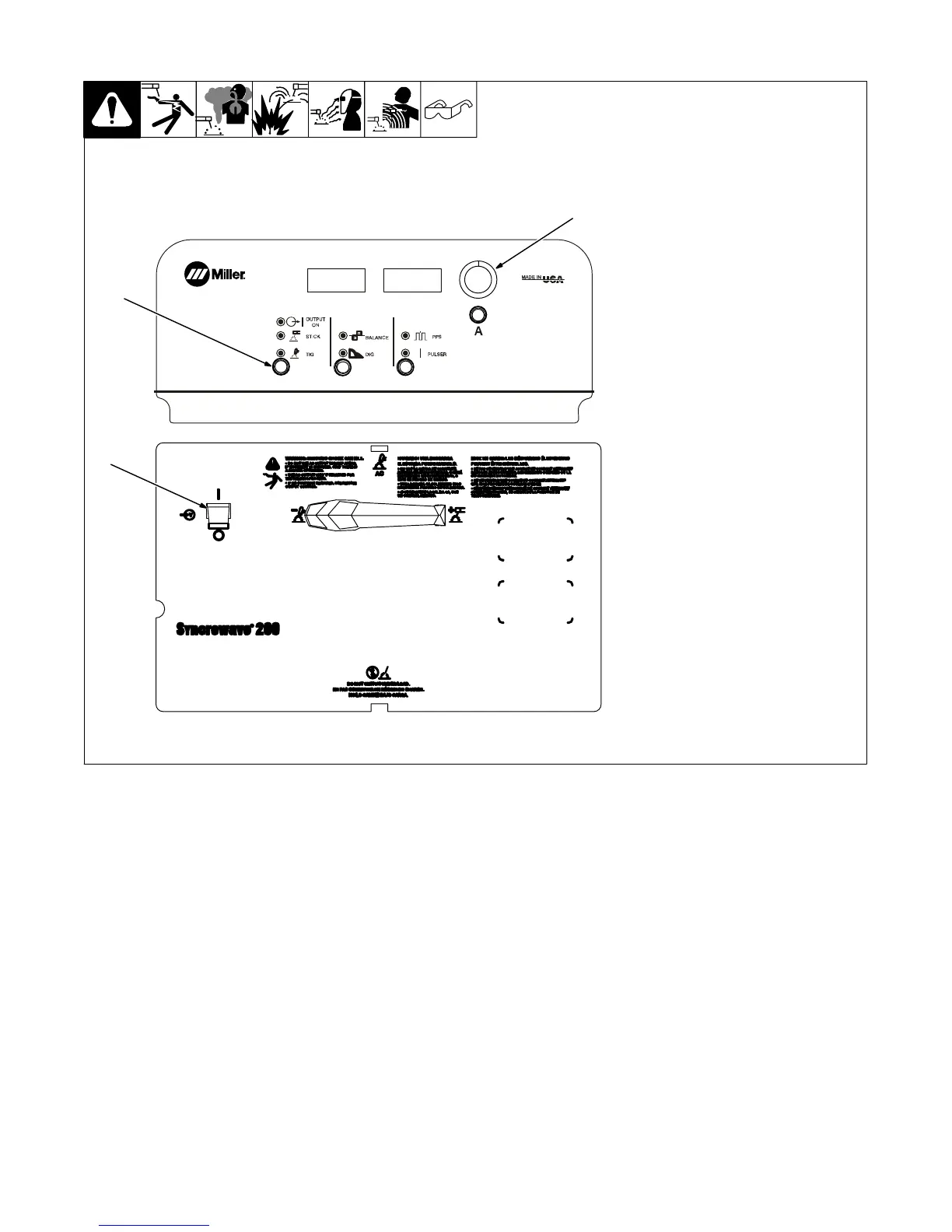
3-8. Postflow Control
1
Postflow time is automatically con-
trolled. Auto-postflow provides a
minimum of five seconds of post-
flow for anything less than 50 amps
of weld current, and an additional
one second of postflow for each
additional ten amps of weld current.
1 Power Switch
2 Process Control
3 Encoder Adjust Control
To override auto-postflow and set a
specific postflow time, press and
hold Process push button while
turning on power. Hold button for
approximately 7 seconds. Voltme-
ter will display POST, and ammeter
will display AUTO. Turn encoder to set
desired time in seconds. Postflow
settings effects AC and DC TIG,
and is not polarity specific. Press
torch trigger or turn off power to
save settings.
Application:
Auto-postflow time is optimally set
based on weld amperage. This
amount of auto-postflow time pro-
vides adequate shielding with no
manual adjustment. The use of
auto-postflow at low amperages
avoids excessive postflow times
and a waste of shielding gas. See
Section 3-7 for postflow
parameters.
2
3










 To Next Page