OM-284794 Page 28
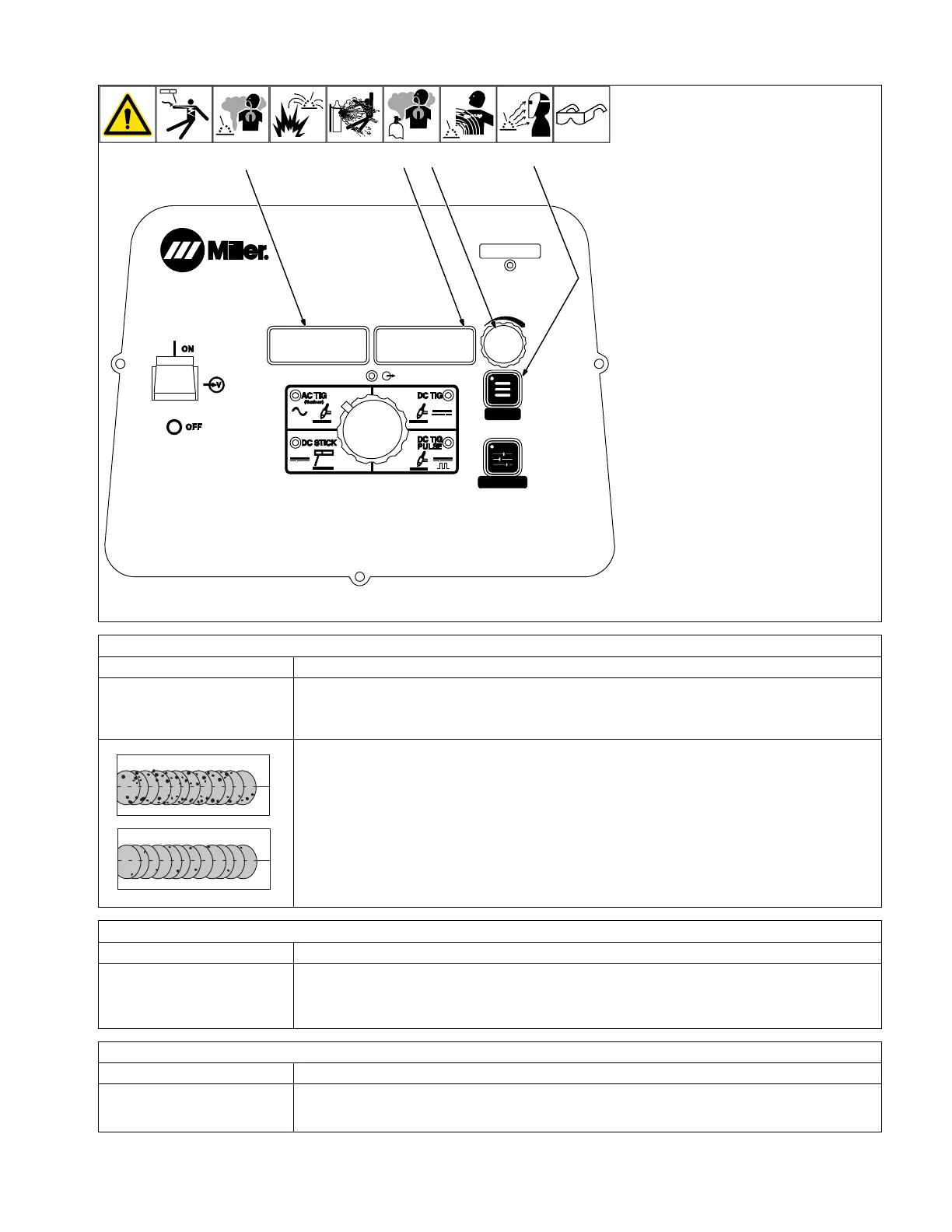
6-2. Accessing Process Menu: AC TIG
MENU
PRO-SET
280539-B
1
32
4
150A
1 Menu Button
Press Menu button to cycle through parame-
ters that can be set.
2 Parameter Display
3 Setting Display
4 Amperage Adjustment Control
Rotate Amperage Adjustment control to ad-
just parameter setting.
F
Parameter automatically returns to am-
perage setting 15 seconds after Amper-
age Adjustment control is inactive.
Amperage Control
Controls the welding amperage output. Limits
the maximum output of a remote amperage
device.
*PRO-SET provides PROfessionally devel-
oped SETtings for the weld process. To use
PRO-SET, press the menu button to display
the parameter and adjust the amperage ad-
justment control until PRO-SET flashes on
the display. PRO-SET flashes one time and
reveals the professional setting for the
parameter.
Balance Control* (%EN)
Parameter/Setting Display Description
[BAL] [68%] Controls oxide cleaning.
Increasing setting reduces oxide cleaning. Range is Ball, 60% to 80%.
“Ball” sets the Balance to 30%. This allows the operator to form a ball on the tip of the tungsten. “Ball” is
not intended for normal welding operation.
A com
plete Parts List is
avail
able at www
.Mill
erWelds.com
OM-270536 Page 17
3-2. Accessing Control Panel Menu: AC TIG
247222-D
1
150A
2
3
4
TIP: AC Balance controls the cleaning action. If floating black spots appear in the puddle, the balance set-
ting is too high. Turn the balance down until puddle becomes clear.
Frequency Control* (Hz)
Parameter/Setting Display Description
[FREQ] [70HZ] Controls the width of the arc cone. Increasing the AC Frequency provides a more focused arc and in-
creased directional control. Range is 50 - 150 Hz. Pro-Set value is 70 Hz.
F
Decreasing the AC Frequency softens the arc and broadens the weld puddle for a wider weld.
Post Flow Control
Parameter/Setting Display Description
[POST] [AUTO] Controls the length of time gas flows after welding stops. Range is AUTO, OFF - 50T (seconds). AUTO
calculates the time based on the maximum amperage of each welding cycle. The minimum time is 8 sec-
onds. Auto = maximum amperage/10.












 To Next Page