OM-284794 Page 25
F
Complete Parts List is available at www.MillerWelds.com
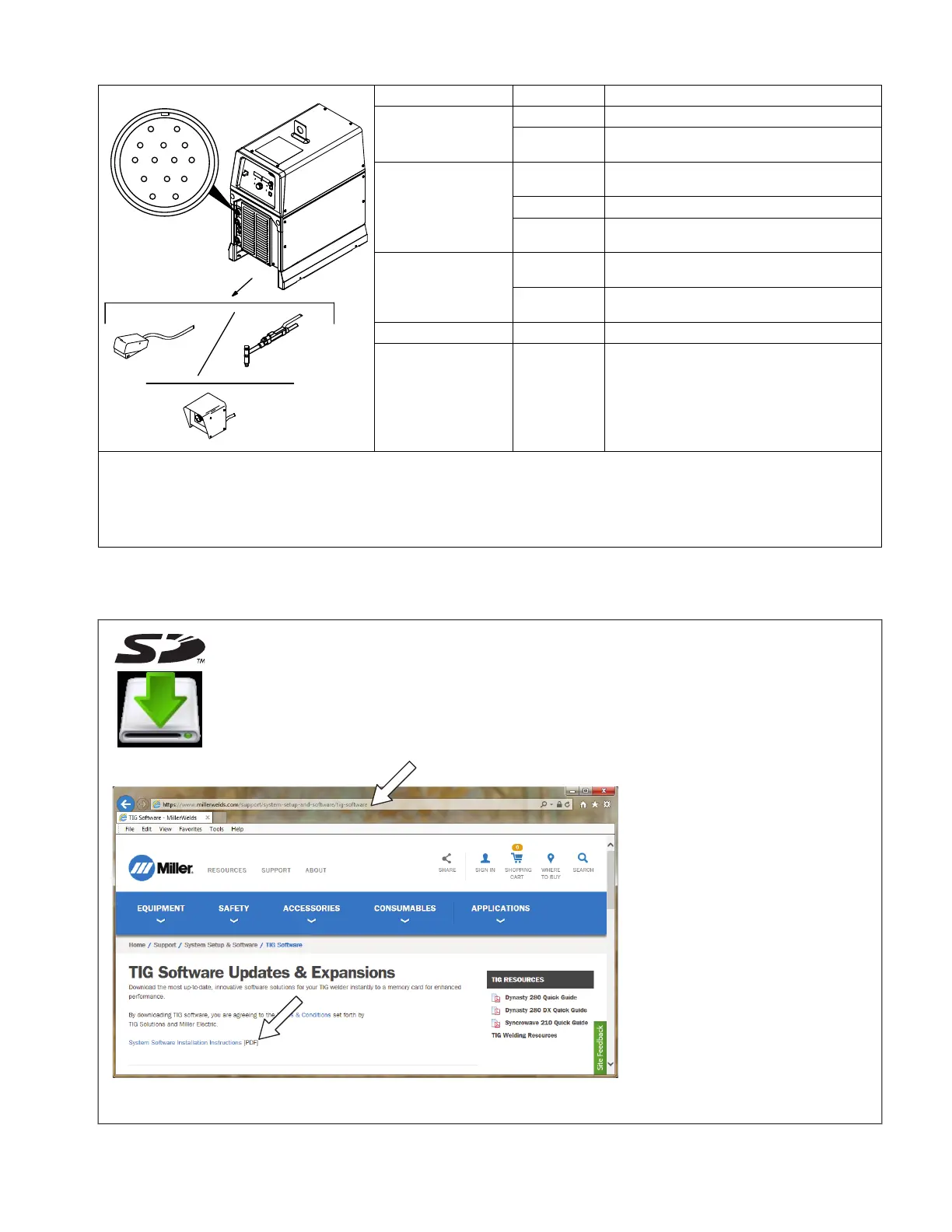
5-9. Remote 14 Receptacle Information
Remote 14 Socket Socket Information
15 Volts DC Output
Contactor
A Contactor control +15 volts DC, referenced to G.
B
Contact closure to A completes 15 volts DC con-
tactor control circuit and enables output.
Remote Output
Control
C
Output to remote control; +10 volts DC output to
remote control.
D Remote control circuit common.
E
0 to +10 volts DC input command signal from re-
mote control.
F
Current feedback; +1 volt DC per 100 amps
output.
H
Voltage feedback; +1 volt DC per 10 volts
output.
Common G Return for all output signals: F, H, and A.
Chassis K Chassis
Sockets G and K are electrically isolated from each other.
F
If a remote hand control like the RHC-14 is connected to the Remote 14 receptacle, some current value above min. must be set on the
remote control before the Panel or Remote contactor is turned on. Failure to do so will cause current to be controlled by the panel con-
trol, and the remote hand control will not function.
5-10. Software Updates
A. Downloading Software Updates
2-13. Software Updates
A. Reasons For Downloads Of Software Updates
B. Requirements
2
1
C. Software Installation
273670-B
12
2-13. Software Updates
A. Reasons For Downloads Of Software Updates
B. Requirements
2
1
C. Software Installation
273670-B
1 2
Reasons To Download Software Updates:
l To get the latest feature and software
improvements with future software
updates.
l For all circuit board replacements, a
software update is required to ensure
proper unit operation.
l A software update is required to ensure
proper software expansion operation of
all purchased feature expansions.
Requirements
A computer with an SD memory card port, or
SD memory card reader is required to down-
load software updates.
32 GB max, full size SD memory card
required.
The SD logo is a registered trademark of
SD-3C LLC.
How To Download Software Updates
In a web browser, go to www. millerwelds.
com/support/system-setup-and-software/tig-
software
Click System Installation Instructions
(PDF) and follow the instructions.












 To Next Page