OM-284794 Page 31
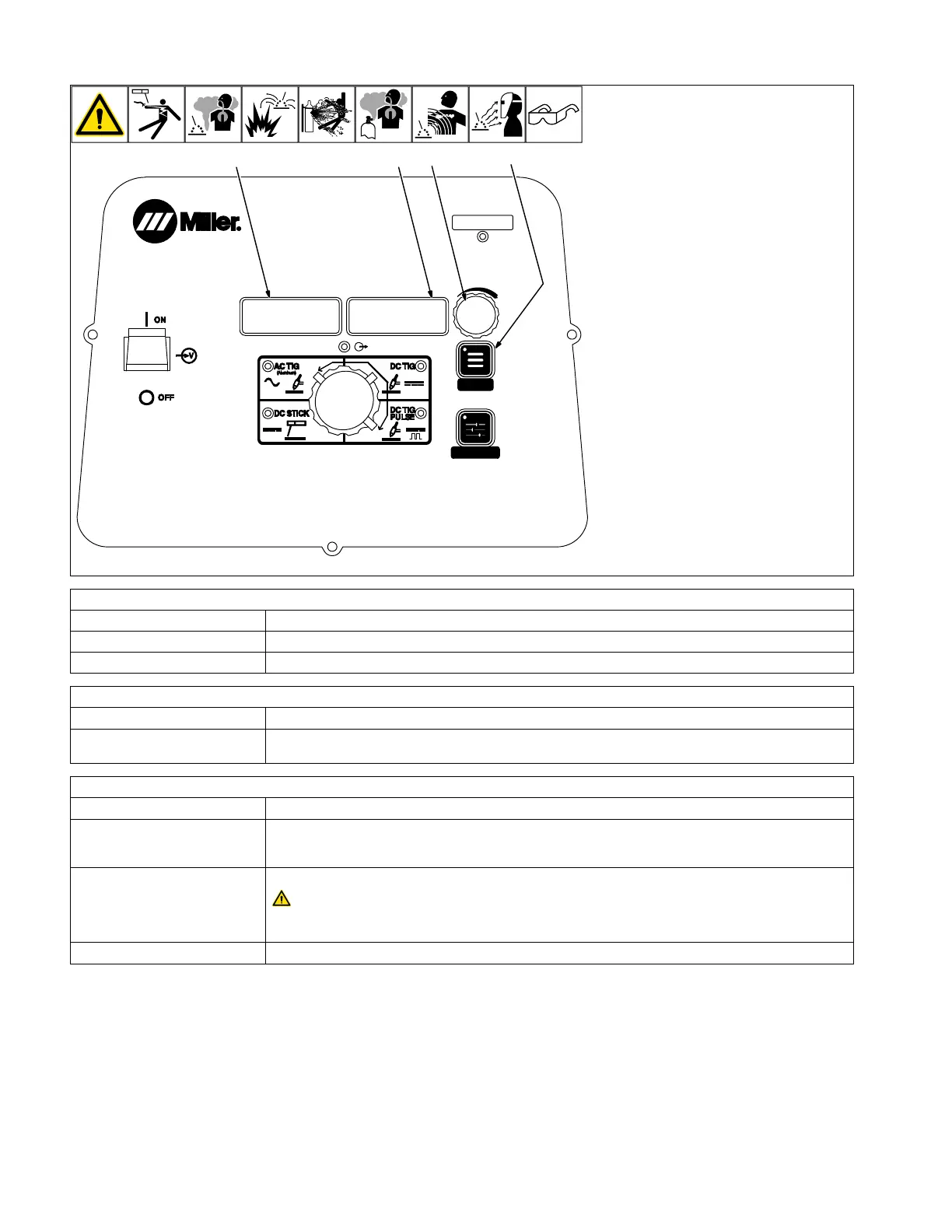
6-5. Accessing User Menu: AC/DC TIG And DC TIG Pulse
MENU
PRO-SET
MENU
USER
1
2
3
4
USER
280539-B
1 Menu Button
Press and hold Menu button for approxi-
mately two seconds until USER MENU ap-
pears to access machine configuration
menus. Press Menu button to cycle through
parameters that can be set.
2 Parameter Display
3 Setting Display
4 Amperage Adjustment Control
Rotate Amperage Adjustment control to ad-
just parameter setting.
F
To exit menu, press and hold Menu but-
ton until Menu Off is displayed.
Arc Starting Method Selection
Parameter/Setting Display Description
[STRT] [HF] High Frequency is a non-contact starting method (see Section 13-1).
[STRT] [LIFT] Lift Arc is a contact starting method (see Section 13-1).
Tungsten Diameter Selection
Parameter/Setting Display Description
[TUNG] [3/32] Each tungsten size has preset starting parameters specific to that diameter for optimized starting. Range
is 0.040 in.−1/8 in. or 1.0 mm−4.0 mm.
Trigger Mode Selection
Parameter/Setting Display Description
[RMT] [STD] Typically used with a remote foot or hand control. RMT STD requires a maintained contact closure to ena-
ble weld output. Amperage can be controlled with a remote potentiometer, or it can be set at the control
panel.
[OUT] [ON] Output on. (Lift Only)
Weld output terminals are energized at all times when displays read [OUT] [ON].
No remote control or trigger required. Amperage can be controlled at the control panel or with a remote
potentiometer. Blue output on LED illuminates to indicate output is on.
[PRE] [0.2T] Preflow Time: Controls length of time gas flows prior to arc start. Range is OFF-25T (seconds).












 To Next Page