OM-284794 Page 33
F
Complete Parts List is available at www.MillerWelds.com
SECTION 7 – ADVANCED MENU FUNCTIONS
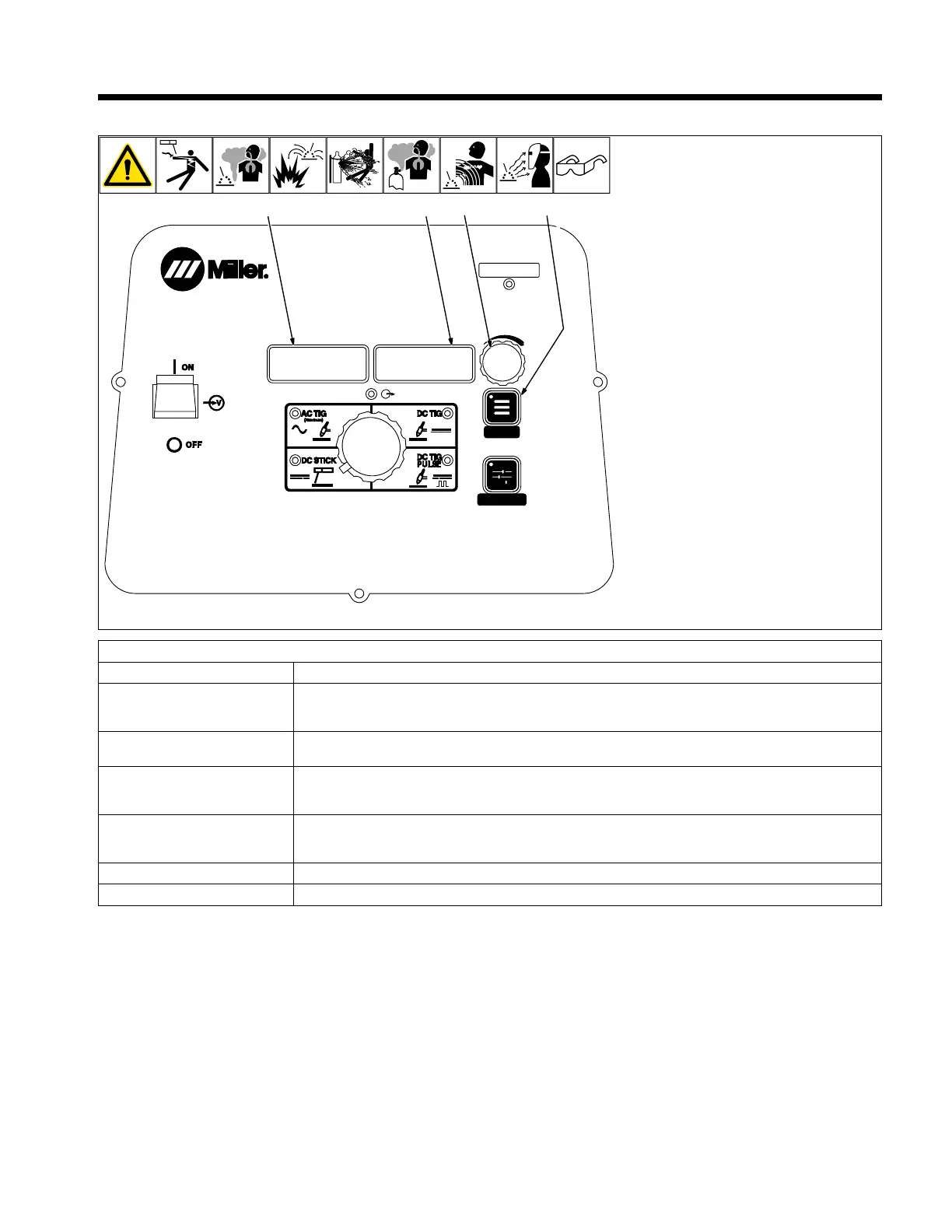
7-1. Accessing Tech Menu
MENU
PRO-SET
1
MENU
2
3
4
TECH
280539-B
1 Menu Button
Press and hold Menu button for approxi-
mately four seconds to scroll past User Menu
to Tech Menu. Use Menu button to cycle
through parameters that can be set.
2 Parameter Display
3 Setting Display
4 Amperage Adjustment Control
Rotate amperage adjustment control to ad-
just parameter setting.
To exit tech menu, press and hold menu but-
ton approximately one second, or turn power
off.
F
Settings in the Tech Menu are global,
meaning they may pertain to all or some
of the process.
Parameter/Setting Display Description
[ARC] [T/CY] Arc Timer: Monitors hours, minutes, and cycles of valid arc on. To view, rotate Amperage Adjustment
Control. To reset, rotate Amperage Adjustment Control until [RESET] [YES] is displayed. Press Menu but-
ton to display [RESET] [Done]. Displays turn to [000] [000].
[ERR] [LOG] Error Log: Use to view last eight logged error events. Each event may list multiple Error Codes. See Sec-
tion 8-5.
[COOL] [AUTO] Cooler Power (Optional): Selects between [OFF], [ON], and [AUTO]. [OFF] disables the power to the
cooler. [ON] enables the power to the cooler whenever power source is turned on. [AUTO] provides power
to the cooler when the TIG process is active.
[MACH] [RSET] Machine Reset: Resets all machine values back to factory defaults. To reset, turn Amperage Adjustment
Control to [RESET] [YES]. Then press Menu button. [RESET] [DONE] will be displayed when the reset is
complete and factory defaults have been restored.
[SOFT] [WARE] Software Number: Software number and revision will be displayed.
[SERL] [NUM] Serial Number: If serial number displayed does not match serial number of machine, see Section 8-5












 To Next Page