OM-284794 Page 30
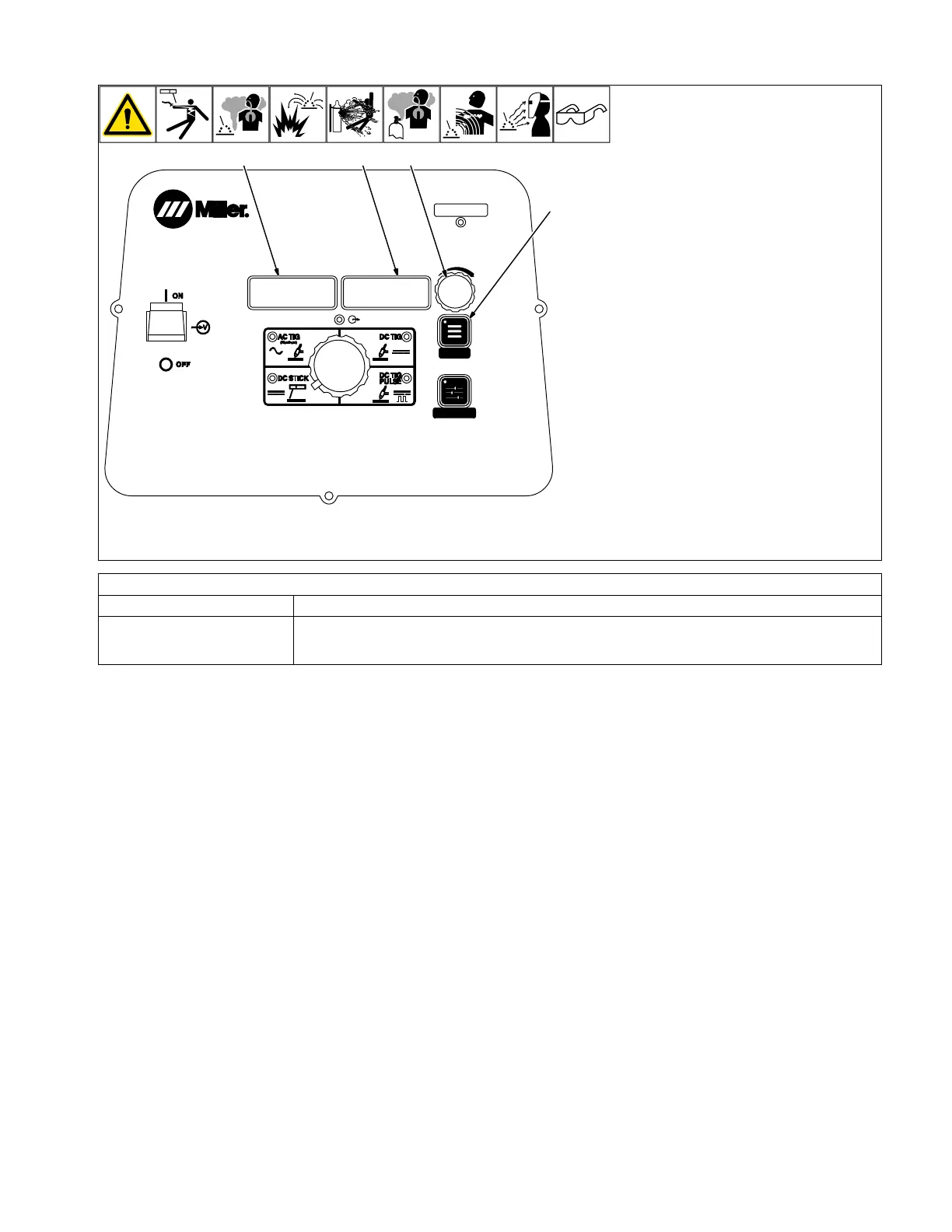
6-4. Accessing Process Menu: DC Stick
MENU
PRO-SET
1
2
3
4
280539-B
110A
1 Menu Button
Press Menu button to cycle through parame-
ters that can be set.
2 Parameter Display
3 Setting Display
4 Amperage Adjustment Control
Rotate Amperage Adjustment control to ad-
just parameter setting.
F
Parameter automatically returns to am-
perage setting 15 seconds after Amper-
age Adjustment control is inactive.
Amperage Control
Controls the welding amperage output. Limits
the maximum output of a remote amperage
device.
*PRO-SET provides PROfessionally devel-
oped SETtings for the weld process. To use
PRO-SET, press the menu button to display
the parameter and adjust the amperage ad-
justment control until PRO-SET flashes on
the display. PRO-SET flashes one time and
reveals the professional setting for the
parameter.
Arc Force Control*
Parameter/Setting Display Description
[DIG] [30%] Controls the amount of additional amperage at low voltage (short arc length) conditions. Adjust the force
of the arc for different joint configurations and electrodes. Range is OFF−100%. Features PRO−SET val-
ues for 6010 [65%] and 7018 [30%] electrodes.












 To Next Page