Mitel 3000
Installation & Maintenance Manual
63
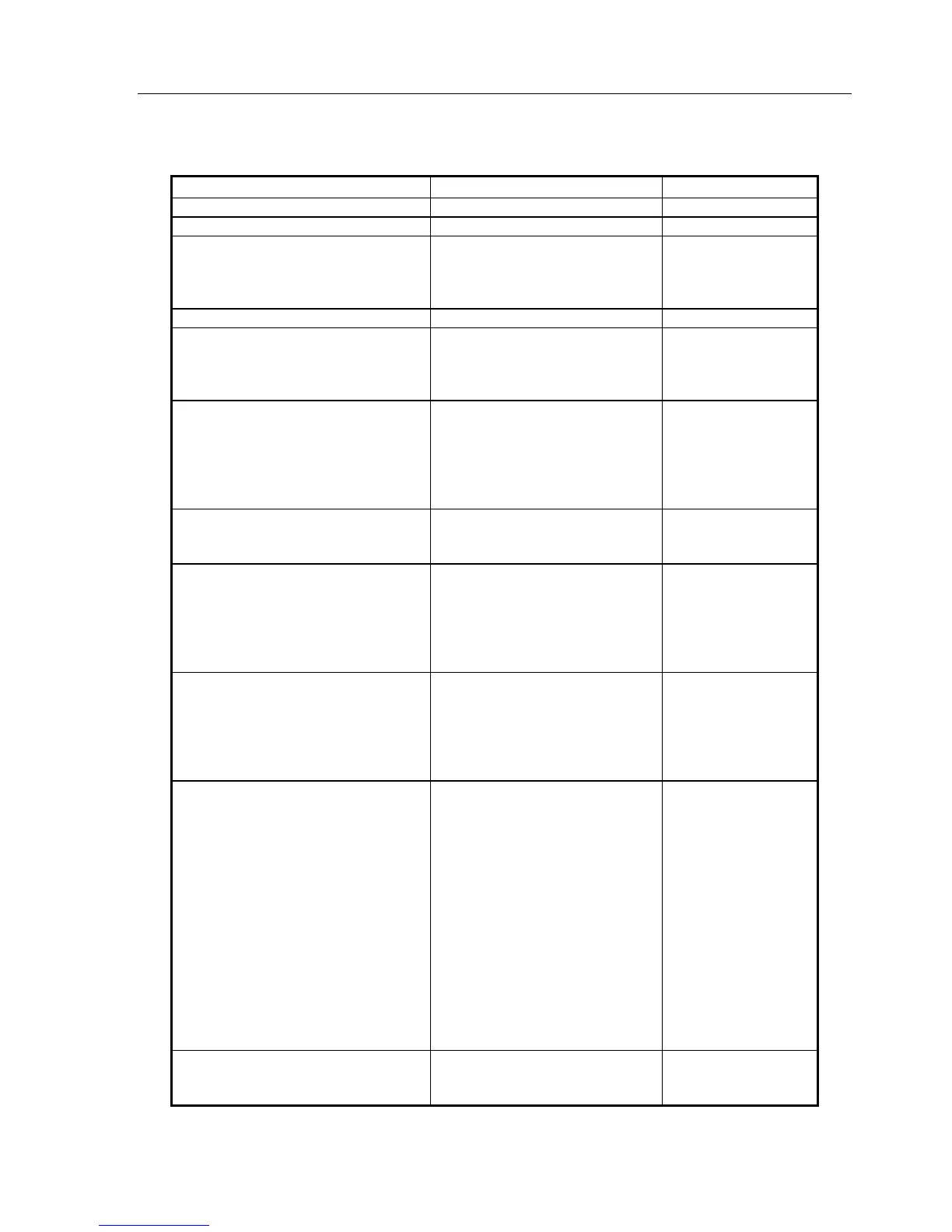
“System” programming options.
Feature
Default
Notes
Language English for all extensions See page 71.
Time And Date XX:XX xx-xx-xx See page 71.
Change password
• System Password
• Speed Dial Password
1111
0000
See page
71.
See page
72.
Programming Position Extension 20 See page 72.
Night Service
• Automatic On Times
• Automatic Off Times
• Weekend Service
Not programmed See page
72.
Music On Hold
• Internal Source
• External Source – (extension
selected to connect the source)
• Tone On Hold
• Silence
Internal Source See page
73.
Line Key Light
• Light Flashing On Hold
• Light Steady On Hold
Light Flashing On Hold See page
73.
Change Greetings
• Auto-Attendant Day
• Auto-Attendant Night
• Courtesy Service Day
• Courtesy Service Night
• Directory Message
Default messages See page
74.
See page
74.
Call Logging
• Call Logging On
• Call Logging Off
• Restricted Call Log On
• Enable X-on / X-off
• Print Log
Call Logging Off See page
74.
Timers
• Recall On Hold
• Recall On Transfer
• Forward On No Answer
• Courtesy Delay
• Open The Door
• Door Phone Ring Dur.
• Call Park
• Ringback Time Duration
• Auto-Attendant Day
• Auto-Attendant Night
• System VM Box Delay
• VM Message Length
• AA Dial Timer
• Hunt Timer
90 seconds
90 seconds
15 seconds
30 seconds
5 seconds
30 seconds
180 seconds
30 seconds
1 second (immediate answer)
1 second (immediate answer)
30 seconds
120 second
2 seconds
15 seconds
See page
75.
Door Phone
• Door Phone Equipped
• Door Phone Not Equipped
Door Phone Not Equipped See page
76.





 To Next Page