EasyManua.ls Logo

MPI 40 Series - Page 92

Default Icon
102 pages
Print Icon
To Next Page IconTo Next Page
To Previous Page IconTo Previous Page
Loading...
6.3 SELECT DRIVE
WITHOUT
LOADING
HEAPS
OR ENABLING STEPPER
In
the
standard
configuration,
the
heads
are
loaded
and
the
stepper
motor
is
energized
when
DRIVE
SELECT
is
enabled.
With
this
option
the
user
may
keep
the
drive
selected
all
the
time
so
that
the
output
status
can
be
monitored
while
the
heads
are
unloaded,
which
will
extend
head
and media
life.
Heads
can
be
loaded
when
required
by
activating
the
HEAD
LOAD
interface
line
(pin
18)
which
also
will
enable
the
stepper
motor.
After
the
HEAD
LOAD
line
is
activated,
a
35
ms
delay
is
required
before
WRITE
GATE
and
WRITE
DATA
are
applied
to
the
drive
or
before
READ
DATA
is
valid.
This
delay
is
the
head
load
time.
If
more
that
one
drive
is
assigned
to
the
controller,
separate
I/O
pins
should
be
used
as
HEAD
LOAD
lines
for
each
drive.
These unused
I/O
pins
need
to
be
connected
to
jumper-pin
C3.
This
can
be
accomplished
by
soldering
a
wire
between
the
unused
pin
and
CJ.
Pin
2,
pin
6,
and
pin
8
can
be
used
to
implement
this
option,
however
certain
restrictions
will
apply.
Pins
6 and 8
are
spares,
but
pin
2
can
also
be
used
as
an
external
write
current
switch.
When
used
as
a
head
load
line
its
alternate
function
can
not
be
implemented
(refer
to
paragraph
3.5.3).
To
install
this
option
on a
standard
drive,
the
following
jumpers
must be
added and
deleted.
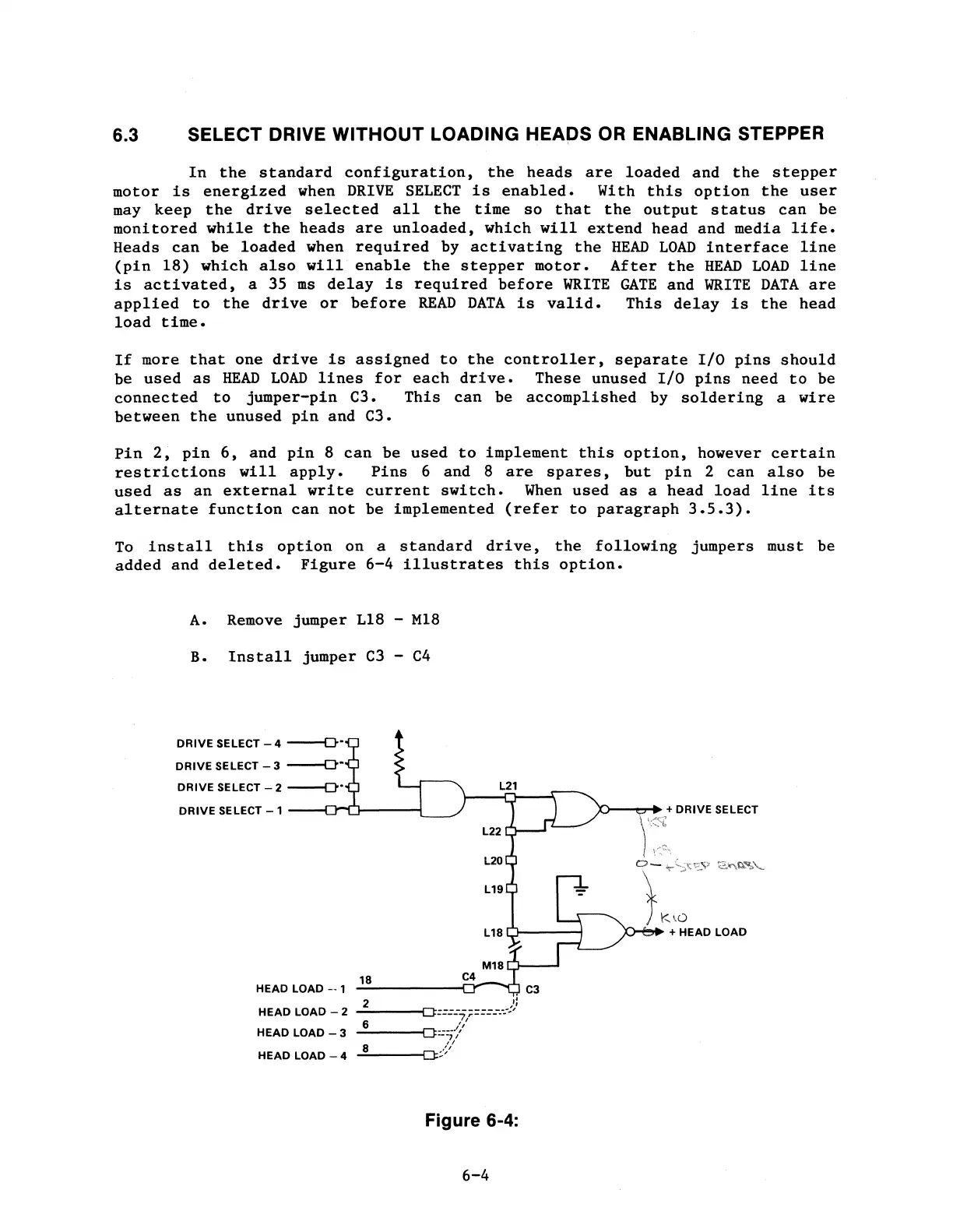
Figure
6-4
illustrates
this
option.
A.
Remove
jumper
Ll8
-
Ml8
B.
Install
jumper
C3
-
C4
18
HEAD LOAD
--
1
2
};
HEAD LOAD - 2
----D===-~7;===---·:-'
HEAD LOAD - 3 -
6
---D:=:(,/
8
,l,'
HEAD LOAD - 4
0:~'
Figure 6-4:
6-4
'!..>--""°•
+ DRIVE SELECT
~(~::-t
+HEAD
LOAD

Table of Contents