5-Input Connections
14
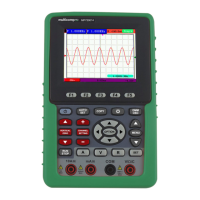
7. AUTO SET: Under DSO mode, automatically selects the horizontal scales, vertical scale, and
trigger level according to the input signal.
8. COPY: Press to save the waveform data into the USB Mass Storage Device.
9. ▲ (red): Adjust vertical position in Channel.
10. VERTICAL ZERO (red): Adjust vertical position to zero.
11. ▼ (red): Adjust vertical position.
12.
(red): Adjust voltage scale.
13. CHANNEL SETTING (red): Enter Channel settings directly.
14.
(red): Adjust voltage scale.
15. RUN/STOP: key for running or stopping the operation
16. LIGHT: backlight control.
17. DMM/OSC: Operation mode switching key between oscilloscope and multimeter.
18. MENU ▲: Choose the upper item on the menu list.
19. MENU: Show / Hide the menu
20. MENU ▼: Choose the lower item on the menu list.
21. OPTION: the key for DSO setting and combines with four arrow keys. Then to set main time
base, trigger horizontal position and trigger vertical position. Furthermore adjust cursor 1 (V1
or T1) and cursor 2 (V2 or T2) position during cursor measurement.
22. ▲ (OPTION): Oscilloscope display upward adjustment key.
23. ▼ (OPTION): Oscilloscope display downward adjustment key.
24. ► (OPTION): Oscilloscope right-direction adjustment key.
25. ◄ (OPTION): Oscilloscope left-direction adjustment key.
26. A: Selects DMM current measurement
27. V: Selects DMM voltage measurement
28. R: Selects DMM impedance, diode, continuity and capacitance measurement
29. SET: convert AC and DC during measure current or voltage in Multi-meter; convert
resistance, diode, on-off and capacitance measure during resistance measuring.



 To Next Page