8-Advanced Function of Oscilloscope
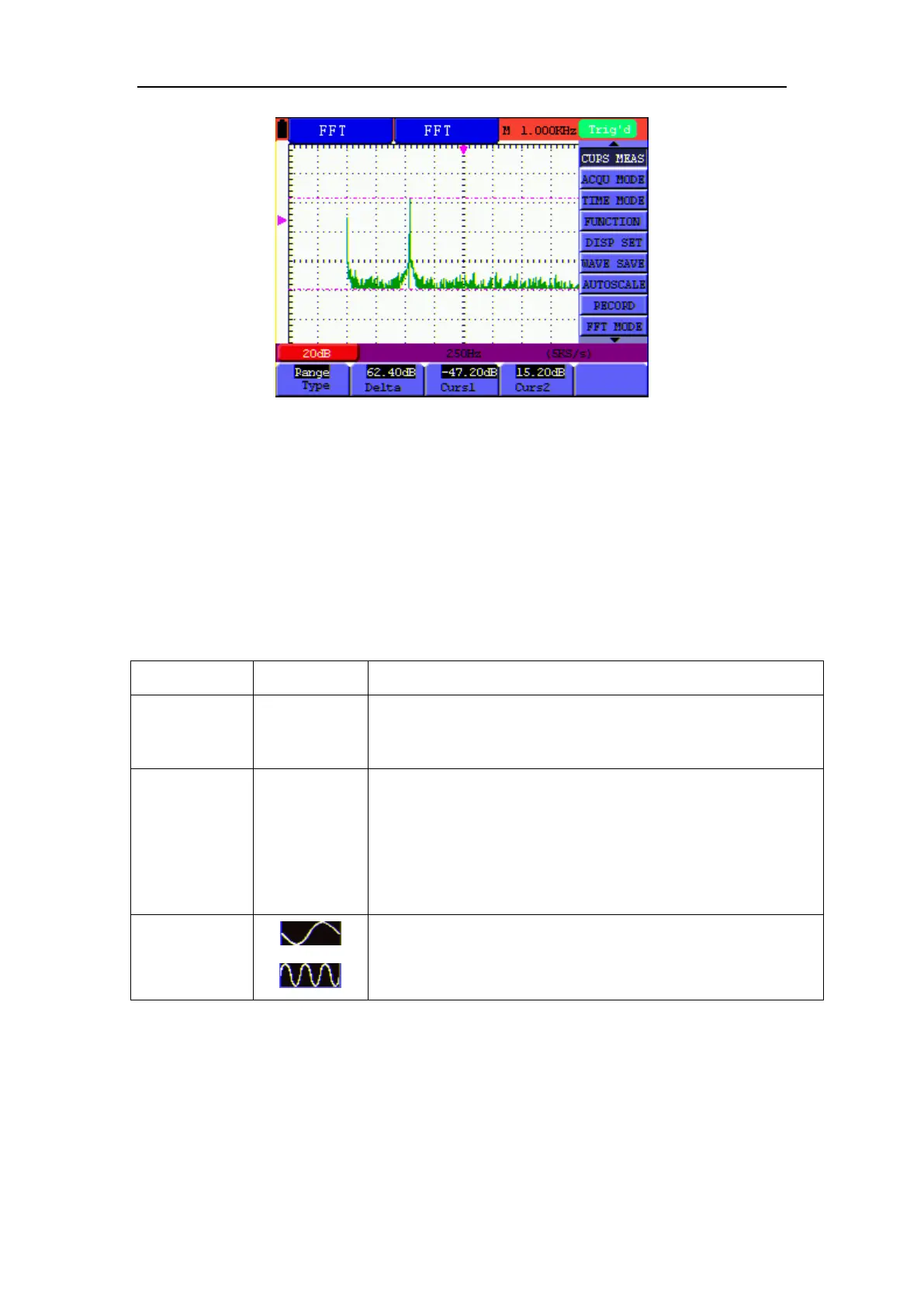
Figure 50: Cursor range measurement
8.11 Autoscale
The function is applied to follow-up signals automatically even if the signals change at any time.
Autoscale enables the instrument to set up trigger mode, voltage division and time scale
automatically according to the type, amplitude and frequency of the signals.
The menu is as follows:
Function menus Settings Description
Autoscale
OFF
ON
Turn off Autoscale
Turn on Autoscale
Mode
Horizontal
Vertical
HORI—VERT
Only adjust vertical scale according to input signal.
Only adjust horizontal scale according to input signal.
Adjust both vertical and horizontal scales according to
input signal.
Display only one or two cycles in waveform.
Display Multi-cycles in waveform.
If you want to measure voltage of Channel 1, you can do as the follows:
1. Press MENU, the function menu will appear on the right of the screen.
2. Press MENU ▲ or MENU ▼ and choose AUTOSCALE, three options will show at the
bottom of the screen.
3. Press F1 and choose ON.



 To Next Page