Vector-LP Radio Beacon Transmitter Technical Instruction Manual Page 3-31
Section 3 Operating Instructions Issue 1.1
Main Menu Select Back
12:43:16 Power: 0W Side A Bypass
Standby Code 2
[ X ] Enable Standby Code 2
Alternates between the standard keyed
frame and the Standby Code 1 frame.
Main Menu View Details Back
12:43:16 Power: 0W Site A Bypass
Main Menu Select Back
12:43:16 Power: 0W Side A Bypass
Standby Code 2
[ X ] Enable Standby Code 2
Alternates between the standard keyed
frame and the Standby Code 1 frame.
Main Menu Select Back
12:43:16 Power: 0W Side A Bypass12:43:16 Power: 0W Side A Bypass
Standby Code 2
[ X ] Enable Standby Code 2
Alternates between the standard keyed
frame and the Standby Code 1 frame.
Main Menu View Details Back
12:43:16 Power: 0W Site A Bypass12:43:16 Power: 0W Site A Bypass
Main Menu Select Back
12:43:16 Power: 0W Side A Bypass
Standby Code 1
[ X ] Enable Standby Code 1
Inserts additional spaces between
the last character and the trailing
marks in each keyed frame.
Main Menu Select Back
12:43:16 Power: 0W Side A Bypass12:43:16 Power: 0W Side A Bypass
Standby Code 1
[ X ] Enable Standby Code 1
Inserts additional spaces between
the last character and the trailing
marks in each keyed frame.
Reset Done Cancel
12:43:16 Power: 0W Side A Bypass
Frame Sequence
MK MK MK MK MK MK MK MK
Keyed String: TEST
Frame Format: NAV CAN
Frame Timing: 20.0 sec
Press up/down
keys to change
the duration of
each frame.
Press Done to
confirm changes.
Reset Done Cancel
12:43:16 Power: 0W Side A Bypass12:43:16 Power: 0W Side A Bypass
Frame Sequence
MK MK MK MK MK MK MK MK
Keyed String: TEST
Frame Format: NAV CAN
Frame Timing: 20.0 sec
Press up/down
keys to change
the duration of
each frame.
Press Done to
confirm changes.
Fr
m
Timin
Reset Done Cancel
12:43:16 Power: 0W Side A Bypass
Frame Sequence
MK MK MK MK MK MK MK MK
Keyed String: TEST
Frame Format: NAV CAN
Frame Timing: 20.0 sec
Press up/down
keys to select a
frame format to
use. Press Done
to confirm your
selection
Reset Done Cancel
12:43:16 Power: 0W Side A Bypass
Frame Sequence
MK MK MK MK MK MK MK MK
Keyed String: TEST
Frame Format: NAV CAN
Frame Timing: 20.0 sec
Press up/down
keys to select a
frame format to
use. Press Done
to confirm your
selection
Frame Format
Reset Next Cancel
12:43:16 Power: 0W Side A Bypass
Frame Sequence
MK MK MK MK MK MK MK MK
Keyed String: TEST
Frame Format: NAV CAN
Frame Timing: 20.0 sec
Legend:
MK: All Marks
SP: All Spaces
AL: Alternating
Marks/Spaces
KY: Keyed String
Reset Next Cancel
12:43:16 Power: 0W Side A Bypass12:43:16 Power: 0W Side A Bypass
Frame Sequence
MK MK MK MK MK MK MK MK
Keyed String: TEST
Frame Format: NAV CAN
Frame Timing: 20.0 sec
Legend:
MK: All Marks
SP: All Spaces
AL: Alternating
Marks/Spaces
KY: Keyed String
Frame Se
uence
Reset Next Cancel
12:43:16 Power: 0W Side A Bypass
Frame Sequence
MK MK MK MK MK MK MK MK
Keyed String: TEST
Frame Format: NAV CAN
Frame Timing: 20.0 sec
Press up/down
keys to change
the selected
letter. Press
Next to go on to
the next letter
Reset Next Cancel
12:43:16 Power: 0W Side A Bypass12:43:16 Power: 0W Side A Bypass
Frame Sequence
MK MK MK MK MK MK MK MK
Keyed String: TEST
Frame Format: NAV CAN
Frame Timing: 20.0 sec
Press up/down
keys to change
the selected
letter. Press
Next to go on to
the next letter
Ke
ed Strin
Main Menu Toggle Back
12:43:16 Power: 0W Side A Bypass
Keyer Modulation
Modulation
Keyer
Tone Generator
Tone Frequency
[ON ]
[OFF ]
[ON ]
[1020 Hz]
Main Menu Toggle Back
12:43:16 Power: 0W Side A Bypass12:43:16 Power: 0W Side A Bypass
Keyer Modulation
Modulation
Keyer
Tone Generator
Tone Frequency
[ON ]
[OFF ]
[ON ]
[1020 Hz]
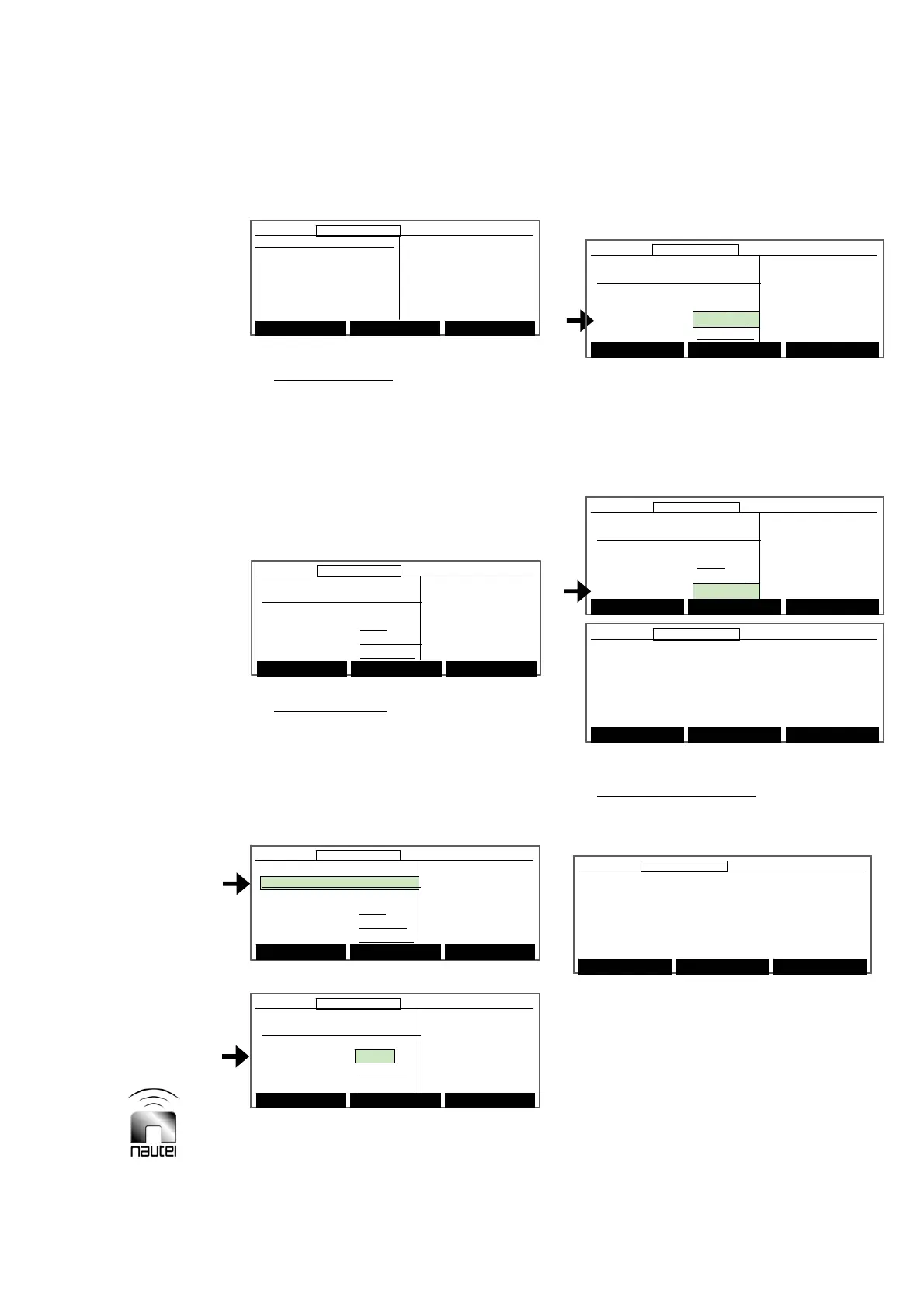
(b) Keyer Modulation:
Select the desired
parameter, using f or g. Press Toggle
to change the status or value and then
press Back:
x Modulation, Keyer and Tone Generator
can be set to ON or OFF.
x Tone Frequency can be set to 400 Hz or
1020 Hz.
(c) Keyer Sequence:
Select the desired
parameter, Frame Sequence, Keyed
String, Frame Format or Frame Timing,
using f or g. Press Modify and follow
the instructions on the right-hand side of
the GUI display.
(set to either NAV CAN or ICAO)
- ICAO: International Civil Aviation
Organization
- NAV CAN: uses a 10 s frame and 0.125
ms bits to key out 3 symbols.
(set between 4.0 s and 20.0 s)
(d) Standby Codes 1 and 2:
Press Select to
enable [X] or disable [ ] the standby code
1 or 2.
3.6.13.2 VIEWING POWER MODULE
STATUS
Configure the transmitter’s software for the
number of power blocks and view the status
of individual power modules as follows:
Main Menu Modify Back
12:43:16 Power: 0W Side A Bypass
Frame Sequence
MK MK MK MK MK MK MK MK
Keyed String: TEST
Frame Format: TRANS CAN
Frame Timing: 20.0 sec
Press up/down
keys to select a
field to change
Press Modify to
make changes
Main Menu Modify Back
12:43:16 Power: 0W Side A Bypass12:43:16 Power: 0W Side A Bypass
Frame Sequence
MK MK MK MK MK MK MK MK
Keyed String: TEST
Frame Format: TRANS CAN
Frame Timing: 20.0 sec
Press up/down
keys to select a
field to change
Press Modify to
make changes



 To Next Page