6/71
Modem Web Interface
MDM2210
User Manual R4.1 v1.0
4 Modem Web Interface
4.1 Connecting the Modem to Your Computer
Using an Ethernet Cable
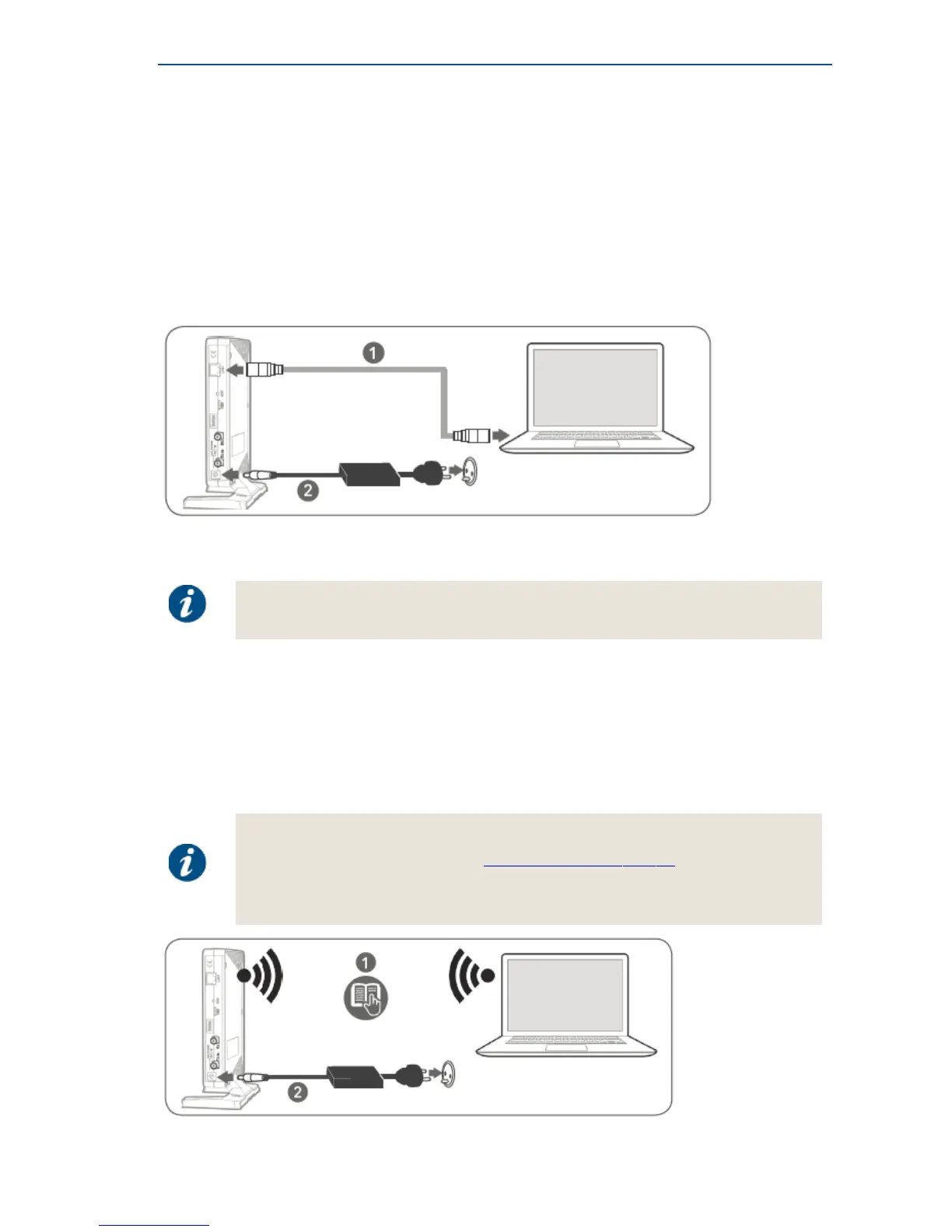
» Plug the network cable in the modem's and your computer's Ethernet ports.
» Connect the power adapter provided in the box gently to the modem and a wall outlet.
The result should resemble like the figure below:
» Check if your computer is set to DHCP. This way the computer can receive an IP address from
the modem.
To check and/or change your IP settings, please refer to the help pages of the
Operating System on your computer.
Using a Wi-Fi Connection
» Connect the power adapter provided in the box gently to the modem and a wall outlet.
» Make a Wi-Fi connection between your management computer and the MDM2210.
– Enter the SSID and initial password on your management computer.
– The SSID and initial password can be found on the product label of the modem.
If it is not possible to setup a Wi-Fi connection:
• Check if Wi-Fi is enabled, refer to LocalWi-FiSettingsonpage34.
• Wi-Fi can also be controlled remotely by your service provider.
Please contact your service provider when it is impossible to enable Wi-Fi locally.



 To Next Page