4/71
Modem Description
MDM2210
User Manual R4.1 v1.0
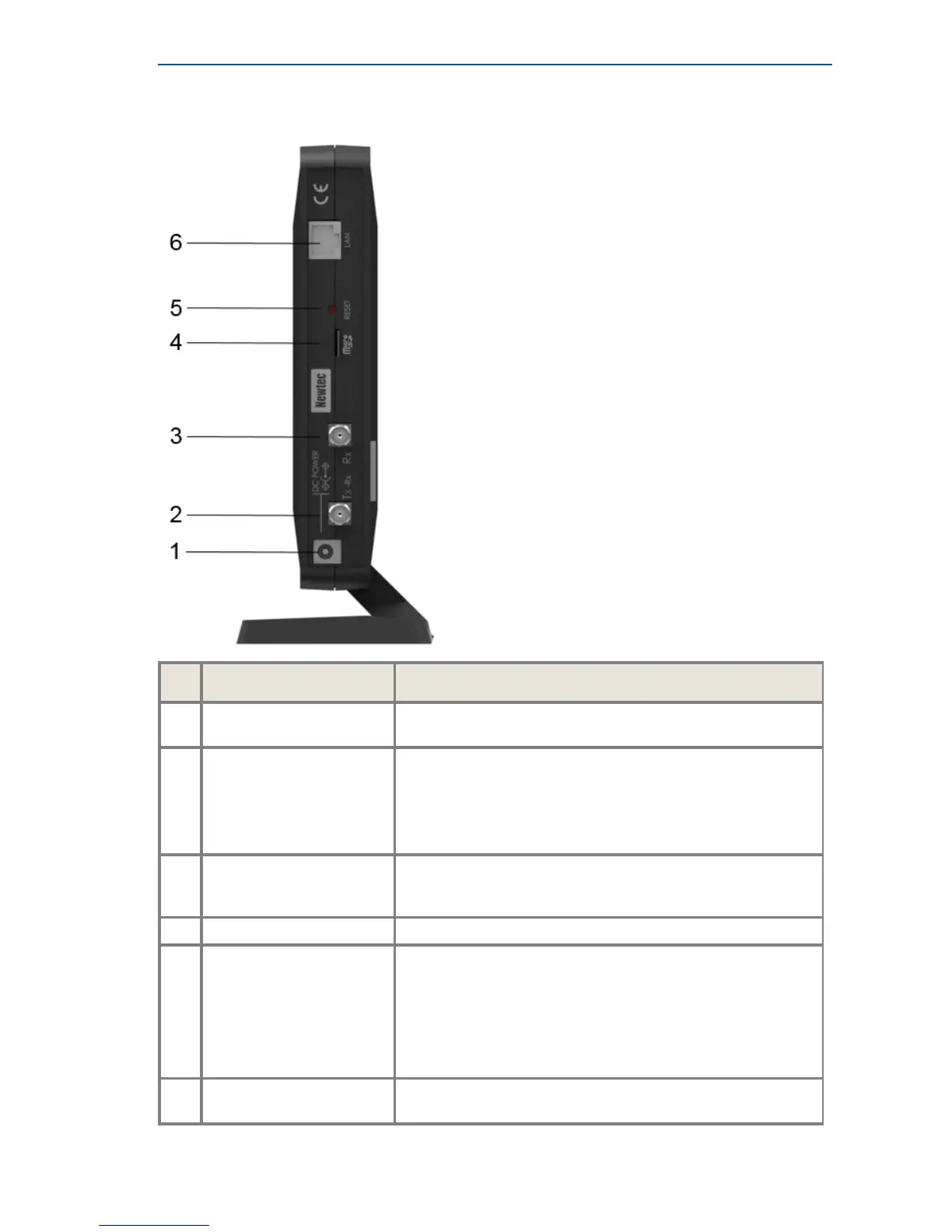
3.2 Modem Back Panel
Nr What Description
1
24 V Power cable
connector
Power connector (5.5/2.1mm plug).
2
TX - Rx connector Indoor connection for the transmit/receive coax cable.
This connector is used for transmit and receive when using the
ILB2220 or ILB2221 outdoor unit.
When using another ILB this connector is only used as
transmit.
3
RX connector Indoor connection for the receive coax cable.
(Not connected when using the ILB2220 or ILB2221 outdoor
unit.)
4
Micro SD For future use - not yet supported.
5
Reset button Multi-functional button:
• Press once briefly (hold less than 5 seconds) to reboot the
modem.
• Press and hold for more than 5 seconds to perform a
Factory Reset. This will reboot the modem and change all
IP-settings back to the default factory settings.
6
Gigabit Ethernet cable
connectors
Connection for the LAN, type RJ-45 (Ethernet cable).



 To Next Page