437
LAN adapters
(0 261)
• Communication Unit UT-1: Use a USB cable to connect the
UT-1 to the camera and an Ethernet cable to connect
the UT-1 to an Ethernet network.
Once connected, you
can upload photos and movies to a computer or ftp
server, control the camera remotely using optional
Camera Control Pro 2 software, or browse pictures or
control the camera remotely from an iPhone or web
computer browser.
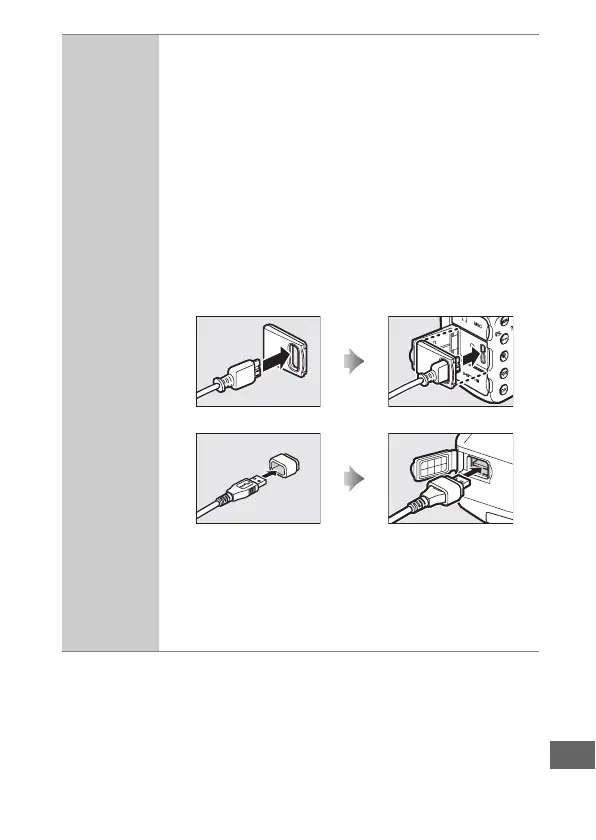
• USB Cable Gaskets and Connector Covers: Use a UF-4
connector cover for USB cables and UF3-RU14 USB
cable gasket to help prevent accidental
disconnections. Before connecting the cable, attach
the UF-4 at the camera end and the UF3-RU14 at the
end that connects to the communication unit.
• Wireless Transmitter WT-5: Attach the WT-5 to the UT-1 to
access wireless networks.
Note: Use of LAN adapters requires an Ethernet or wireless network and
some basic network knowledge.
Be sure to upgrade any related software to
the latest version.
UF-4 (attaches to connector for camera)
UF3-RU14 (attaches to connector for UT-1)



 To Next Page