353
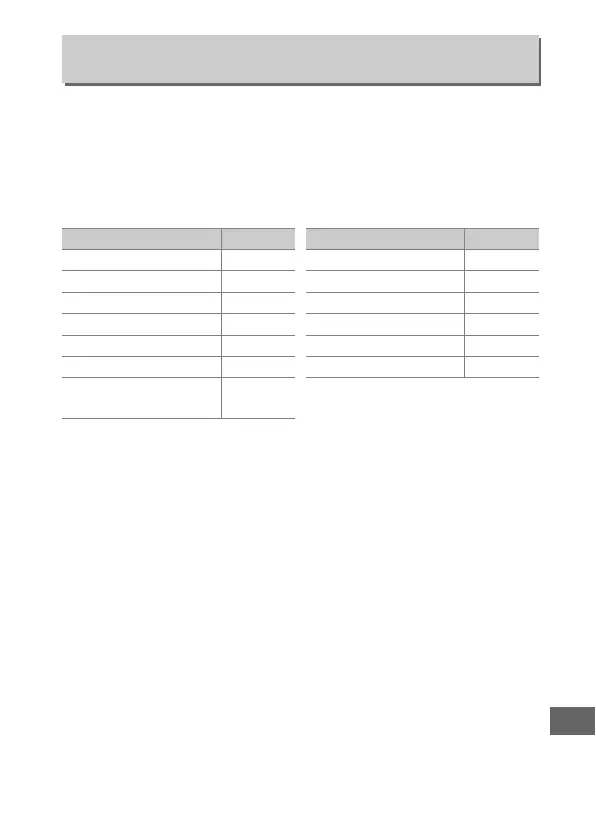
Selecting Ye s allows adjustments that are normally made by
holding a button and rotating a command dial to be made by
rotating the command dial after the button is released.
Setting
ends when the button is pressed again, the shutter-release
button is pressed halfway, or the standby timer expires.
This
option is available with the following buttons:
1 When assigned Active D-Lighting or exposure delay mode using Custom Setting f4.
2 When assigned Active D-Lighting or exposure delay mode using Custom Setting f5.
3 When assigned exposure delay mode using Custom Setting f6.
4 When assigned white balance or ISO sensitivity using Custom Setting f13.
f10: Release Button to Use Dial
G button ➜ A Custom Settings menu
Button
0
I (Q) button 116
E button 131
M (Y) button 190
D button 134, 139, 143
S button 109
T button 80, 84
U button
149, 153,
157, 159, 163
c button 115
AF mode button 39, 41, 88, 91
Fn button
1
348
Pv button
2
349
A AE-L/AF-L button
3
349
Movie-record button
4
355
Button
0



 To Next Page