126
Shutter speed lock is available in shutter-priority auto and
manual exposure modes, aperture lock in aperture-priority auto
and manual exposure modes.
Shutter speed and aperture lock
are not available in programmed auto exposure mode.
1 Assign shutter speed and aperture lock to a camera control.
Select Shutter spd & aperture lock as the “press + command
dials” option in the Custom Settings menu (0 348).
Shutter
speed and aperture lock can be assigned to the Fn button
(Custom Setting f4, Assign Fn button, 0 343), the Pv button
(Custom Setting f5, Assign preview button, 0 349), or the
A AE-L/AF-L button (Custom Setting f6, Assign AE-L/AF-L
button, 0 349).
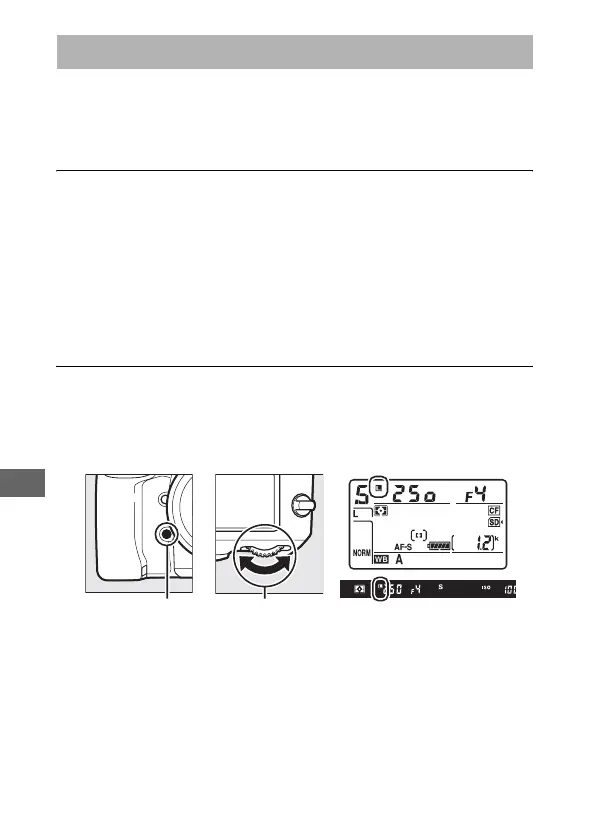
2 Lock shutter speed and/or aperture.
Shutter speed (exposure modes f and h): Press the selected button
and rotate the main command dial until F icons appear in
the viewfinder and control panel.
To unlock shutter speed, press the button and rotate the
main command dial until the F icons disappear from the
displays.
Shutter-Speed and Aperture Lock
Fn button Main command
dial



 To Next Page