Configuring RMON with the Java Device Manager 101
•
"Viewing history" (page 101)
•
"Enabling ethernet statistics gathering" (page 105)
•
"Disabling Ethernet statistics gathering" (page 107)
Viewing history
Ethernet history records periodic statistical samples from a network. A
sample is called a history and is gathered in time intervals referred to as
"buckets."
Histories establish a time-dependent method for gathering RMON statistics
on a port. The default values for history are:
•
Buckets are gathered at 30-minute intervals.
•
Number of buckets gathered is 50.
Both the time interval and the number of buckets is configurable. However,
when the last bucket is reached, bucket 1 is dumped and "recycled" to hold
a new bucket of statistics. Then bucket 2 is dumped, and so forth.
To view RMON history:
Step Action
1
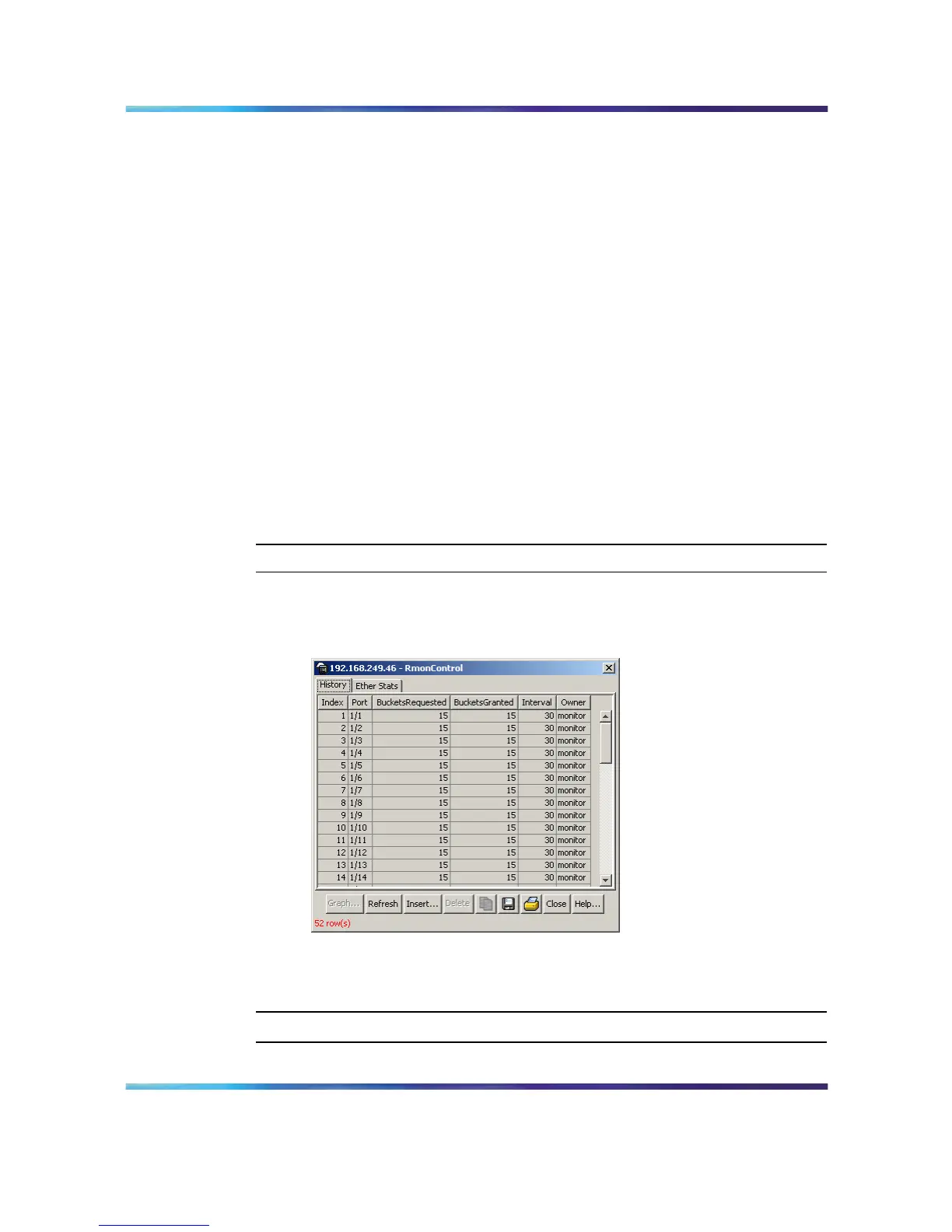
Open the RmonControl screen by selecting Serviceability >
RMON > Control from the menu. This screen is illustrated below.
RmonControl screen - History tab
"History tab fields" (page 102) describes the fields on the History
tab.
—End—
Nortel Ethernet Routing Switch 5500 Series
Configuration - System Monitor ing
NN47200-505 03.01 Standard
5.1 27 August 2007
Copyright © 2005 - 2007, Nortel Networks
.














 To Next Page