124 Chapter 4 IP Flow Information Export (IPFIX)
Protocol The protocol used to transport the IPFIX data to the
collector. Currently only the UDP protocol is supported
for this task.
DestPort The port on which the collector will be listening for
IPFIX data. Currently only port 9995 is supported for
this task.
ProtoVer The format in which IPFIX data is provided to the
collector. Currently only Netflow version 9 formatting
is supported for this task.
Enable The operational state of this collector.
—End—
Configuring IPFIX ports
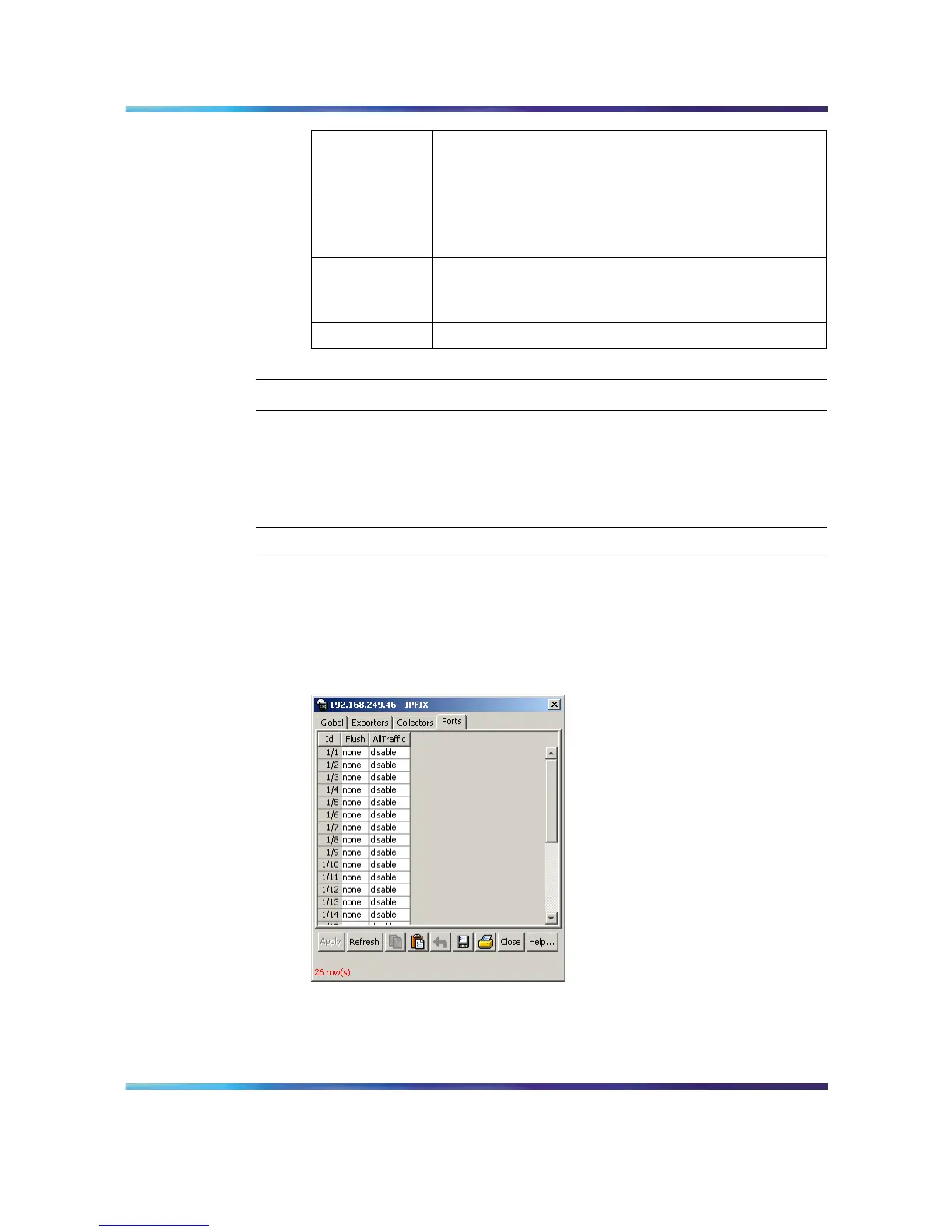
Use the Ports tab to configure port settings for IPFIX data export. To
configure IPFIX ports, use the following procedure:
Step Action
1
Select Serviceability > IPFIX from the Device Manager menu. The
IPFIX dialog will open with the Global tab selected.
2
Select the Ports tab. This tab is used to configure the individual
ports on the exporting units. This tab is illustrated below.
IPFIX dialog - Ports tab
3
Using the fields provided, configure the IPFIX parameters for the
individual ports. The fields on this tab are outlined in the table below.
Nortel Ethernet Routing Switch 5500 Series
Configuration - System Monitor ing
NN47200-505 03.01 Standard
5.1 27 August 2007
Copyright © 2005 - 2007, Nortel Networks
.






 To Next Page