IGMP and the system event log 23
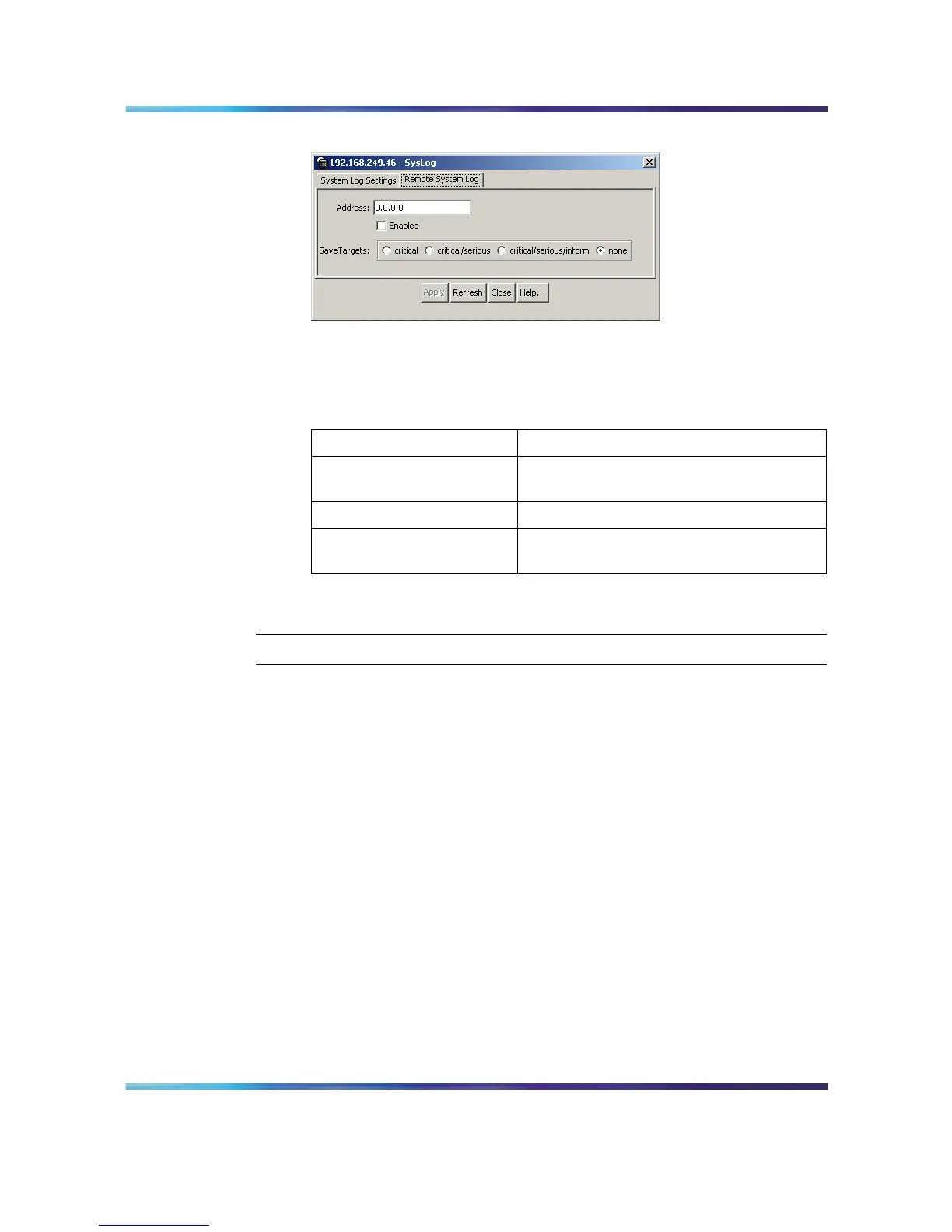
System Log dialog - Remote System Log tab
2
In the fields provided, enter the remote logging information. The
following table describes the fields on this screen.
Remote System Log tab fields
Field Description
Address The IP address of the remote syslog
server.
Enabled Enables or disables remote logging.
SaveTargets Sets the severity level of messages that
are saved to the remote server.
3
Click Apply.
—End—
IGMP and the system event log
IGMP utilizes the components provided by the syslog tool. Functions such
as storing messages in the NVRAM or remote host, and displaying these
log messages through the CLI, console menu, or Telnet is then carried out
by the syslog tool on its own.
The IGMP log events can be classified into the following three categories
based on their severity:
•
Critical
•
Serious
•
Informational
IGMP logs in the messages whenever any of the following types of events
take place in the system:
•
IGMP initialization
•
Configuration changes from the user
Nortel Ethernet Routing Switch 5500 Series
Configuration - System Monitor ing
NN47200-505 03.01 Standard
5.1 27 August 2007
Copyright © 2005 - 2007, Nortel Networks
.














 To Next Page